

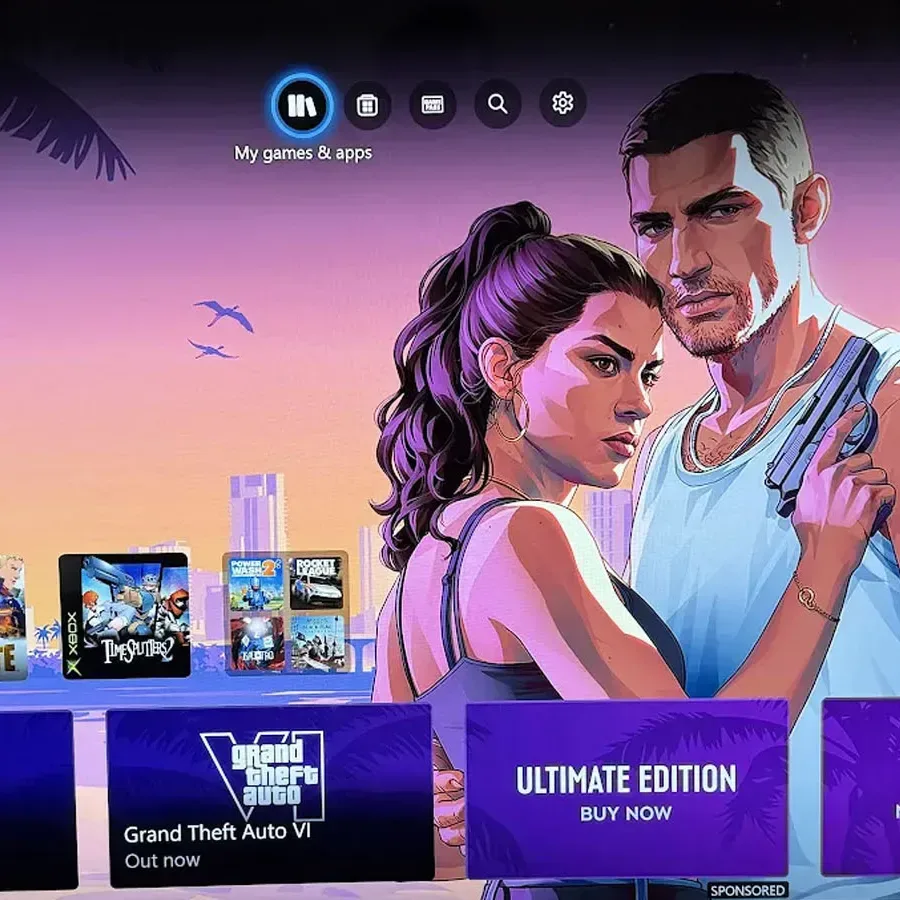
Xbox is seeking player feedback after its Event Backgrounds feature once again replaced custom console dashboard artwork by default, this time with promotional imagery for Grand Theft Auto 6. When users power on an Xbox console, the familiar personal background they selected may instead be covered by artwork featuring GTA 6 protagonists Jason and Lucia.
The change has reignited criticism around the way Event Backgrounds are enabled. While the feature can be turned off, many players have objected to being opted in automatically, particularly when the dashboard is one of the most personal areas of a console interface. A newly appearing Xbox Feedback poll suggests Microsoft is now looking to measure how players feel about the system, including how often they believe it should be used and whether they have already disabled it.
The GTA 6 promotion is not the first time Xbox owners have encountered this issue. Last month, custom backgrounds were similarly replaced with imagery tied to Call of Duty: Modern Warfare 4. That earlier rollout established a concern that the feature could become a recurring marketing tool for major releases rather than an occasional themed celebration controlled by the player.
Embedded X/Twitter post
What Xbox Event Backgrounds Are Doing
Event Backgrounds are dashboard themes that Xbox can activate around particular game launches or other major events. In principle, the idea is straightforward: a console can reflect a notable moment in gaming with matching art, creating a more timely and celebratory home-screen experience.
For useful background on this topic, read GTA 6's Fake Instagram Feed Turns Doomscrolling Into a Sharpest Satire Yet.
In practice, the objection is less about the existence of themed art and more about control. Players who have carefully chosen a wallpaper, screenshot, achievement image, or other custom background may not expect that selection to be temporarily overridden. Even if the setting is reversible, the first impression is that a personalized space has been changed without permission.
That distinction has driven much of the negative reaction. Promotional dashboard takeovers can be seen as useful when a player wants them, but they can feel intrusive when they arrive unannounced and are active by default. Some players have compared the situation to unwanted advertising appearing directly on a phone's wallpaper, while others have invoked the notorious example of a U2 album being automatically added to iPhones.
There is also a practical concern about precedent. If the system is used only for a small number of genuinely huge releases, some players may tolerate it as part of a platform-wide celebration. If it becomes a standard addition for frequent launches, seasonal promotions, or games users have no interest in buying, the appeal of the feature is likely to diminish quickly.
How to Turn Off Event Backgrounds on Xbox
Xbox owners who prefer to keep their existing dashboard image can disable the feature through the console settings. The relevant option is located in the personalization section:
- Open Settings on the Xbox console.
- Select Personalisation.
- Choose My Background.
- Uncheck Show Event-themed Background.
Disabling that option restores control over the dashboard background and prevents event artwork from taking over the selected custom theme. The setting is available, but its placement means some users may not know the feature exists until they see a promotional background appear.
That visibility issue is central to the response. An opt-out setting is not the same as an opt-in choice, especially for a change that affects the first screen users see whenever they use their console. Critics have argued that the checkbox should be off by default, or that Xbox should ask for approval before applying an event-specific theme.
The New Feedback Poll Could Shape the Feature's Future
The Xbox Feedback poll arrives alongside the GTA 6 Event Background rollout and asks players to evaluate the feature from several angles. Participants can indicate positive or negative views, say how often they think Event Backgrounds should appear, acknowledge if they have disabled the function, and offer suggestions for improving it.
That is a meaningful sign that Xbox is aware of the reaction, though a poll does not necessarily guarantee a change to the default behavior. Still, the questions being asked point directly at the community's major concerns: frequency, preference, and the ability to avoid unwanted promotional art.
A likely compromise would be to keep Event Backgrounds available for those who enjoy them while making the first activation an explicit choice. Xbox could also offer a notification when a theme changes, a short-term preview mode, or separate controls for high-profile launch celebrations and broader advertising campaigns. Any of those options would give users more agency without eliminating the feature outright.
There is room for Event Backgrounds to be a welcome addition. A major game launch can create a sense of occasion, and fans of a particular series may appreciate seeing their dashboard transform for a release they have been anticipating. The challenge is that Xbox's player base is varied. A GTA fan may enjoy the Jason and Lucia artwork, while another owner may only see an advertisement replacing a background they deliberately chose.
Why GTA 6 Makes This a Particularly Visible Test Case
Grand Theft Auto 6 is among the biggest game launches in the industry, making it an understandable candidate for a prominent Xbox dashboard campaign. The scale of interest around the game means that themed artwork will likely attract attention even from players who do not normally care about console interface changes.
At the same time, GTA 6 is a particularly notable case because PlayStation has a broad marketing partnership with Rockstar Games for the title. PlayStation branding has been highly visible throughout GTA 6 marketing, to the point where casual audiences could easily come away with the impression that the game is associated primarily with PS5.
Xbox does not have the same opportunity to dominate the conventional marketing push, so the platform's own dashboard represents valuable space. Event Backgrounds give Microsoft a way to place GTA 6 directly in front of active Xbox users and to encourage digital purchases without relying solely on advertising elsewhere.
From a business perspective, that strategy is easy to understand. From a player perspective, it raises the question of where platform promotion ends and a personal dashboard begins. Console interfaces have long included stores, featured tiles, announcements, and promotional panels. Replacing a user-selected background crosses a different line for many people because it alters an area traditionally associated with individual customization.
A Small Setting With a Larger Platform Question
The Event Background debate is ultimately about more than a single GTA 6 image. It reflects a wider tension in modern console ecosystems, where the home screen is both a personal space and a commercial storefront. Platform holders want to promote new games, subscriptions, updates, and events. Players want quick access to their libraries and control over how their device looks.
Xbox's feedback survey gives users a direct opportunity to explain where they believe the balance should sit. Responses may show that players like special backgrounds but want clear consent. They may indicate that event themes should be rare. Or they may demonstrate that a large number of users simply want their chosen wallpapers left untouched.
For now, anyone unhappy with the GTA 6 dashboard art can turn off Event Backgrounds manually. Whether Xbox changes the feature's default setting, reduces its use, or adds better notification and consent tools will be the more important result to watch. With a second high-profile replacement already drawing complaints, the next move will help determine whether Event Backgrounds become a popular customization option or a persistent point of friction for Xbox users.
Community
Discussion
Start the conversation.
No comments have been posted yet.