

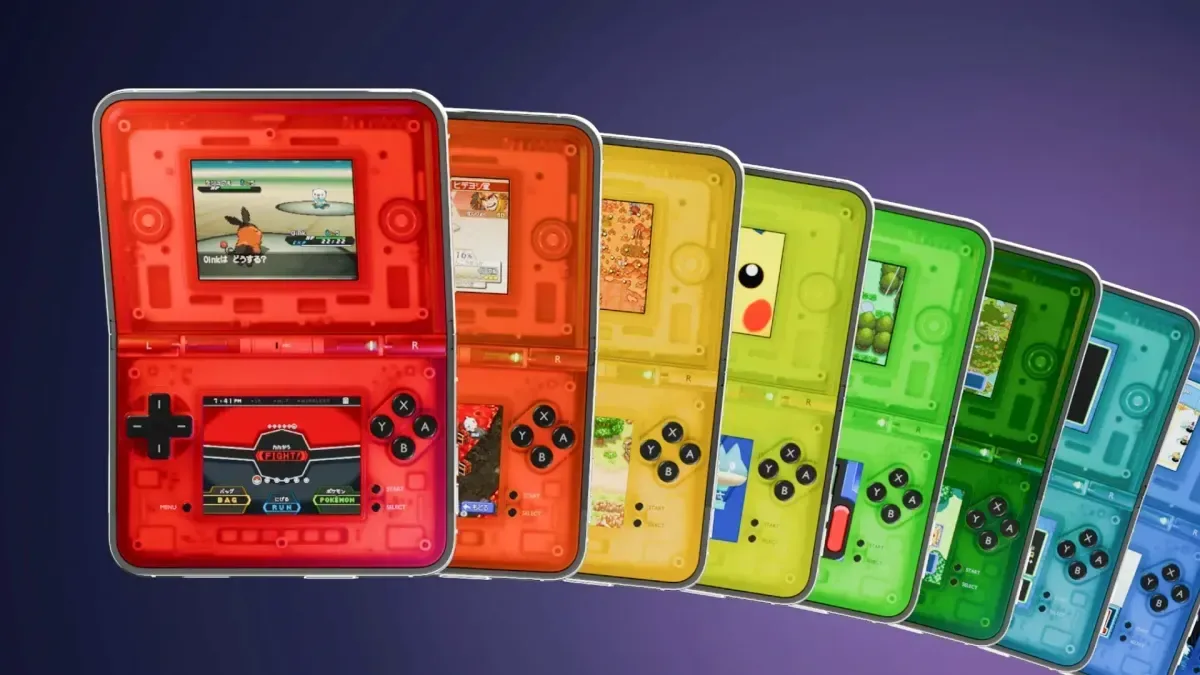
Delta users with an iPhone Duo now have a new way to make Nintendo DS emulation feel much closer to using a purpose-built clamshell handheld. Crystal Shell, a collection of transparent controller skins created by designer Alan of Clearcase Studio, has been built specifically around the foldable phone's unusual display configurations. The skins turn the device into a visual approximation of a clear-shell DS-style system, complete with rendered internals and a visible hinge.
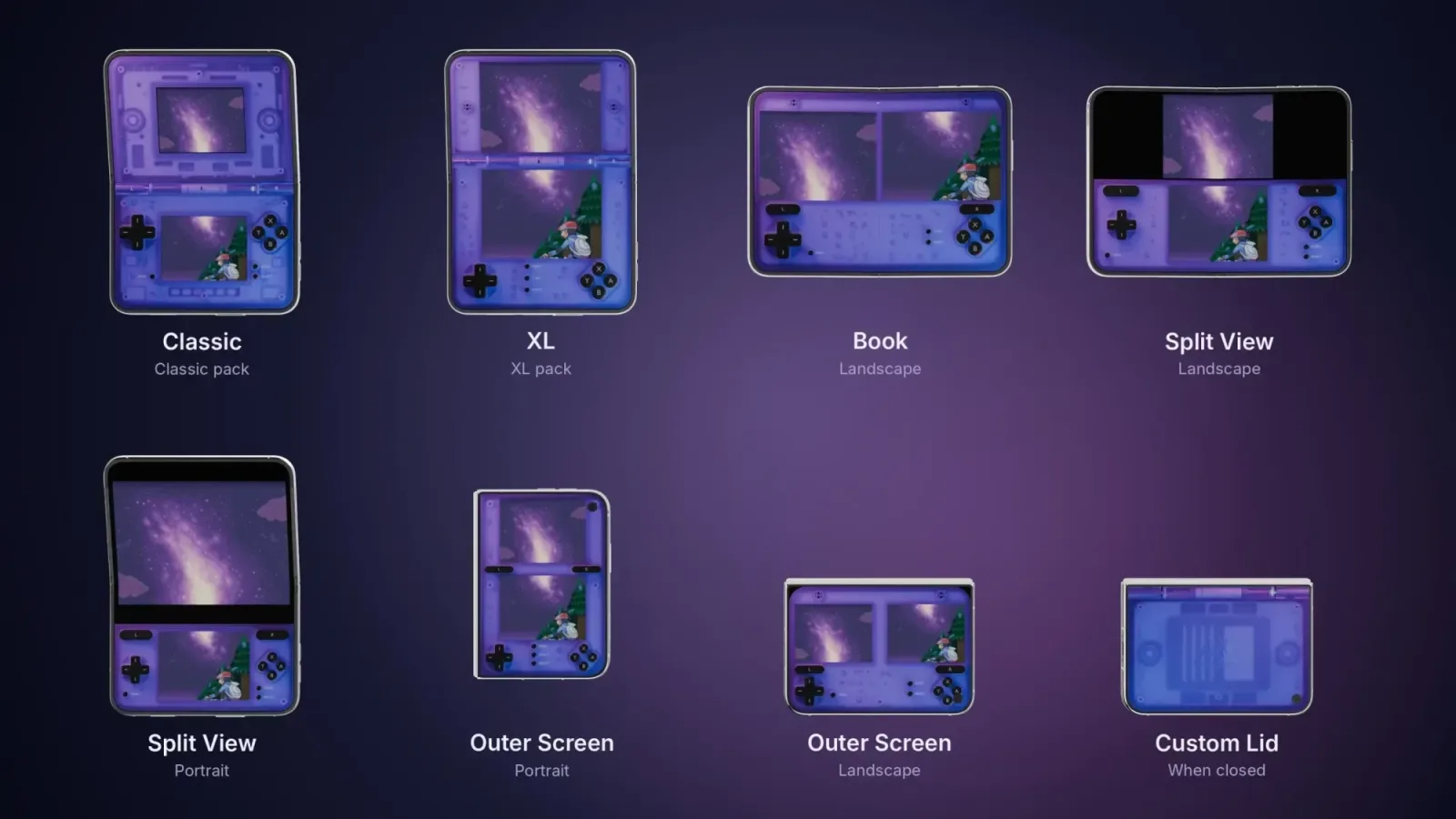
The release arrives as interest in tailoring Delta's interface for folding hardware continues to grow following Delta 2.0. While controller skins have long been one of the emulator's most appealing customization features, a standard phone layout does not necessarily take full advantage of a device with both inner and outer screens. Crystal Shell is designed to address that by providing layouts for the iPhone Duo's different orientations and states rather than treating the folding screen as a simple enlarged display.
For players who use Delta for Nintendo DS titles, that distinction matters. The original DS hardware was defined by its dual-screen clamshell design, so a foldable phone can potentially offer a more thematically appropriate way to arrange game screens and touch controls. Crystal Shell does not turn the iPhone Duo into original hardware, of course, but it uses the form factor to create a more convincing retro handheld presentation.
What Crystal Shell adds to Delta
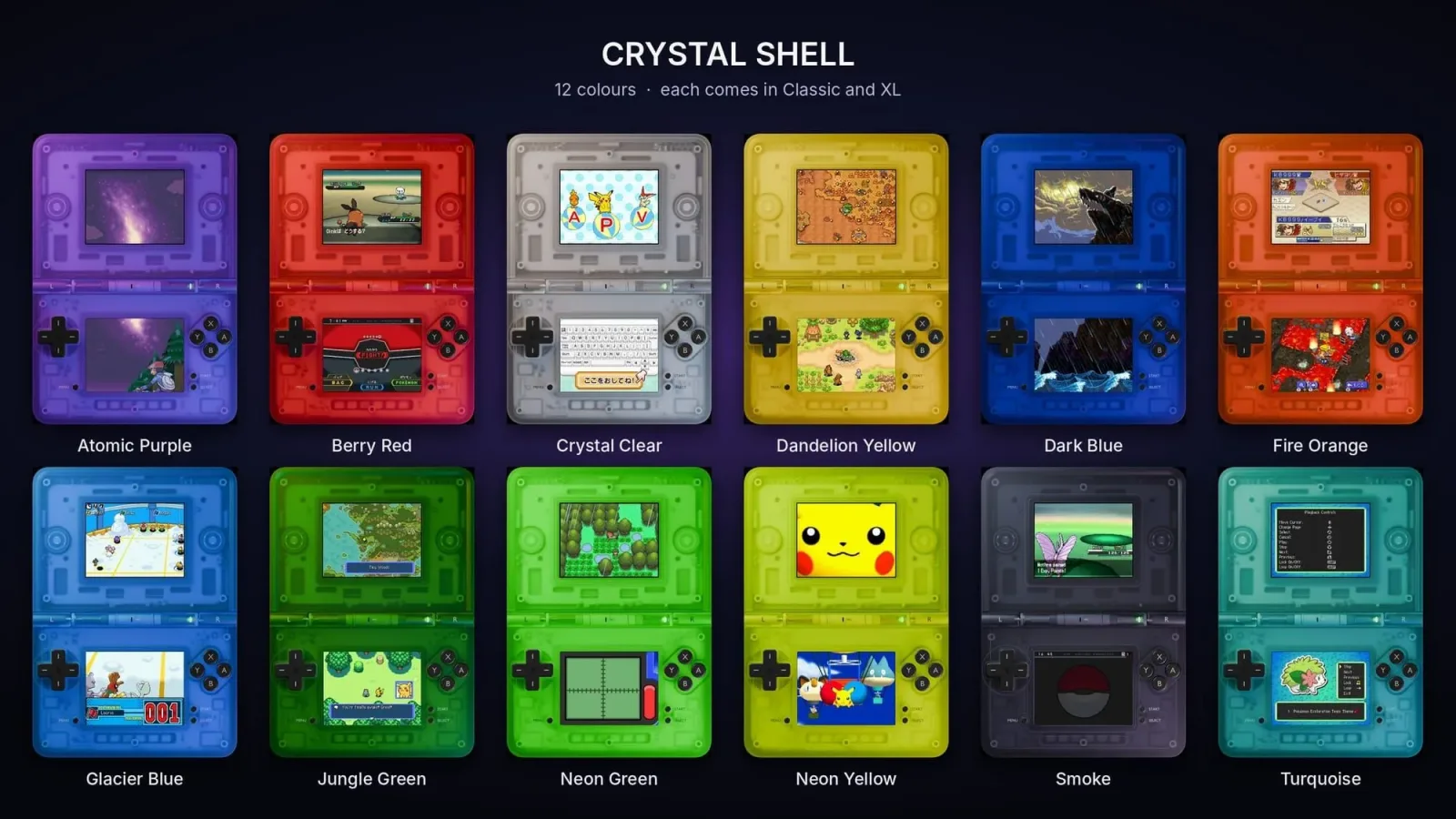
Crystal Shell is a set of 3D-rendered, transparent Nintendo DS-inspired controller skins for Delta. Instead of placing conventional opaque virtual buttons over a game, the designs mimic clear plastic hardware. Users can see an illustrated shell, internal components, and hinge details through the design. The result is intended to evoke the many translucent handheld variations that have remained popular with collectors and retro gaming fans.
For useful background on this topic, read Jagex Explains Why RuneScape Reignited Was Canceled After Player Backlash.
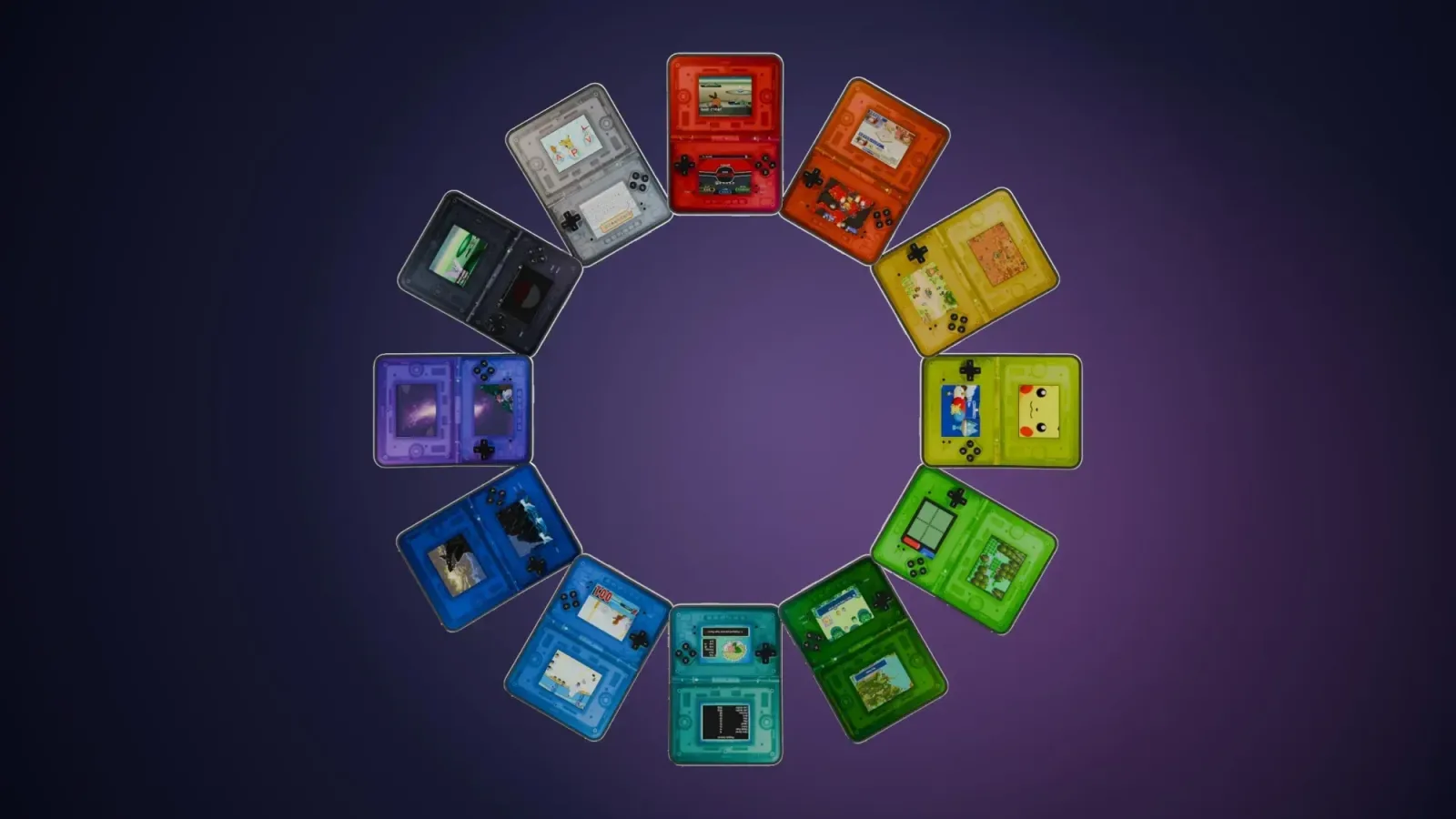
The collection includes 12 color options, offering players a broad range of styles instead of a single transparent finish. Each color is supplied in both Classic and XL versions. That gives users flexibility depending on whether they prefer a more compact visual design or a larger controller treatment on the available display space.
More importantly, the package accounts for the iPhone Duo's multiple screen modes. Crystal Shell supports the inner display, the outer display, and Split View. It also includes a custom lid image for when the phone is closed. In that state, the device can visually resemble a closed clamshell portable rather than simply appearing as a folded smartphone. It is a small aesthetic touch, but one that helps sell the overall concept.
The different layouts mean the skin is not merely a static wallpaper or decorative frame. It is meant to be selected in Delta's controller skin settings for the appropriate display orientation and usage scenario. Players can therefore adjust their presentation based on how they intend to hold and use the iPhone Duo during a session.
A natural fit for Nintendo DS emulation
Nintendo DS games remain an especially interesting case for mobile emulation because they were developed around two screens, touch interaction, and a physical foldable form factor. Standard slab-style phones can run many DS games well, but arranging both screens comfortably can be a compromise. Virtual buttons also occupy space that can make an already busy layout feel more crowded.
Foldable devices offer a different approach. With more room and a physical hinge dividing the display area, they can visually echo the relationship between the DS's upper and lower panels. Crystal Shell leans directly into that resemblance. The skin supplies the illusion of a clear handheld chassis around Delta's interface, making the software presentation more closely match the category of machine being emulated.
That appeal is likely to extend beyond strict authenticity. Some players enjoy emulator skins because they make a library feel personal, much like choosing a dashboard theme, a custom boot screen, or a replacement shell for a real handheld. A transparent style can be particularly appealing because it calls back to a long-running design trend in gaming hardware, from colorful translucent accessories to clear portable console shells that put the device's internal construction on display.
Crystal Shell's modeled hinge and internal details make that idea more elaborate than a simple color swap. The skin is trying to make the iPhone Duo look like an object designed for games, rather than a phone that happens to be running an emulator. For users who regularly play DS titles in Delta, that can make the interface feel less generic without changing the games themselves.
Pricing and available versions
The Crystal Shell skins are available individually or as a complete bundle. A single color costs £2.99/$2.99 or more, with both Classic and XL sizes included for that selected color. Players who want the full collection can purchase every color and both size variations for £8.96/$8.96 or more.
Because the set has 12 colors, the bundle is the option aimed at users who expect to change their layout regularly or who want a skin to match a favorite device finish, case, wallpaper, or game. Individual purchases may be more suitable for those who know exactly which translucent color they want and do not need a large library of cosmetic choices.
A transparent purple version is also being offered as a free trial option. That gives curious users a chance to see how the skin sits on the iPhone Duo and how it feels in everyday Delta use before buying another color or the complete set. Since virtual controller preferences can be highly personal, trying a layout first is useful, especially on a foldable device where screen posture can affect comfort and visibility.
How to install a Crystal Shell skin in Delta
Installing a downloaded skin uses Delta's built-in customization options and the iPhone Duo's Files app. Before starting, users should ensure the skin file has been downloaded and saved somewhere accessible in Files. The process can then be completed directly through Delta's settings.
- Open Delta and enter the app's settings menu.
- Select the console associated with the skin that was downloaded. For Crystal Shell, this will be the relevant Nintendo DS configuration.
- Choose whether to change the vertical or horizontal skin, depending on the layout you plan to use.
- Find the + button in the upper-right corner of the controller skin screen.
- Select the button to open the Files location where downloaded skins are stored.
- Choose the Crystal Shell file you want to import.
- After it is selected, the skin should appear in Delta's Controller Skins list, where it can be chosen for use.
The key step is selecting the correct orientation before importing or assigning the skin. Delta distinguishes between vertical and horizontal controller layouts, so users should match the file and setting to the way they expect to play. Since the iPhone Duo can be used in several configurations, it may be worth importing multiple relevant layouts and testing each one with a favorite DS game.
Customization remains one of Delta's strengths
Emulation is often discussed in terms of performance, compatibility, controller support, and game preservation. Those are crucial considerations, but interface design can shape the experience just as noticeably for players who use an emulator every day. A well-made skin can improve readability, provide clearer button placement, and give software a distinct identity.
Delta's support for user-installed skins creates room for designers to experiment with that side of the experience. Crystal Shell is a particularly clear example of how community-made visual tools can respond to new hardware. Rather than creating a general-purpose overlay for any phone, the design is centered on a folding device and the nostalgic potential of its shape.
For iPhone Duo owners already using Delta 2.0 for Nintendo DS games, the collection offers a polished alternative to a default touchscreen look. The choice of transparent materials, 3D-rendered internals, multiple colors, and a dedicated closed-device lid all point toward a single goal: making a modern foldable phone feel a little more like a retro clamshell handheld.
Whether players choose the free purple sample, a single preferred finish, or the full 12-color package, Crystal Shell highlights the advantage of an emulator interface that can be customized around both personal taste and the hardware in hand.
Community
Discussion
Start the conversation.
No comments have been posted yet.