

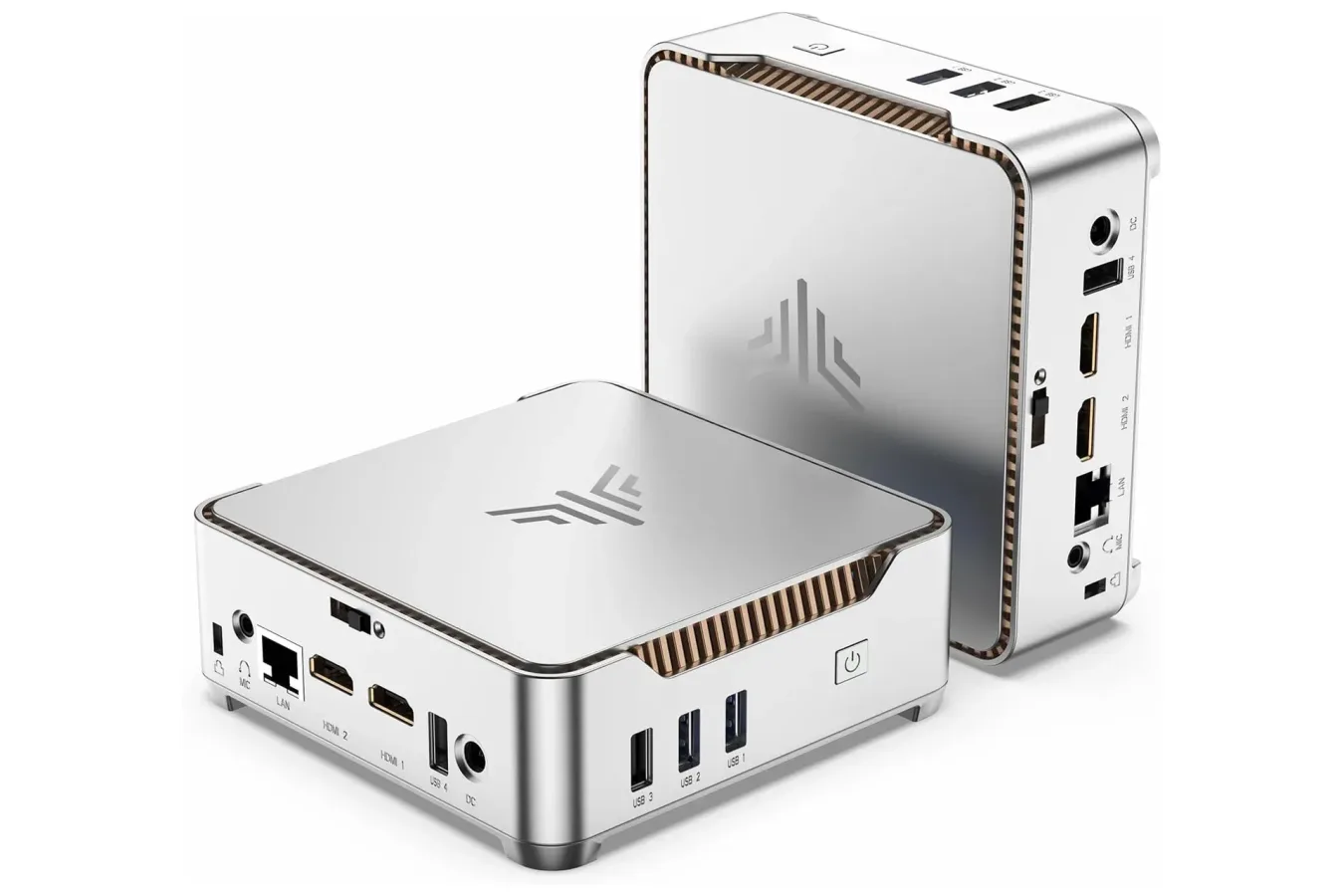
The Kamrui GK3PLUS Mini PC is temporarily listed at $319, an $80 reduction from its usual $399 price. The deal arrives ahead of Prime Big Deal Days and applies to a configuration equipped with an Intel Pentium Silver N5030 processor, 16GB of memory, and a 512GB M.2 SSD.
For PC players, the important distinction is that this is not a small-form-factor replacement for a current high-end gaming desktop. Its compact dimensions, low-power processor, integrated graphics, and price position it much more naturally as an affordable general-use PC, a lightweight retro-gaming box, a streaming companion, or a secondary machine for a desk setup. That does not make the discount irrelevant to gaming audiences; it simply means buyers should match expectations to the hardware rather than treating the word "PC" as a promise of performance in every new release.
At $319, the appeal is largely in the all-in-one core specification. The system includes a comparatively generous 16GB RAM allocation for basic computing and a 512GB SSD, while leaving the monitor, keyboard, mouse, webcam, and other accessories to the buyer. For anyone who already owns those peripherals, that approach can reduce both cost and desk clutter compared with purchasing a similarly equipped laptop.
What the Kamrui GK3PLUS includes
The GK3PLUS uses Intel's Pentium Silver N5030, a four-core, four-thread processor that can operate at up to 3.1GHz. It is paired with 16GB of RAM and a 512GB M.2 2280 solid-state drive. Those specifications are appropriate for the kinds of routine tasks that benefit from having a responsive SSD and enough memory to keep several lighter applications open at once.
For useful background on this topic, read Build a Rocket Boy Reportedly Winding Down as Employees Signal the Studio's End.
That can include web browsing, office work, email, music playback, video streaming, voice chat, and running a browser alongside documentation or a game guide. A mini PC can also be useful as a dedicated machine in a living room, a compact family computer, or a low-footprint desktop for someone who does not need the portability of a notebook.
Storage expansion is another notable part of the specification. Kamrui says the unit has two 2.5-inch SATA SSD or hard-drive slots and can be expanded to as much as 8TB across those bays. The included 512GB drive is enough space for everyday files and a modest selection of smaller games, but modern blockbuster installs can consume that capacity quickly. The expansion option is therefore potentially more meaningful for users who want to keep a local media library, archive older titles, or build a broader retro collection.
As always with a compact PC, prospective buyers should consider the cost of any upgrades they actually plan to make. Added SATA drives are not part of the listed base configuration, and a larger library can raise the final spend beyond the $319 headline price.
For another perspective on this story, read Kamrui GK3PLUS Mini PC Falls to $319 Ahead of Prime Big Deal Days.
Three-display support is a practical strength
The GK3PLUS has two HDMI outputs and one VGA port, allowing connections to as many as three displays simultaneously. Each HDMI output is listed as supporting resolutions up to 4K UHD, while VGA can reach up to 1080p HD. There are also four USB ports and a 3.5mm AUX connection for headphones, a headset, or external speakers.
For productivity, multiple outputs may be the most compelling feature in the entire package. A user could dedicate one panel to a document or spreadsheet, another to communication apps, and a third to a browser, video, or reference material. Stream viewers and community moderators could similarly find utility in a small machine that handles chat, video, dashboards, and other supporting tasks separately from a primary gaming PC or console.
Resolution support should not be confused with gaming performance at that resolution. Being able to send a 4K image to a compatible display is valuable for desktop use and video playback, but it does not mean the integrated graphics hardware is designed to render demanding recent games at 4K. Buyers considering the system for games should regard the display specifications and the gaming workload as separate questions.
What it can mean for gaming
The Pentium Silver N5030 is not aimed at high-end games, and the GK3PLUS does not include the kind of dedicated graphics card expected in a modern gaming tower. New, graphically intensive releases generally demand substantially more CPU and graphics power. Players looking to run those games at high settings, high frame rates, or 4K resolutions should not view this mini PC as a suitable option.
Its more realistic gaming uses are lighter and older software. Less demanding PC games, classic titles, 2D releases, and games with scalable visual settings may be more appropriate than recent big-budget 3D releases. Retro gaming is another potential fit, subject to the requirements of the individual emulator and the user's own legally obtained game files. Performance can vary considerably between platforms, emulators, settings, and the resolution selected, so it is wise to research the specific games or systems that matter most before purchasing.
The machine could also serve players who rely on game streaming rather than local rendering. In that role, the PC's job is to run the streaming client, manage peripherals, and output the video signal rather than create all of the game's graphics itself. The experience in that scenario will still hinge on network quality, latency, the selected service, and the performance of the remote hardware.
For players with a more powerful main computer, the GK3PLUS could make sense as a supplementary device. It can support a separate workspace, an extra screen arrangement, remote desktop access, a browser-and-chat station, or a compact media setup. That is a different use case from buying one PC to handle everything, but it is often where low-cost mini PCs are at their most useful.
Mini PC trade-offs to consider
Mini PCs save space by relying on compact, laptop-style components and omitting the integrated screen, battery, keyboard, trackpad, and camera that add cost to a laptop. This can be a strong value proposition for buyers who already have a monitor and input devices, especially where a traditional desktop tower would be excessive.
There are trade-offs, however. Compact systems are usually less upgradeable than standard desktops, especially when it comes to processors and graphics. This model's storage expansion is useful, but buyers should not expect a straightforward path to turning it into a powerful gaming rig later. Anyone whose goal is to play upcoming demanding games locally may be better served by saving toward hardware with a dedicated GPU rather than buying a budget mini PC first.
Peripheral needs also matter. The listed machine has USB connectivity and audio output, but the total purchase still needs to account for a display, keyboard, mouse, and potentially a controller, speakers, storage upgrades, or an operating setup suited to the buyer's work and play habits. People who already have those pieces will see the strongest value from the compact design.
A deal best suited to focused expectations
The limited-time $319 price makes the Kamrui GK3PLUS more affordable than its standard $399 listing, and its 16GB RAM, 512GB SSD, three display outputs, and internal storage expansion offer a balanced feature set for a modest desktop. It is particularly easy to understand as a productivity machine, home media PC, secondary setup, or lighter gaming and retro-focused device.
The key is avoiding the assumption that its small size and 4K display capability translate into modern 4K gaming. They do not. The Intel Pentium Silver N5030 configuration is built for everyday computing first, with gaming possibilities concentrated in less demanding titles, older software, emulation scenarios that fit the hardware, and streamed play.
For shoppers who need exactly that kind of compact, peripheral-ready PC and already have a display setup waiting, the $80 discount is meaningful. For those pursuing the latest releases with premium settings, it is better treated as an affordable companion machine than the centerpiece of a gaming setup.
Community
Discussion
Start the conversation.
No comments have been posted yet.