

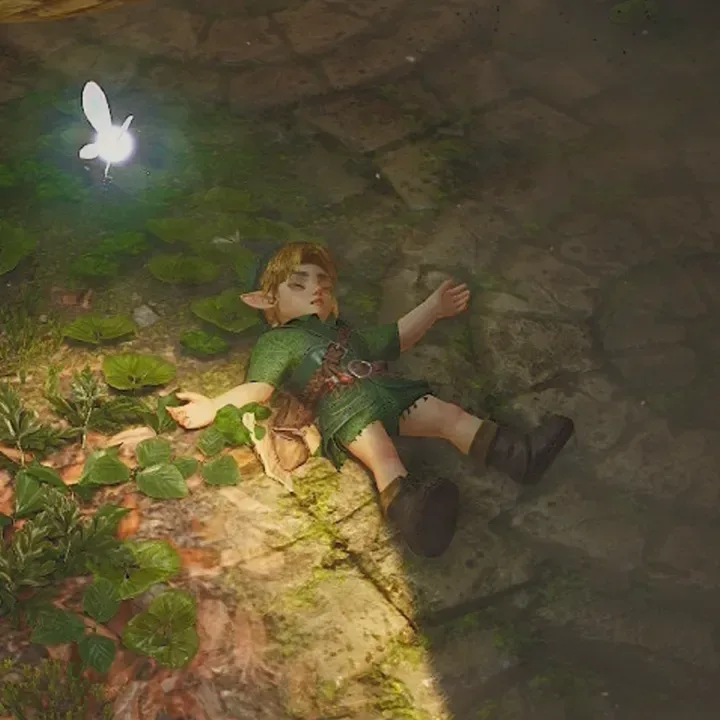
The Legend of Zelda: Ocarina of Time for Switch 2 has made a major change to one of the most familiar movement conventions in the series: Link no longer automatically hops over short gaps. Instead, players must use a dedicated jump button.
It sounds like a relatively modest adjustment for a remake that revisits one of the most influential games ever made. Yet it has immediately become one of the most noticeable differences for returning players. In clips and discussions that have circulated during the game's first weekend, plenty of longtime fans can be seen approaching a small ledge exactly as they did in the Nintendo 64 original--then watching Young Link run directly into water, collide with scenery, or tumble awkwardly off an edge.
For a generation that has spent decades trusting Link to make small jumps automatically, the change is more than a new control option. It is a rewrite of muscle memory formed over nearly 30 years.
Embedded X/Twitter post
Embedded X/Twitter post
Embedded X/Twitter post
From automatic movement to player control
When Ocarina of Time arrived on Nintendo 64 in 1998, 3D action-adventure controls were still being defined. The original game handled short jumps contextually: when Link reached an appropriate ledge or gap while moving forward, he would make the leap on his own. Players did not need to stop, aim a reticle, or remember a separate input. They simply moved toward the destination and trusted the game to recognize what they intended.
For useful background on this topic, read Nintendo Switch 2 Settings and Features Worth Using Before Your Next Game.
That design made traversal feel unusually approachable at the time. It also suited the broader philosophy behind the original game's movement and targeting systems. Link could climb, vault, swim, and cross the world without forcing players to manage a sprawling list of actions. The context-sensitive approach helped make Hyrule feel navigable even though players were adapting to analog 3D spaces.
The Switch 2 remake takes a different route. Link now has the freedom to perform a short jump by pressing a button, bringing a more direct degree of control to everyday exploration. It is a meaningful modernization on paper. A dedicated jump can make platforming more deliberate, and it gives players a familiar tool that many modern action games treat as standard.
But familiarity is relative. For newcomers, a jump button may be the obvious expectation. For people who know the original inside out, the expected action is still to walk toward a gap and let Link take care of the rest.
A launch-week lesson in old habits
Player reactions have made the result clear: the adjustment period is real. One widely shared post summed up the issue simply, with a player admitting they kept forgetting to press jump after a Kakariko Village misstep sent Link into the water. The reply from another returning fan was equally direct: decades of habit are difficult to undo.
That feeling appears to be widespread. The remake has only been available since November 5, but players have already shared a steady stream of small failures caused not by a difficult dungeon encounter or a complicated puzzle, but by the absence of a once-automatic hop. Link walks off a drop. Link fails to clear a narrow space. Link meets the side of a platform rather than landing on it.
These are minor mistakes, and the game generally does not punish them severely. Still, they are revealing because they show how deeply a specific control decision can become part of a game's identity. Auto-jump was not merely a convenience setting in the original. It was a silent agreement between player and game: if a jump looked safe and sensible, Link would do it.
Now players need to consciously break that agreement. The first few hours can turn routine navigation into a mental checklist: approach ledge, remember the new control scheme, press jump, then continue exploring. Missing any part of that sequence can result in a very undignified fall.
The button layout is part of the debate
Not every complaint is about the presence of a jump button itself. For some players, the issue is where that action has been placed. The default jump input is assigned to X, a choice that some fans say feels unnatural after years of using Nintendo controllers and older Zelda control schemes.
There is an answer for those players in the settings menu: jump can be reassigned from X to B. That flexibility may ease the transition for some, particularly for anyone whose instincts place a primary action on the face button most closely associated with confirmation or common movement inputs.
Remapping, however, cannot restore the original automatic behavior. Players who preferred auto-jump are not necessarily asking for a more comfortable button position; they are missing the frictionless rhythm of the Nintendo 64 game. The larger disagreement is therefore about design rather than just layout.
One side sees manual jumping as a sensible step forward, offering more agency and a control language that feels more current. The other sees auto-jump as one of the original game's cleverest ideas, especially because it solved a problem early 3D games were still learning how to address. Both perspectives reflect the unusual challenge faced by any remake of a foundational game: update the mechanics without erasing the choices that made the original feel distinctive.
Ragdoll physics make every slip more dramatic
The new movement system has another consequence: falls are not just more common for players still adjusting, they are also more entertaining to watch. The Switch 2 remake includes ragdoll physics that give Link's failed landings extra force and personality. A missed jump can send him sprawling against a platform, crumpling into a wall, or hitting the ground in a way that makes an otherwise ordinary traversal error look much more painful.
That has turned many of the shared clips into comedy rather than frustration. Players have joked about Link appearing to break a rib, injure his jaw, or violently collide with the side of a ledge. Young Link's adventures through Hyrule have always involved danger, but this version's physical reactions put a new emphasis on the smaller accidents between battles and dungeon puzzles.
There is an irony to it. The addition of a manual jump gives players more control, but the learning curve has temporarily made Link look less graceful. Instead of smoothly clearing terrain without a second thought, he is becoming the star of countless accidental dives and face-first impacts.
Fortunately, the stakes are usually low. Link does not normally suffer much damage from these sorts of falls, meaning players can laugh at a bad landing, climb back up, and try again. That forgiving approach is especially helpful while returning fans retrain instincts built around the original game's automatic movement.
A small mechanic with a big legacy
The reaction to the jump button underlines why Ocarina of Time remains such a significant game. A remake can improve visuals, add systems, alter physics, and revise controls, but even a small change can prompt a major response when it touches something players have performed thousands of times.
Its original auto-jump system may not have been flashy. It was not the feature people usually cite alongside Z-targeting, the time-travel structure, the dungeons, or Hyrule Field. Yet it contributed to the game's sense of ease. It let players focus on where they wanted to go rather than on the exact command needed to get there.
Dedicated jumping changes that relationship. It may ultimately be welcomed by players who want more precision, and newcomers may never understand why walking toward a gap without pressing anything was once such an important part of Zelda movement. But for veterans, the earliest days with the Switch 2 remake have become a reminder that instinct can outlast almost any graphical upgrade.
As players continue through Hyrule, the new input will likely become second nature. The missed jumps will become less frequent, the water hazards less embarrassing, and Link's ragdoll collisions less common. For now, though, one of gaming's most experienced heroes is paying the price for a simple new button--and players are still learning to press it.
What it means for the remake's wider conversation
The jump debate is only one part of the early discussion around Ocarina of Time for Switch 2. Fans are also examining its larger changes, while datamining activity has encouraged speculation about possible Master Quest downloadable content or even a future remake of Majora's Mask. Speedrunners, meanwhile, have already found ways to break the game in amusing fashion less than a week after launch.
Those conversations show how intensely players are engaging with the remake's details. Yet the dedicated jump button may be the most immediate change because everyone encounters it from the moment they begin moving through Hyrule. It affects villages, fields, dungeons, shortcuts, and every small obstacle that once prompted Link to hop forward automatically.
For the moment, the clearest advice for returning players is simple: check the jump-button setting, consider moving it to B if that feels more natural, and remember that Link needs an extra prompt before crossing those small gaps. Otherwise, he may be taking another unexpected swim.
Community
Discussion
Start the conversation.
No comments have been posted yet.