

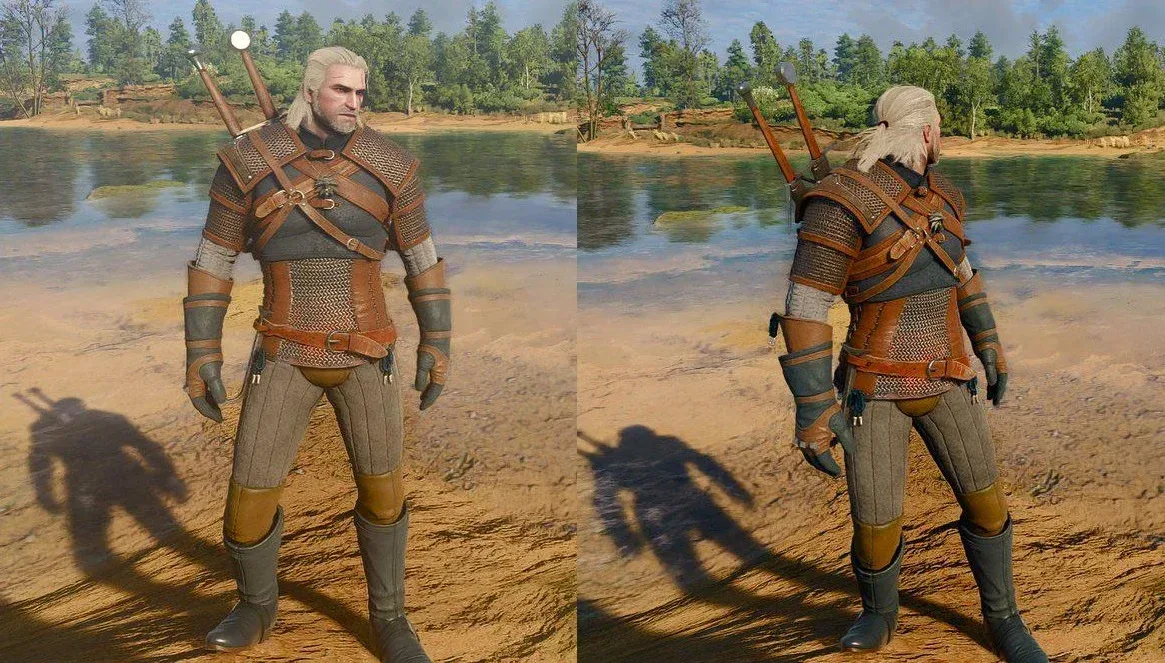
The Witcher 3 Remastered has arrived with an updated visual presentation, but one element of that overhaul is already prompting a lively debate: lighting. Some players appreciate the remaster's brighter scenes, sharper contrast, and more elaborate illumination. Others feel that the new image loses a little of the somber, grimy atmosphere that helped define Geralt's journey through a war-torn fantasy world.
For PC players who fall into the latter camp, an early settings tweak has emerged as a particularly effective answer. Turning bloom off can substantially change the game's look, reducing the bright haze around light sources and making many scenes appear darker, crisper, and closer in mood to the earlier version.
The change is simple, immediate, and entirely subjective. It will not settle the question of which version looks "best," because that depends heavily on a player's display, room lighting, and personal tastes. Still, early screenshot comparisons and player reactions suggest the bloom toggle is worth testing for anyone who thinks the remaster currently looks overly bright or washed out on PC.
Embedded X/Twitter post
Embedded X/Twitter post
Why bloom has become the focal point
Bloom is a post-processing effect designed to make intense light appear to spill or glow beyond its source. In moderation, it can make sunlight, candles, torches, magical effects, reflective surfaces, and bright skies feel more luminous. It can also contribute to a more cinematic image by softening the harsh edges around powerful highlights.
For useful background on this topic, read Dressmaker Is Winning Over Steam Players With Detailed Virtual Sewing.
That same effect can be divisive. If it is too prominent for a player's preference or display setup, bloom can make highlights seem foggy, flatten darker detail, or create the impression that the entire image has a pale sheen over it. In a game associated with muddy roads, candlelit interiors, threatening forests, and bleak battlefields, that impression can feel at odds with the atmosphere some longtime fans remember.
The discussion around The Witcher 3 Remastered began as players and reviewers compared images and impressions following the end of the review embargo and the game's launch. One side sees the revised lighting as more sophisticated and naturalistic, with bolder highlights and a more modern sense of illumination. The other favors the heavier shadows and darker tone associated with the previous presentation.
Neither perspective is inherently wrong. A remaster has to balance technical modernization with the visual identity that players formed over years of adventuring through the Continent. Lighting changes are especially noticeable because they affect nearly every outdoor vista, interior, cutscene, and weather condition rather than being limited to a single texture or model upgrade.
For another perspective on this story, read Turn Off Bloom in The Witcher 3 Remastered on PC for a Darker Look.
How to try the darker PC presentation
On PC, the key adjustment is found in the game's graphics or display-related settings. Players who want to compare the two looks should locate the Bloom option and switch it off, then examine the same location before and after the change. It is best to test a few different environments rather than judging from one screenshot alone.
- Try a bright outdoor area during daylight, where the difference around the sky and sunlit surfaces may be easiest to spot.
- Visit a torchlit or candlelit interior to see how the setting changes the softness of artificial light.
- Check a rainy, foggy, or overcast area, since bloom can combine with weather effects in ways that alter the perceived contrast.
- Compare both exploration and dialogue scenes, as cinematic camera angles can make highlights and bright backgrounds more noticeable.
Players who dislike the remaster's initial visual balance may find that disabling bloom delivers the fast, dramatic improvement they were looking for. Several early community responses have described the difference as striking, particularly for those who wanted a more restrained image. The reaction has been enthusiastic enough that the recommendation is quickly circulating among PC users looking to restore some of the game's harsher fantasy mood.
At the same time, those who enjoy the brighter lighting should feel no obligation to change it. Bloom is not automatically a flaw simply because it is visible. The option exists because different visual treatments appeal to different people, and a remaster with adjustable settings is better served when players can tailor the presentation to their own preferences.
More post-processing options may be worth testing
Bloom is receiving the most attention because it appears to make the largest immediate difference for dissatisfied PC players, but it is not the only image-processing feature that can influence the final look. Players interested in a more direct, less stylized presentation may also want to experiment with motion blur, chromatic aberration, and vignetting.
Motion blur can create a smoother sense of movement, but some people find that it reduces perceived clarity while moving the camera or during combat. Disabling it is a common preference for players who prioritize sharpness.
Chromatic aberration mimics a lens-like separation of colors near parts of the image. It can add a filmic quality, though it may also make edges appear less clean. Turning it off can make the image feel more precise for players who prefer a neutral visual style.
Vignetting darkens or shades the outer edges of the screen to pull attention toward the center. It can reinforce a cinematic mood, but it may be unnecessary for anyone seeking the clearest possible view of the world. Unlike bloom, which has become associated with reducing excessive brightness, vignetting is mainly a matter of whether a player enjoys the framing effect.
There is no universally correct configuration. A player could turn off bloom while leaving vignetting enabled, for example, preserving some of the game's dramatic framing without retaining the extra glow around highlights. Others may choose to disable every one of these effects in pursuit of a sharper, cleaner image. The best approach is to make one change at a time and revisit familiar scenes.
Console players do not have the same quick fix
The most important limitation is that the bloom toggle is currently a PC-only solution. On PS5 and other console versions, players do not have an equivalent option to directly switch bloom on or off. That means the most popular early adjustment for reducing the brighter visual character of the remaster is unavailable to a portion of the audience.
Console players can still adjust brightness, contrast, and gamma. Those controls may help improve visibility or prevent black levels and highlights from feeling too extreme on a particular television or monitor. However, they are broader calibration tools, not a direct substitute for disabling one specific post-processing effect.
Brightness usually changes the overall luminance target, while gamma affects how midtone values are displayed between black and white. Contrast alters the separation between dark and bright areas. Each can improve an image that is poorly calibrated for a screen, but changing them too aggressively can crush shadow detail, clip highlights, or introduce a different kind of imbalance. Players should make small adjustments and use a dark scene as well as a bright one for comparison.
For now, there is no indication that console editions will receive a bloom setting, nor is there confirmation that the current lighting behavior is considered an error. The development team has not provided an update on any further visual changes it may be considering. That leaves the matter open: the current presentation may remain as intended, additional options could arrive later, or future patches could make other lighting refinements.
A debate about atmosphere, not just technology
The response to The Witcher 3 Remastered highlights a familiar problem for remasters and modern re-releases. Players do not only remember technical image quality. They remember a feeling: the color of a dusk sky over Velen, the gloom of a cramped tavern, the way a storm made the wilderness appear hostile, and the contrast between warm firelight and cold darkness.
Updated lighting can make a game technically more advanced while changing that remembered feeling. More brightness can reveal detail. More realistic illumination can add depth. Better reflections and stronger highlights can create a richer scene. Yet if the overall result seems cleaner, sunnier, or less oppressive than a player expects, it may feel less faithful even when it is objectively more complex.
That is why the PC bloom option matters beyond a single checkbox. It gives players a degree of authorship over the remaster's atmosphere. Fans who want the bold new lighting can keep it. Fans who want less glow and a darker presentation can make a quick adjustment without waiting for a patch or relying solely on display calibration.
For PC players starting The Witcher 3 Remastered and wondering why the image feels brighter than expected, bloom should be the first setting to test. It will not be the ideal choice for everyone, but it is currently the clearest way to alter the lighting balance in favor of a more restrained, classically grim Witcher look. Console players, meanwhile, will need to work with brightness, contrast, and gamma unless future updates add more granular visual controls.
Community
Discussion
Start the conversation.
No comments have been posted yet.