

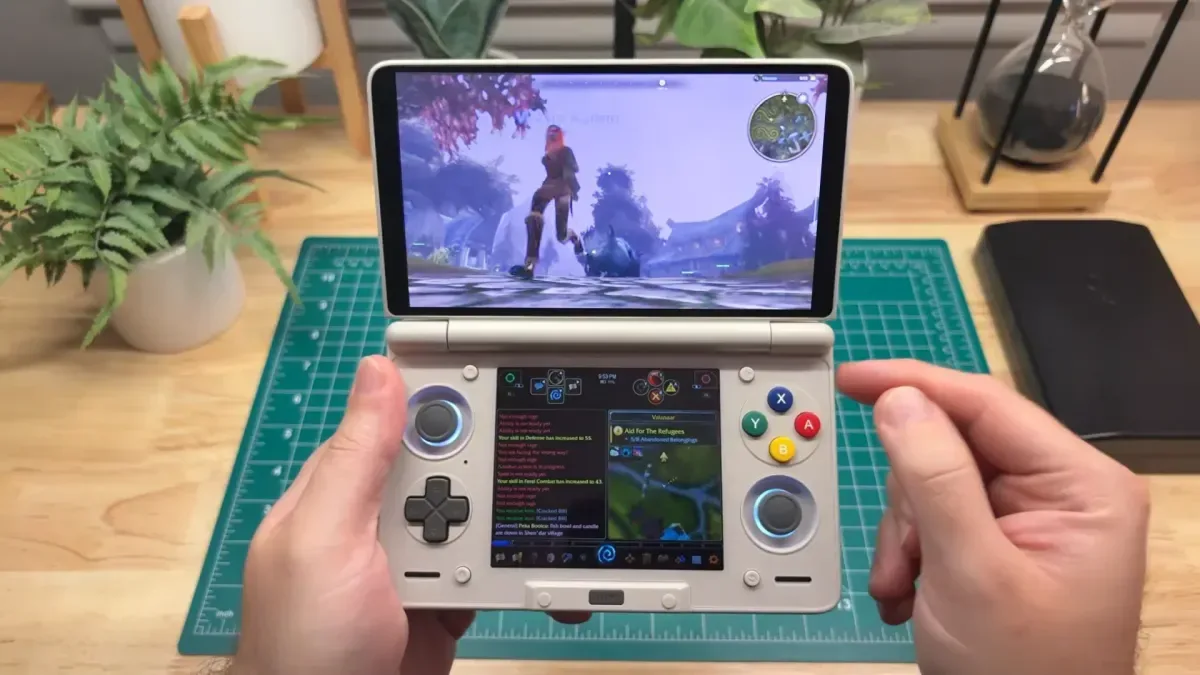
Playing a full-scale PC MMORPG on a handheld has always involved compromises. A smaller screen can make hotbars difficult to read, touch controls rarely replace a mouse cleanly, and the genre's constant stream of maps, quest logs and inventory windows demands more room than most portable devices can provide. A new unofficial project aimed at the dual-screen AYN Thor is trying to tackle that problem directly.
WoW Forever is now playable on the AYN Thor through DS Forever, an Android launcher and companion application developed by Jreese702. The setup runs the PC version of the game on the Android-based handheld while putting the Thor's second display to work as a persistent gameplay aid. Footage and setup information shared by YouTuber CD's Retro Corner show what may be one of the more unusual ways to take an MMORPG away from a conventional desktop.
It is not a plug-and-play native Android release, and prospective users should approach it as an enthusiast project. Installation requires an existing game account, locally obtained game files, significant storage space, manual permissions, and a willingness to configure controls for a game designed around a keyboard and mouse. But for players who already own an AYN Thor and want a more portable way to revisit WoW Forever, the appeal is clear: the second screen can reduce some of the interface congestion that normally makes this kind of game awkward on handheld hardware.
What DS Forever does
DS Forever combines ideas from WoW Forever Android Launch and GameNative. It is a fork that brings the capabilities of those projects together in a format intended for the AYN Thor's hardware and dual-display design. Rather than replacing the game with a mobile version, it serves as a way to launch and support the regular PC client on the device.
For useful background on this topic, read Scion Ex Brings a Rare 1984 Arcade Shooter to the Amiga.
The technical stack includes a Wine/Proton compatibility layer, DXVK, and a custom Turnip graphics driver. In practical terms, those components help translate the PC game's software and graphics demands into something the Thor's Snapdragon-based Android platform can handle. This kind of compatibility work is increasingly familiar to owners of powerful Android gaming handhelds, though it remains more complex than simply downloading a title from a storefront.
The result is particularly interesting because WoW Forever is not the sort of game that benefits only from raw performance. Its interface is a major part of the experience. Players are routinely checking objectives, navigating areas, managing abilities, tracking NPCs and reviewing loot, often while keeping the main world view visible. A typical single-screen portable has to compress those functions into one crowded display. The Thor has an additional screen available, and DS Forever is built around using it.
The second screen is more than a novelty
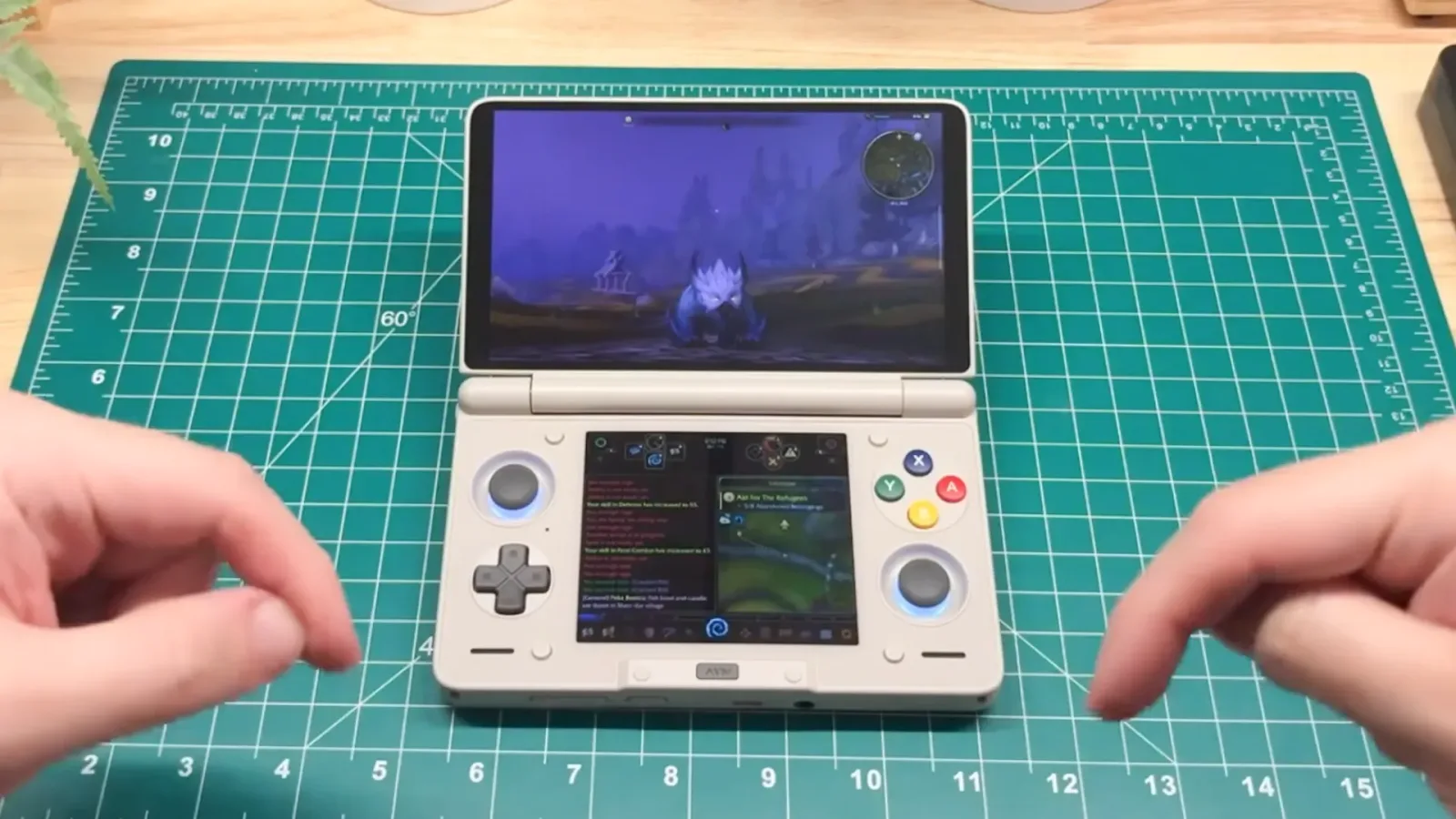
Dual-screen hardware can be difficult for developers to support meaningfully, especially when an application was never designed around it. DS Forever's companion features give the lower display a practical role instead of leaving it unused.
Players can use the second screen for several types of information, including:
- A map view for the current area.
- Indoor map layouts with colour coding for exits and floors.
- Information on NPCs the player has already encountered.
- Quest data drawn from the popular Questie add-on database.
That arrangement could be especially useful during long quest chains and dungeon runs. The primary display can remain focused on combat and movement, while the lower screen handles reference material that would otherwise require repeated menu navigation. It is a straightforward concept, but it addresses one of the most persistent problems with MMORPGs on portable systems: there is never quite enough screen space.
It also gives the AYN Thor a more distinct use case than simply being another device capable of launching Android games or streaming from a PC. The dual-screen format is being used to reshape how a PC game's information is presented. For players who remember the Nintendo DS era fondly, the layout may feel familiar, even though the software running here is far more demanding than the handheld games traditionally associated with two displays.
What users need before starting
DS Forever does not include WoW Forever or provide access to the game by itself. Users need an active subscription or available game time, their own account, and their own game installation files. The application then points to that local installation and prepares the necessary supporting data.
The game folder copied to the Thor needs to include the .build.info file and the Data folder. Testing has used a location in the device's internal storage under Documents/WoW Forever. Storage requirements are substantial: the installation needs roughly 60GB of free space. That makes capacity planning important before beginning, particularly for owners using a model with limited internal storage.
After obtaining the most recent DS Forever APK from the project's GitHub releases page, users must permit installation from unknown sources in Android. That is a normal requirement for sideloaded applications, but it is also a point where caution matters. Anyone downloading an APK or other files outside a conventional app store should verify what they are installing and follow sensible device-security practices.
How the setup process works
The first launch requires storage access so DS Forever can locate the copied game folder. From there, the application's two-screen setup process performs seven required checks before its Play button becomes available. During this stage, it prepares map artwork from the local game files and downloads the quest database used by the companion display.
If a check does not complete successfully, the application provides a Try Again option. This is another sign that the project is still a hands-on setup rather than a polished retail app: users should expect to troubleshoot permissions, file locations, and configuration steps if something does not work immediately.
- Ensure that an active game account and game files are available.
- Copy the full required WoW Forever folder to the AYN Thor's internal storage.
- Install the current DS Forever APK and grant the requested file access.
- Select the game folder when prompted.
- Complete the seven two-screen setup checks and retry any that fail.
- Use Configure Login to sign in, approving an authenticator manually where required.
- Launch the game and spend time mapping controls to the handheld's inputs.
DS Forever includes an updater for both the app and the game client, which should make ongoing maintenance less cumbersome than repeating the full installation process whenever software changes. Still, the project is reportedly receiving frequent updates, so individual menus and steps may change over time. The developer's current documentation should take priority over any general outline when users are ready to install it.
Controls and hardware expectations
Even with the second screen handling supporting information, WoW Forever remains a PC MMORPG being operated on a compact handheld. Button mapping and configuration are therefore central to the experience. Players will need to decide which combat actions, menus, targeting functions and interface commands deserve the most accessible physical inputs. No single layout will suit every class or play style.
The project currently supports the AYN Thor specifically. It has not been tested on single-screen handhelds or other devices such as the Retroid Pocket Duo. That distinction matters: the second-screen tools are a defining feature, not a small optional extra, and compatibility should not be assumed simply because another Android handheld has comparable processing hardware.
Hardware configuration may matter as well. Higher-end Thor models with additional RAM are recommended for this use, while the Lite and Base versions may produce less satisfying results. The compatibility layer, game client, companion app and dual-screen utilities all place demands on the system, so prospective users should keep expectations measured if they own the lower-spec models.
An ambitious handheld option, with caveats
DS Forever is an intriguing example of the increasingly flexible handheld scene. It is not the simplest way to play WoW Forever, nor is it likely to replace a desktop setup for every player. A larger portable PC can offer a more familiar environment, while a desktop still provides the easiest access to a full keyboard, mouse and large monitor.
Yet the AYN Thor approach has a different advantage. It prioritizes compact dual-screen play, turning a potential hardware gimmick into a useful MMO interface tool. For players who want to quest from a smaller handheld without constantly opening and closing maps or reference windows, that could be compelling.
The project has been described as not violating Blizzard's terms of service, but users should still review applicable rules for themselves and make their own decision before using unofficial software. It has also been noted that AI tools assisted its development. Neither point changes the basic requirement that users bring their own legitimate account and game files.
For now, WoW Forever on the AYN Thor remains a technically ambitious option for players comfortable with sideloading, compatibility layers and manual setup. If those hurdles are acceptable, DS Forever demonstrates why a second screen can be more valuable than an extra panel of glass: in the right game, it can make a demanding PC interface feel far more at home in the palm of a player's hands.
Community
Discussion
Start the conversation.
No comments have been posted yet.