

Building or buying a full-scale gaming PC remains an expensive proposition, particularly for players who want a powerful graphics card, generous storage, and enough memory to keep modern releases running comfortably. Not everybody needs that level of machine, though. For home offices, retro libraries, indie games, cloud gaming, streaming, and less demanding PC titles, a compact mini PC can be a practical alternative to a bulky desktop tower.
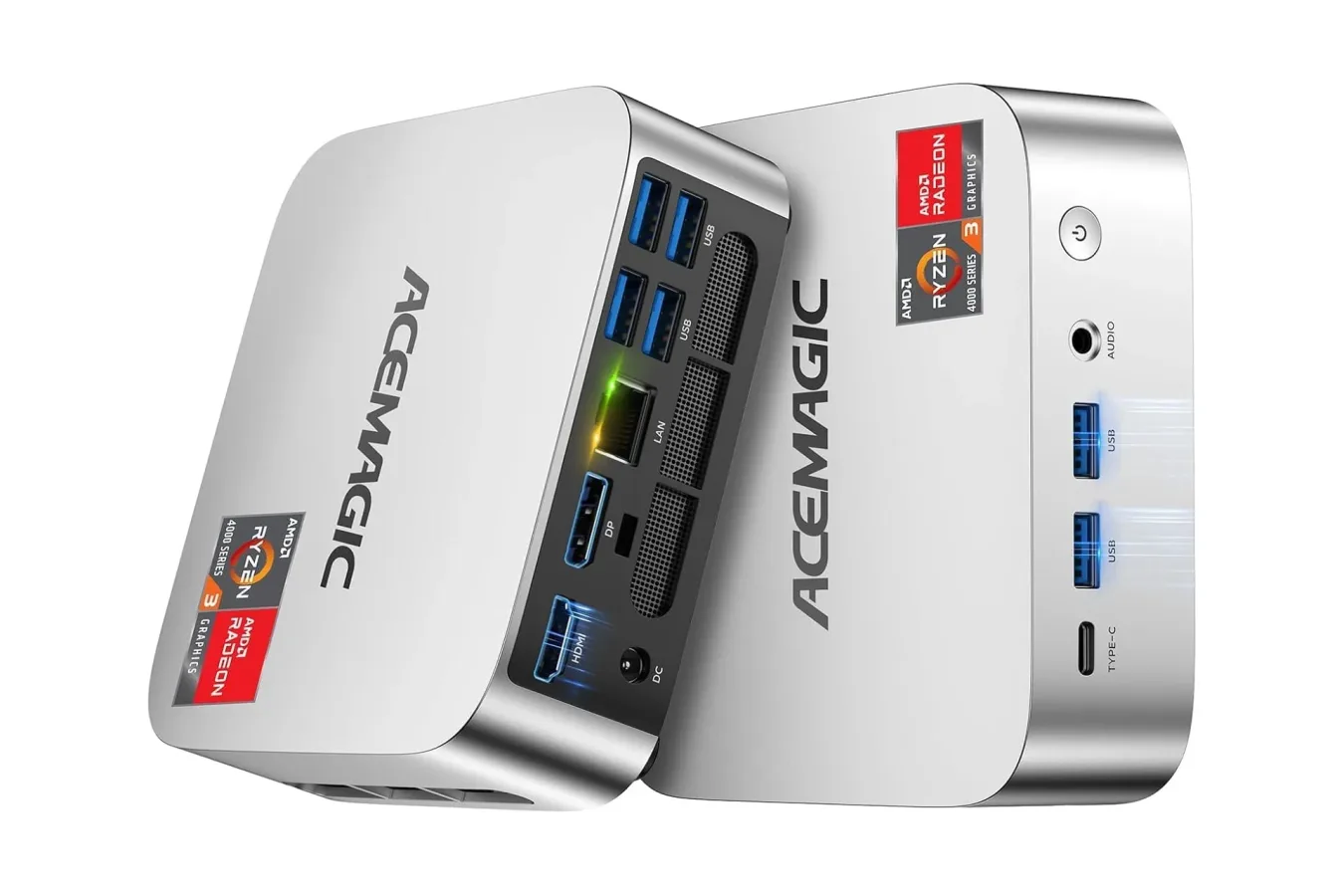
The AceMagic K1 mini PC is currently available for $339 for a limited time, representing a $121 reduction from its usual $460 price. That works out to roughly 26% off. This configuration includes an AMD Ryzen 3 Pro 7330U processor, 16GB of RAM, and a 256GB M.2 2280 solid-state drive in a small silver chassis designed to sit unobtrusively on a desk, mount to a wall, or attach behind a compatible monitor.
That price does not turn the K1 into a direct substitute for a dedicated gaming rig with a current high-end GPU. Its appeal is instead its balance of small footprint, capable everyday specifications, and broad connectivity. For a certain type of player--especially someone who already has a monitor, keyboard, mouse, and perhaps a sizable collection of lightweight or older games--the discount makes it worth a closer look.
What Is Inside the AceMagic K1?
The central component is AMD's Ryzen 3 Pro 7330U, a processor with four cores and eight threads. Its boost clock can reach up to 4.3GHz. The chip is positioned as a noticeable step up from the N150/3500U hardware AceMagic previously used, with the company describing the Ryzen option as more than twice as powerful.
For useful background on this topic, read Kukirin Life Codes for October 2026: Active Crates and Cash Rewards.
For daily desktop work, four cores and eight threads should offer a reasonable foundation for web browsing, office software, media playback, Discord, and multitasking across several lighter applications. The included 16GB of RAM is particularly important at this price point. It gives the machine more breathing room than systems that ship with 8GB, especially if it will be used with numerous browser tabs, game launchers, voice chat, streaming services, and background utilities at once.
Storage is more complicated. The installed 256GB M.2 2280 SSD should help the operating system and applications feel responsive, but its capacity will fill rapidly if the device is intended to host several large current games. A handful of modern blockbuster installs can consume most of that space before considering operating-system files, updates, screenshots, recordings, and other personal data.
Fortunately, the K1's housing supports storage expansion up to 2TB. Buyers who see the mini PC as a long-term game-library machine should pay close attention to that upgrade path. Expanding the internal drive could be a more elegant answer than constantly managing a small built-in library, although anyone considering an upgrade should verify the compatible drive type and installation process before making a purchase.
A Mini PC for Modest Gaming Expectations
Mini PCs occupy an increasingly useful space between a basic low-power computer and a conventional desktop. The K1 is best considered a compact multipurpose system rather than a machine built solely around cutting-edge game performance. The supplied specifications support plenty of gaming-adjacent uses without requiring a desk to be dominated by a full tower.
For example, the system could suit players focused on indie games, older PC releases, classic game collections, turn-based strategy games, visual novels, 2D platformers, and other titles with modest hardware needs. It may also be a sensible dedicated machine for streaming games from another PC, using cloud-gaming services, or accessing remote-play setups, where the most demanding processing happens elsewhere.
Expectations matter here. The listed configuration does not include a separate dedicated graphics card, and it should not be purchased on the assumption that it will effortlessly handle the newest visually intensive releases at high settings. Players seeking a box specifically for demanding AAA games, high-resolution settings, or high frame-rate competitive play will generally want to look toward a desktop with discrete graphics hardware.
That limitation does not erase the K1's value. A great many PC games do not require premium hardware, and a compact system can be more convenient than a powerful tower for a living-room display, a secondary workspace, a student desk, or an uncluttered casual setup. The right question is not whether it replaces an enthusiast-grade gaming computer; it is whether its capabilities line up with the kinds of games and tasks an individual actually uses every day.
Ports and Dual-Monitor Support Are Major Selling Points
The AceMagic K1's connectivity is one of its stronger practical features. It includes six USB 3.2 Type-A ports in total. Two are placed on the front for easier access, while four are located on the rear for hardware that is likely to remain connected permanently, such as a keyboard, mouse, external storage drive, webcam, printer, or controller receiver.
A front-facing USB 3.2 Type-C port supports data transfers up to 10Gbps. That is useful for quickly connecting compatible external storage or accessories without reaching around the back of the system. The abundance of ports is meaningful on a compact computer, where users might otherwise expect to rely on hubs or adapters almost immediately.
Display connectivity includes both HDMI and DisplayPort outputs. The combination allows the K1 to drive up to two monitors at the same time without a separate docking station. Dual displays are valuable beyond traditional office work: one screen can hold a game, while the other carries a browser, guide, chat window, music controls, or streaming dashboard. It can also make a small mini PC more versatile for creators who need space for editing tools alongside a preview window.
The system additionally provides an RJ45 Gigabit Ethernet port and a 3.5mm AUX jack for speakers or wired headphones. Ethernet is especially welcome for game downloads, remote streaming, online play, and stable media streaming in homes where wireless signal quality varies from room to room. Meanwhile, the analogue audio connection offers a straightforward option for existing headphones and desktop speakers.
Designed to Disappear Into a Setup
Part of the point of a mini PC is that it does not need to become the visual centerpiece of a room. The K1 uses a silver-toned chassis with a compact design intended to fit into smaller spaces. Its mountable enclosure means it can be placed on a wall or fixed to the rear of a monitor, helping create an all-in-one-style desk setup with fewer visible cables and less equipment competing for surface area.
Cooling is always worth considering in smaller computers because a compact body has less room to dissipate heat than a typical desktop tower. AceMagic equips the K1 with an axial fan and internal cooling design intended to keep temperatures under control while maintaining relatively quiet operation. Noise levels can vary with workload and environment, but the focus on restrained fan sound is relevant for a machine likely to sit close to a monitor in a bedroom, office, or living room.
The small form factor may also be attractive to players who travel between rooms or regularly move their setup. A mini PC is easier to relocate than a conventional tower, though buyers should still account for the display and peripherals they plan to use. It is compact computing, not necessarily a complete portable gaming solution on its own.
Who Should Consider the $339 Deal?
At $339, the AceMagic K1 makes the most sense for shoppers who need a compact PC for everyday work and lighter gaming, or who want a flexible second computer for a home. It has enough memory to avoid the tightest compromises of entry-level systems, a processor capable of handling routine multitasking, and a port selection that reduces the need for immediate accessories.
- Good fit: players concentrating on older games, indie games, retro-focused software, game streaming, cloud gaming, and general productivity.
- Good fit: users who want dual-monitor support, wired Ethernet, numerous USB connections, and a tidy desk-friendly computer.
- Plan for an upgrade: anyone expecting to maintain a broad installed game library should consider additional storage, given the included 256GB SSD.
- Look elsewhere: players who need a dedicated GPU for recent demanding games, high graphics settings, or intensive local rendering workloads.
Mini PCs are not a universal answer to the rising cost of enthusiast hardware, but they can offer a more measured way into PC gaming and everyday desktop use. The AceMagic K1's discounted price, 16GB of RAM, expandable storage support, dual-display capability, and generous selection of ports create a compelling package for people whose needs do not begin and end with maximum graphical performance.
The $121 discount is described as temporary, so shoppers interested in this particular Ryzen 3 Pro 7330U configuration should confirm the live price and available configuration details before buying. For the right user, $339 is a notably lower barrier to a clean, compact PC setup than a full gaming desktop build.
Community
Discussion
Start the conversation.
No comments have been posted yet.