

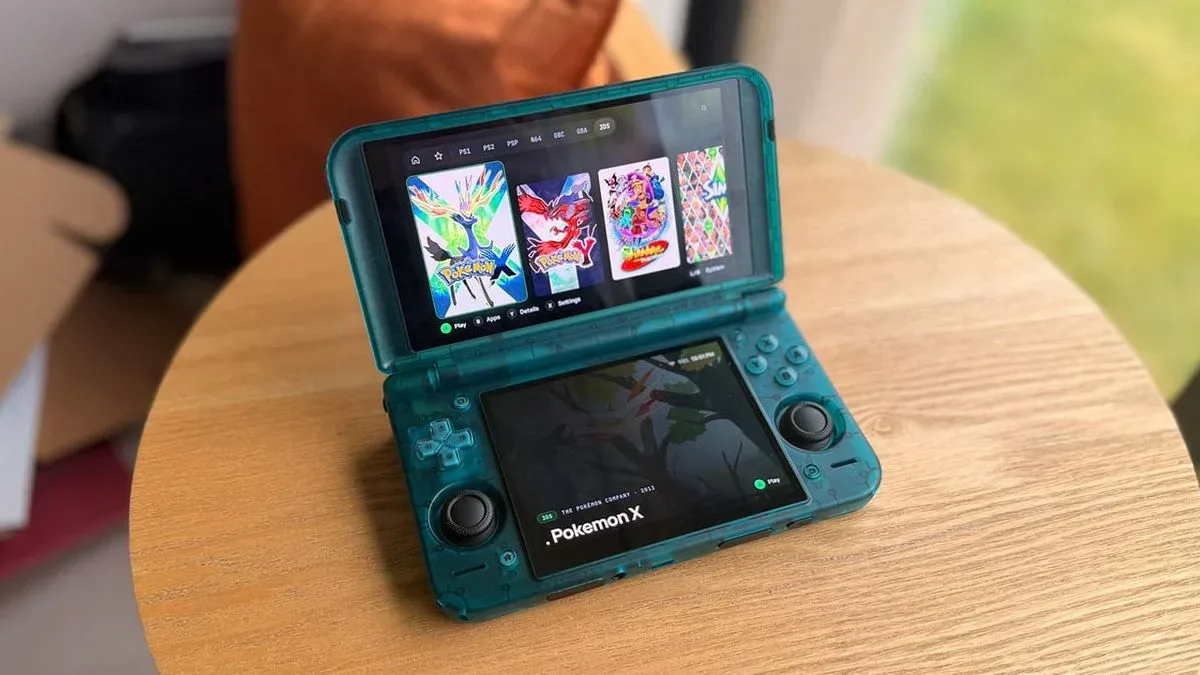
Android gaming handhelds have reached a point where the hardware is no longer the only consideration for players building an emulation library. Powerful processors, larger displays, physical controls, and even dual-screen designs have made portable gaming more flexible than ever, but the software experience can still feel fragmented. A device may launch games perfectly well while offering a library browser that is slow, cluttered, or simply unaware of the unusual screen layout sitting in a player's hands.
Blip is a newly announced Android frontend built to address that particular problem. Developed by Spanish software engineer Endika, Blip is a native Android launcher designed from the outset for both conventional one-screen systems and the growing number of handhelds with two displays. It is available free through Google Play and supports Android 12 or later, giving it potential reach beyond a narrow list of gaming hardware.
The headline idea is straightforward: dual-screen devices should not have to treat their second panel as unused space whenever a game was not made for dual displays. Blip turns that lower screen into a companion interface, while also presenting the main library experience across both panels. The result is a frontend that appears focused less on adding needless complexity and more on making the form factor feel intentional.
A launcher made with two displays in mind
Dual-screen Android handhelds invite obvious comparisons with earlier portable systems, but their use cases extend much further than playing software originally designed around two panels. Many players use them for retro libraries spanning multiple generations, streaming, Android games, and media applications. The difficulty is that a large portion of the software being launched is still fundamentally single-screen. A generic frontend may show its menus on only one display, leave the other largely dormant, or offer a layout that feels improvised rather than tailored to the hardware.
For useful background on this topic, read Avenging Spirit, Mole Mania and Pinball: Revenge of the 'Gator Join Nintendo Switch Online.
Blip's approach is to split its interface across both displays. For games that do not need a second game screen, the lower panel becomes a companion display capable of presenting useful context. Players can use it for game artwork, instruction booklets, metadata, play-time information, and related details while the primary display remains focused on navigation or play.
That could be especially valuable for older games, where manuals and reference materials can still meaningfully improve the experience. Rather than pausing a game to hunt through a separate app or web page for a control layout, a player could keep the relevant instructions on the secondary screen. Artwork and game information may also help large libraries feel more curated, particularly on devices used to store collections from many different platforms.
Blip supports art and metadata gathered from multiple sources, including ScreenScraper and SteamGridDB, while also allowing users to supply their own artwork or instructions. That flexibility matters because retro collections are often personal projects: filenames, regional releases, custom box art, translated manuals, and preferred versions can vary dramatically from one player to another.
Supported handhelds and broader Android compatibility
Although its dual-screen presentation is a central feature, Blip is not limited to a single device manufacturer. The frontend is listed as compatible with several major families of Android gaming hardware: AYN's Odin and Thor lines, Retroid's Pocket devices including the Pocket Duo, AYANEO's Android Pocket handhelds, and Anbernic's Android-based RG handhelds.
It can also run on Android phones and tablets when paired with a controller. More broadly, the requirement is Android 12 or newer, opening the door to other compatible devices beyond the specifically named handheld ranges. That wider compatibility is important for anyone who moves a library between a dedicated portable, a tablet at home, and a phone used for travel.
The emphasis on a native Android experience may be one of Blip's most practical qualities. Frontends are often judged less by their feature lists than by whether they are responsive enough to disappear into everyday use. A fast launcher, simple setup process, and sensible navigation can do more for a library than a long list of settings that most people never touch. Blip positions itself as a clean, speedy alternative for players who want a dedicated gaming environment without wrestling with a complicated setup.
RetroAchievements and RomM sit behind a one-time unlock
The basic Blip frontend is free, but some connected services are part of a one-time Pro unlock. Those features include RetroAchievements integration and support for RomM, a self-hosted game library manager and server.
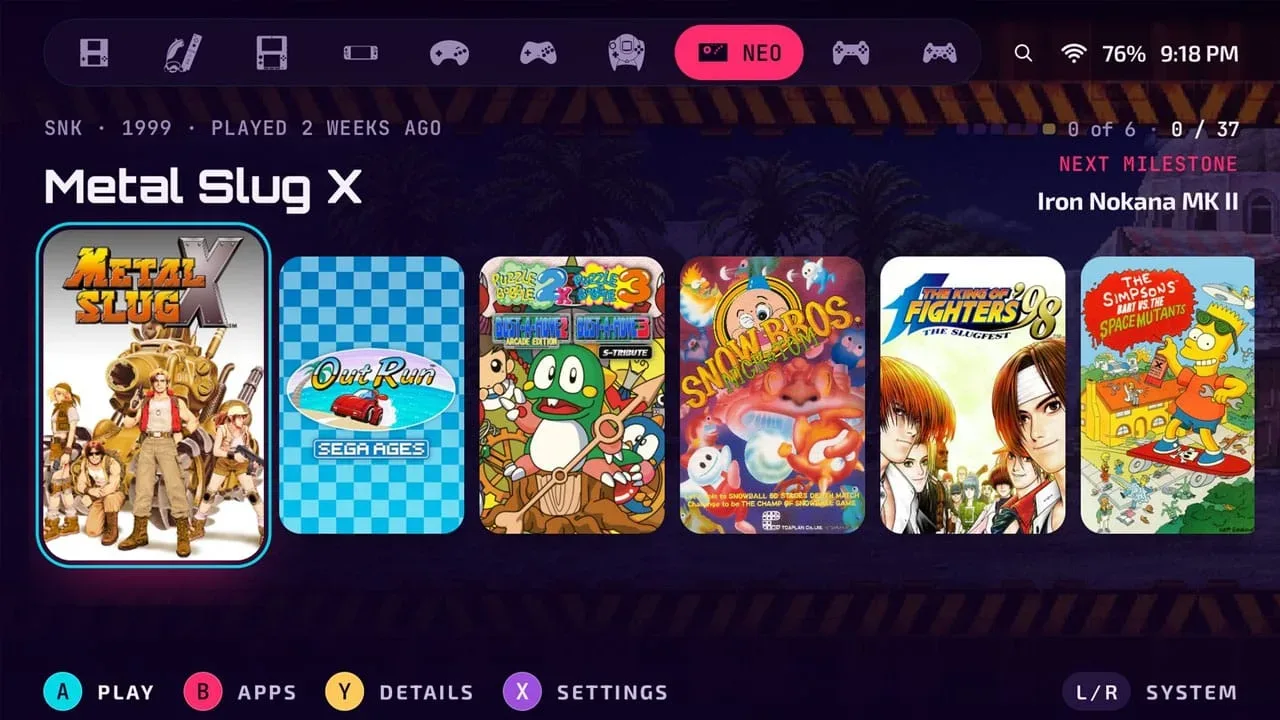
RetroAchievements is one of the more compelling additions for players who enjoy a sense of progress and completion in older games. Blip is designed to show achievement progress throughout the frontend, rather than confining it to a single profile page. That means elements of a library can surface information tied to a player's ongoing progress, including story advancement. For a large backlog, that kind of visibility could make it easier to remember which game was left unfinished and where attention should go next.
RomM support, meanwhile, is aimed at players who maintain their own server-hosted collections. Pairing Blip with a RomM library can provide a more unified route to browsing and accessing a personal catalog. It is a feature likely to appeal most strongly to enthusiasts with multi-device setups, but it also fits Blip's broader ambition of making a library feel consistent rather than isolated to one handheld.
The one-time nature of the Pro unlock is notable in a mobile software landscape where recurring subscriptions are common. No price was detailed, so prospective users will need to check the store listing for the current terms. Still, the free core launcher means players can try the central browsing experience before deciding whether those advanced integrations fit their setup.
Cloud saves are planned through Blip Cloud
Another feature on the roadmap is Blip Cloud, an integrated backup and save-syncing system. It is currently in private beta, with a wider arrival planned for the frontend in the future. The service is intended to back up save files and synchronize them across different devices, a potentially major convenience for players who alternate between a handheld, tablet, or phone.
All users are expected to receive 100MB of storage for free. While that capacity will not suit every possible file type or library, save files for many retro platforms are small, so it could be enough for a meaningful cross-device collection. The key appeal is not merely storage but reducing friction: start a game on one device, then continue it elsewhere without manually transferring saves each time.
Because Blip Cloud remains in private beta, players should view the feature as forthcoming rather than something to rely on immediately. Its eventual quality will depend on the reliability of synchronization, how conflicts are handled, and which files are included. Even so, bringing cloud save management directly into the frontend could give Blip a useful advantage for people with more than one Android gaming device.
Nine themes that change more than the color palette
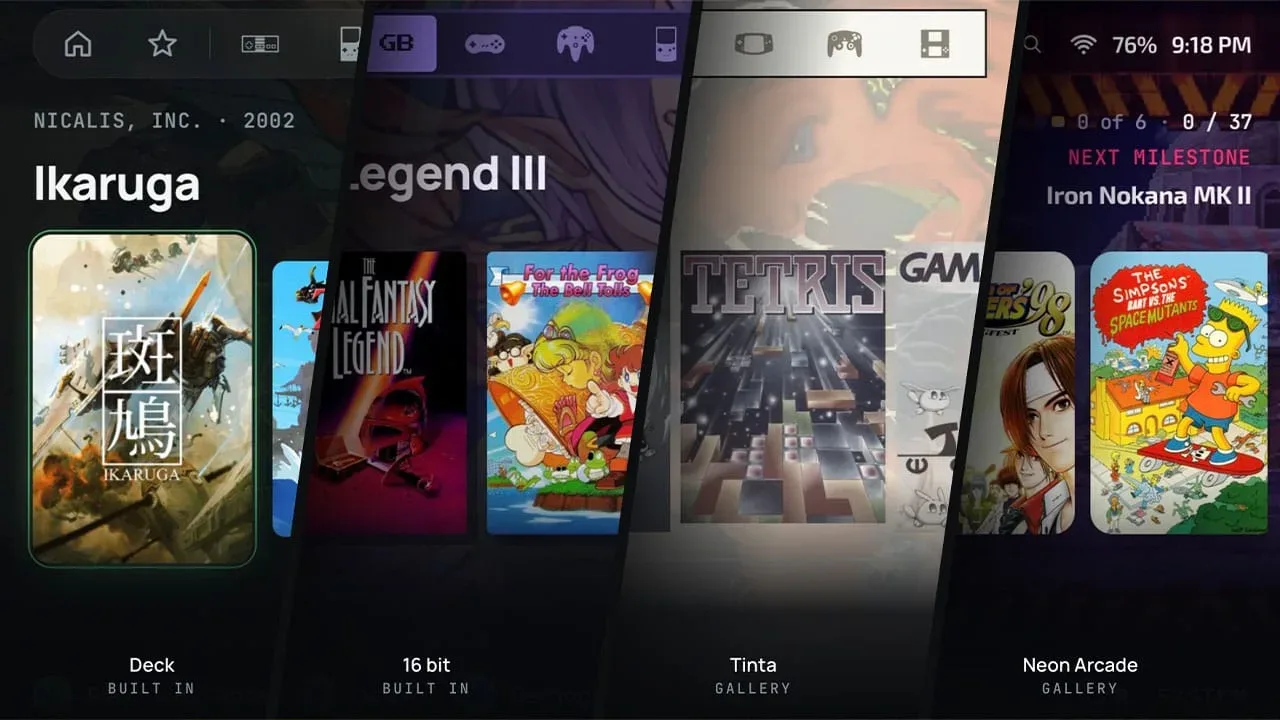
Customization is also a significant part of the package. Blip includes nine themes, each available in light and dark variants. These are presented as full interface identities rather than simple color swaps, changing aspects such as colors, shapes, typefaces, surfaces, and interface sounds.
One theme, 16 bit, uses squared-off corners and is intended to complement handhelds styled after 1990s hardware. Another, Deck, uses slate and near-black blue tones and changes the appearance of the selected item through an inverted treatment. Those details may sound cosmetic, but visual cohesion matters on enthusiast hardware, where the appeal often comes from matching software personality to the design of the device itself.
All of the themes are free, which helps ensure that personalization is not restricted to an additional purchase. Blip also supports nine languages: English, Spanish, German, French, Italian, Brazilian Portuguese, Russian, Japanese, and Simplified Chinese. For a frontend designed around browsing metadata-heavy libraries, broad language support can make a considerable difference to daily usability.
A promising option for Android library management
Blip enters a space where players already have many launcher choices, but its focus is specific enough to stand out. Instead of treating a dual-screen handheld as an ordinary Android device with extra hardware attached, it builds around the possibility that both panels can be useful at once. Companion art, manuals, game data, achievement information, and future save syncing all point toward a frontend meant to serve as a gaming hub rather than a simple app drawer.
For owners of an AYN, Retroid, AYANEO, or Anbernic Android handheld, as well as controller-equipped phones and tablets running Android 12 or later, Blip offers a free way to explore that idea now. The feature set will be most appealing to players who value presentation, metadata, and cross-device organization as much as raw emulation performance. With its private-beta cloud tools still ahead and its paid integrations optional, the initial release leaves room for the frontend to develop alongside the Android handheld market it is designed to support.
Community
Discussion
Start the conversation.
No comments have been posted yet.