

PC gaming on a laptop is always a balancing act. Modern portable machines can deliver impressive performance, but demanding games, long sessions, warm rooms, and limited desk space can all create a setup that feels less than ideal. Heat is one concern, while posture and comfort are another. A laptop cooling stand will not transform an entry-level machine into a high-end gaming rig, but it can be a useful accessory for players looking to raise their screen, improve airflow around the chassis, and make a desk setup more comfortable.
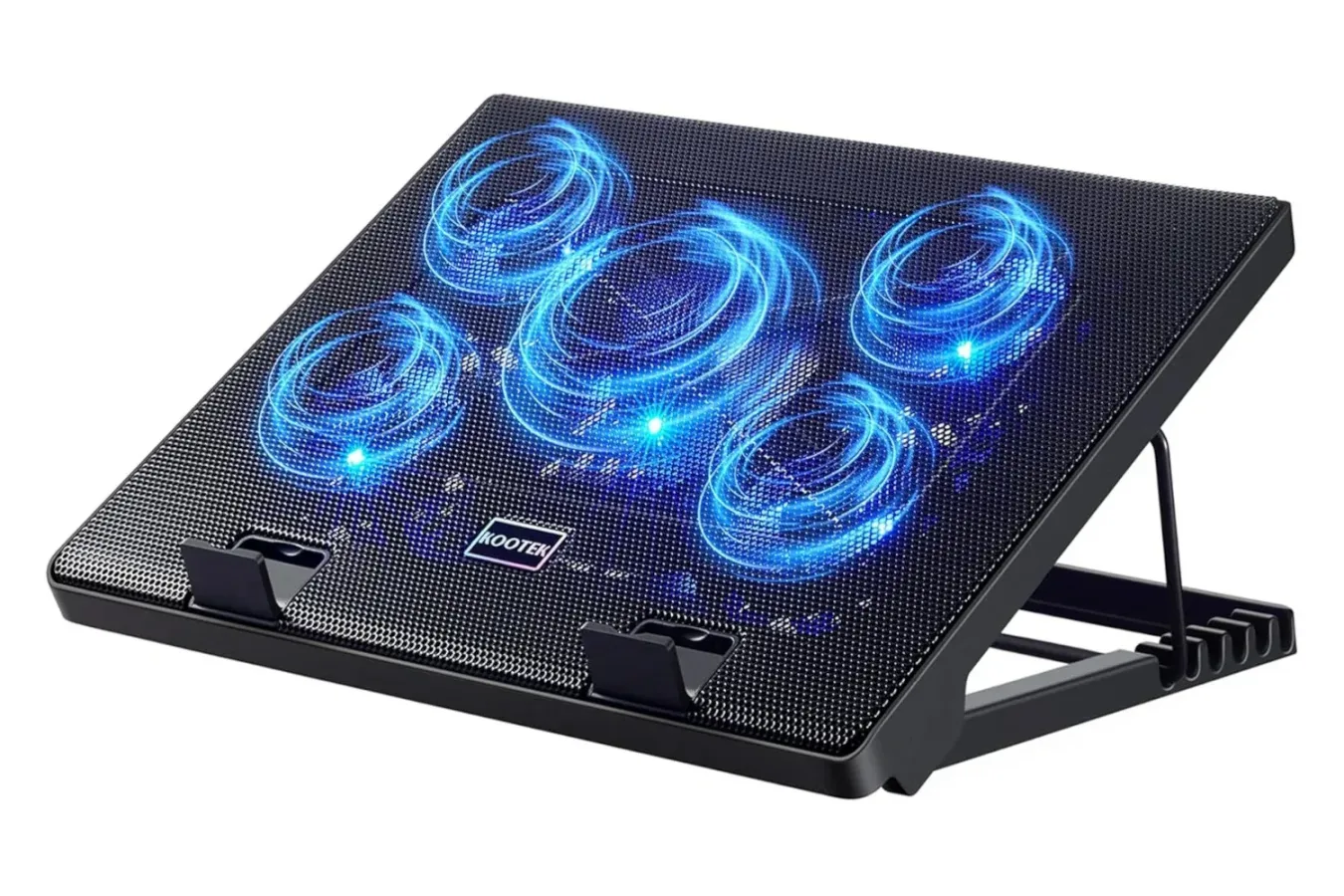
The Kootek Laptop Cooler Stand is currently listed for $26, representing a reported 13% reduction. At that price, it costs less than some basic non-powered laptop stands while adding five cooling fans, adjustable elevation positions, a pair of additional USB ports, and blue LED lighting. The stand is designed for laptops measuring between 12 and 17 inches, covering a wide range of gaming notebooks as well as everyday work and school machines.
For laptop owners whose systems get uncomfortably warm during extended play, the appeal is straightforward: lift the computer off the desk and provide additional active airflow beneath it. The ergonomic benefits may matter just as much for anyone who spends hours moving between games, streaming, homework, remote work, or creative applications.
A five-fan approach to supplemental laptop cooling
The Kootek stand uses five fans intended to help circulate air beneath a laptop. That can be especially helpful for notebooks with intake vents on the bottom panel, where placing the device directly on a desk, blanket, couch cushion, or lap can restrict the space available for airflow. Raising the laptop gives its own cooling system room to breathe; the external fans are an added layer of assistance.
For useful background on this topic, read MW4 DMZ Power Regulator Guide: Best Farming Location and Crafting Recipe.
It is important to set expectations correctly. A cooling pad is not a universal fix for high temperatures, loud fans, or performance problems. Results can vary substantially depending on the laptop's vent layout, internal cooling design, room temperature, the game being played, dust buildup, power settings, and whether the device is already struggling with a hardware issue. Some laptops may see more benefit than others.
Still, a stand can make practical sense even before considering the fans. Keeping a laptop elevated reduces the chance of bottom vents being blocked, and it can place the display at a more useful height. For gaming notebooks that exhaust hot air from the rear or sides, having a clearer, more open desk position can also make cable management and peripheral placement easier.
The five fans are described as surprisingly quiet, which is a meaningful detail for players who use open-back headphones, built-in laptop speakers, or microphones for multiplayer chat. Gaming laptops are rarely silent under load, so an accessory that adds excessive noise can undermine its own purpose. Anyone particularly sensitive to fan sound should still remember that perceived noise depends on the wider setup and the game being played.
More than a temperature-focused accessory
The Kootek unit is also built as an adjustable laptop stand. Multiple elevation levels allow owners to change the angle and height of the keyboard and screen. That flexibility may be useful whether the laptop is being used alone or alongside an external keyboard, mouse, monitor, controller charging cable, capture hardware, or streaming microphone.
For a laptop-only setup, a tilted keyboard can alter wrist positioning and make the keys easier to reach. For a more desktop-like arrangement, elevating the laptop can move the display closer to eye level while users rely on separate peripherals. Neither position is automatically right for every player, but adjustability is valuable because it lets people experiment with an arrangement that fits their desk, chair, and habits.
Comfort is particularly relevant for gamers who tend to play in spaces not designed as permanent offices. A kitchen table, dorm desk, hotel room, living-room side table, or temporary work surface can force awkward posture surprisingly quickly. A portable adjustable stand cannot solve every ergonomic problem, but it can offer more options than laying a laptop flat on a surface.
The design also includes features meant to keep the laptop in place while it is elevated. That matters when the stand is used at a steeper angle or when a player needs to reposition cables and peripherals in the middle of a session. A stable setup is not merely convenient; it reduces the anxiety of balancing an expensive machine at an awkward angle.
USB expansion can help crowded laptop setups
Alongside the cooling and height adjustment features, the stand includes two extra USB ports. Modern laptops often make port management difficult, especially thinner models that may have limited connectivity before a player begins attaching a mouse, wired controller, headset receiver, keyboard, external drive, webcam, or USB microphone.
Extra ports on an accessory can be useful for less demanding peripherals and day-to-day cable organization. However, shoppers should check their own needs before treating the stand as a replacement for a dedicated powered USB hub or docking station. High-speed storage, power delivery, display output, and other specialized requirements may call for hardware built specifically for those jobs. The Kootek stand's USB connectivity is best viewed as a convenient bonus for an otherwise cooling- and ergonomics-focused product.
The blue LED lighting is another included feature. It does not affect gaming performance, but it can complement a desktop setup for players who like a little visual flair. Others may simply appreciate that the lighting makes it easier to see the stand's active fans in a darker room. As with any illuminated peripheral, personal preference will determine whether this is a highlight or a minor extra.
Who should consider the $26 Kootek stand?
This Kootek laptop cooling pad deal is most relevant to PC players using a laptop as their primary gaming system, particularly those with machines in the 12- to 17-inch range. It may also appeal to people with hybrid routines: students who game after class, remote workers who use the same device for entertainment, and travelers who want a lightweight accessory that can improve how a laptop sits on a desk.
- Gaming laptop owners who want an elevated surface and supplemental airflow during longer sessions.
- Players in warm rooms who want another way to keep air moving around a laptop's underside.
- Desk-bound users who want to raise a screen and create a more comfortable typing or gaming angle.
- Users with limited ports who could benefit from a small amount of additional USB connectivity.
- Students and remote workers who use a single laptop for productivity, media, and games.
It may be less essential for players who already use a well-ventilated vertical stand with an external monitor, keyboard, and mouse, or for anyone whose laptop's intake vents are not positioned on the bottom. Likewise, someone dealing with persistent thermal throttling, sudden shutdowns, or unusually extreme temperatures should not assume an external pad will resolve the underlying issue. Cleaning vents, reviewing performance modes, checking fan behavior, and seeking technical support when needed can be more appropriate steps.
A low-cost way to refine a laptop battlestation
At $26, the Kootek Laptop Cooler Stand sits in a practical price range for an accessory that combines several common laptop needs. A basic stand can improve viewing angle and airflow clearance, while a cooling pad adds active fans; this model brings both ideas together and includes modest USB expansion. Its compatibility range of 12 to 17 inches should cover many mainstream gaming laptops, though buyers should still compare their machine's dimensions and weight with the stand's specifications before purchasing.
For competitive games and graphically intensive single-player releases alike, comfort can make a real difference over a long evening. A better screen height, a more stable keyboard angle, and fewer worries about blocked vents can improve the overall experience even if the accessory does not dramatically change benchmark numbers. The same is true outside games, where long work or study sessions can benefit from a more flexible laptop position.
The listed discount may be attractive for anyone who has been considering a laptop stand but wants the additional functionality of active cooling. Prices and availability can change, so shoppers interested in the reported $26 offer should verify the current listing before checking out. As a broadly compatible add-on for a PC gaming laptop, the Kootek stand presents a relatively inexpensive route toward a tidier, more elevated, and potentially cooler setup.
Community
Discussion
Start the conversation.
No comments have been posted yet.