

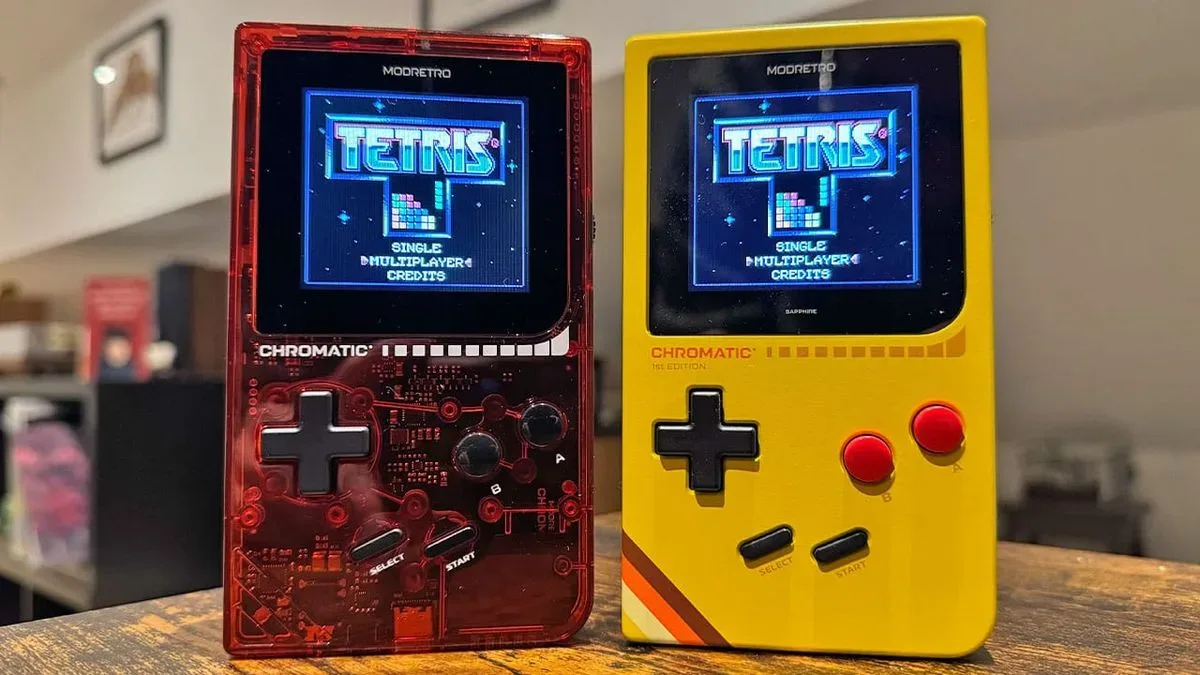
The ModRetro Chromatic has gained a significant new community-made capability through Shiny Relay, a custom firmware add-on that carries Game Boy link-cable functions over Wi-Fi. The project enables Chromatic owners to connect compatible games without physically joining two handhelds with a cable, supporting both nearby wireless sessions and online connections.
For a system designed around playing original Game Boy and Game Boy Color cartridges, that could be a meaningful quality-of-life change. Link cables remain an important part of the original hardware experience, but they can also be temperamental, inconvenient to carry, and dependent on having the right cable available. Shiny Relay aims to replace that physical connection with a wireless one while allowing the games themselves to behave as if a cable were connected.
The firmware does more than multiplayer. It also provides a browser-based method of placing games and apps on the Tetris cartridge included with the Chromatic, meaning users do not necessarily need a separate flash cartridge to experiment with the supported software. Owners can back up the original Tetris game first, then restore it later if they choose.
Embedded X/Twitter post
How Shiny Relay uses the Chromatic's Wi-Fi hardware
The Chromatic has included Wi-Fi hardware since its release, using an ESP32 Wi-Fi chip alongside its FPGA-based design. Shiny Relay makes use of that existing hardware to relay Game Boy link communication wirelessly. In practical terms, it creates a connection between Chromatic systems and presents it to the game like a traditional link cable setup.
For useful background on this topic, read Top 10 Handheld Gaming Picks Worth Keeping on Your Radar.
That opens the door for activities closely associated with Game Boy and Game Boy Color multiplayer: trading creatures, battling, and playing compatible multiplayer modes across a selection of cartridges. Pokémon Red, Blue, and other games that rely on cable trading are an obvious use case. Rather than needing two systems in the same spot and a working cable between them, players can use Shiny Relay to establish a wireless link.
The project supports local connectivity as well as online play. A free Shiny Gen account is required for the Wi-Fi-based online features. This distinction matters for players who simply want a cable-free connection in the same room versus those hoping to connect with another Chromatic owner from farther away.
Shiny Relay has been tested on real hardware for Pokémon trades and multiplayer games, with the project reporting no issues in those tests. As with any custom firmware setup, however, compatibility may depend on the specific game and use case. Players should make sure to preserve saves and original files before changing firmware or cartridge contents.
A custom firmware install, with a route back to stock software
Shiny Relay is installed from a browser and runs through the Chromatic's FPGA and Wi-Fi hardware. The handheld's open-source status has encouraged community projects, and this is one of the more substantial examples to emerge for the platform so far.
Those considering the installation should be aware that this is custom firmware rather than an official built-in menu option. The process involves connecting the handheld to a computer, using a compatible browser workflow, and allowing the device to restart as the necessary temporary access is prepared. Careful attention to prompts and backups is particularly important when working with a cartridge's game data.
Users are not permanently locked into Shiny Relay. ModRetro provides a free updater through its own website that can return the Chromatic to the firmware that originally shipped with the handheld. That rollback option will be reassuring for owners who want to try the new tools without committing to a permanent alteration of their system software.
The ability to restore the stock firmware also reinforces an important point about the project: Shiny Relay expands what the hardware can do, but it does not change the Chromatic's underlying identity as a cartridge-focused Game Boy and Game Boy Color-compatible handheld. Original carts remain at the center of the experience; the add-on simply supplies a new way to handle certain link and software-management functions.
Installing games and apps on the Tetris cartridge
One of Shiny Relay's other major features is the ability to write compatible games and applications to the Tetris cartridge that comes with the Chromatic. This gives owners without a flash cart an alternative way to load supported content. The process can also be used with a user's own game file in .gbc or .gb format.
Before replacing anything on the included cartridge, users are strongly encouraged to back up both its game file and its save file. Those two files should be kept together. They provide the path to putting Tetris back on the cartridge later. Skipping that backup means the current game cannot be restored from the Shiny Relay page.
The browser workflow is laid out in several steps:
- Choose the content. Select a free Shiny Gen game or app, the PARTY BATTLE patch for Tetris, or a personal .gbc or .gb game file.
- Connect the Chromatic. Select "Chromatic - Player 01," then connect again and select "GWU2X." The device appears as two connections, which is why the browser requests access twice.
- Prepare the handheld. Select "Prepare my Chromatic." This takes roughly one to two minutes, and the Chromatic restarts twice while temporary cartridge access is enabled. Nothing is permanently installed during this preparation stage.
- Back up the cartridge. Save both the game and save files before proceeding if preserving Tetris is important.
- Install the selected software. Type "INSTALL," start the process, and keep the cable attached while the Chromatic remains powered on until the page confirms completion.
- Restart the system. Once the process is done, turn the handheld off, wait two seconds, and turn it back on.
Writing a new game to the cartridge takes approximately two to eight minutes. The range will naturally make this feel more suitable for occasional swaps than for constantly changing libraries, but it remains a useful option for people who want a small selection of software without buying additional cartridge hardware.
Games and apps available through the project
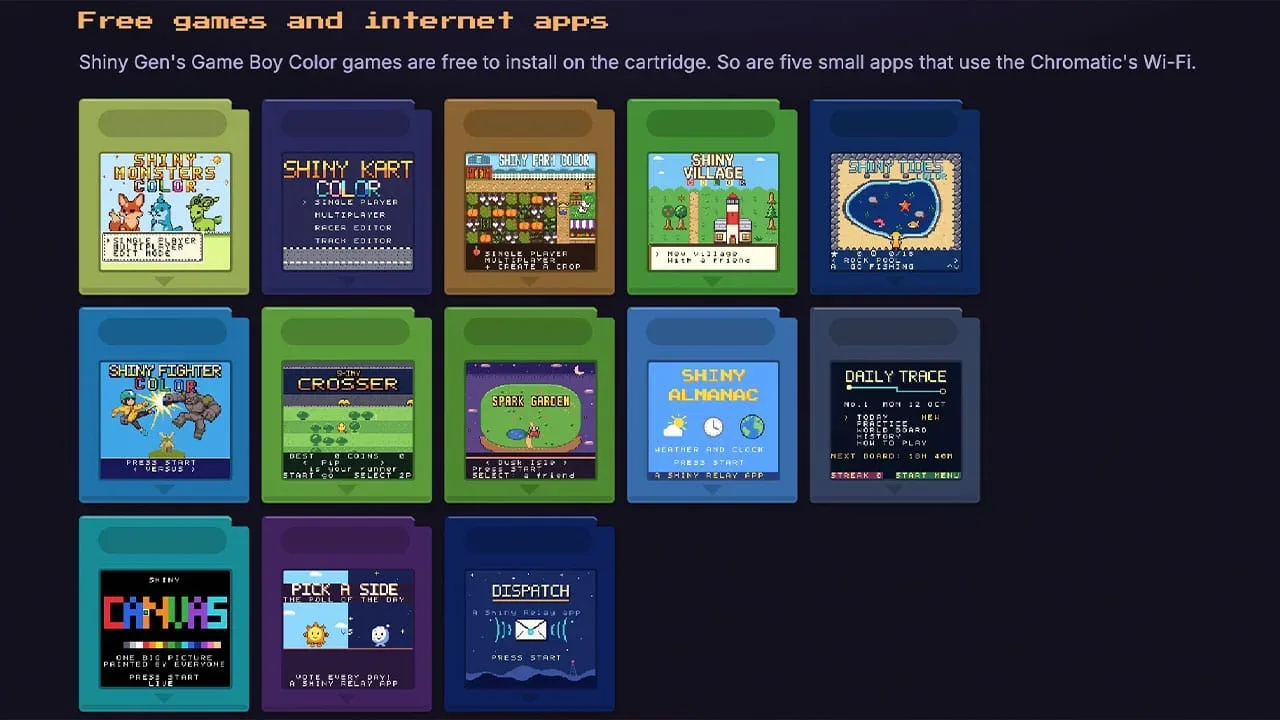
Shiny Relay includes a growing collection of original-looking games that deliberately evoke familiar Game Boy and Game Boy Color genres without being presented as official releases. The current listed games are:
- Shiny Monsters Color
- Shiny Kart Color
- Shiny Farm Color
- Shiny Village
- Shiny Rides
- Shiny Fighter Color
- Shiny Crosser
- Spark Garden
There are also internet-connected apps available for the Chromatic through the same ecosystem. These include Shiny Almanac, which provides weather, a clock, a calendar, and a world map; Daily Trace, a worldwide daily puzzle; Shiny Canvas, a shared global drawing space; Pick A Side, a poll-of-the-day app; and Dispatch, which carries posts from ModRetro.
These applications are a notable departure from the strictly offline expectations usually associated with Game Boy-era software. They show what can happen when modern connectivity is added to a device that still operates with the visual language, physical cartridges, and play habits of a retro handheld. The appeal will not be identical for every owner, but features such as a communal canvas or daily puzzle give the Chromatic a more contemporary social layer.
Why wireless linking matters for retro handheld fans
For many players, the physical link cable is part of the nostalgia. It is an instantly recognizable accessory from the era of trading Pokémon in schoolyards, sharing a screen during Tetris sessions, and huddling around two Game Boys to start a multiplayer match. But nostalgia does not make old accessories more reliable. Aging cables, connector issues, and simple availability can all turn a quick trade or multiplayer game into an unexpectedly difficult task.
Shiny Relay does not eliminate the value of the original cable setup. Instead, it gives Chromatic owners another choice. Local wireless play removes a common point of friction, while online functionality can make link-focused games more practical for people whose friends do not live nearby. The cartridge-writing feature further broadens the handheld's possibilities without requiring every user to invest in a flash cart.
The project is also a reminder of the advantages of accessible hardware. The Chromatic's open-source foundation and built-in Wi-Fi chip have allowed developers to investigate features beyond the system's standard out-of-box offering. Shiny Relay is therefore both a useful utility and an example of how a dedicated enthusiast community can add new dimensions to a modern retro device.
For Chromatic owners interested in wireless trades, multiplayer sessions, or experimenting with supported games and apps on the bundled Tetris cartridge, Shiny Relay offers a substantial expansion of the handheld's toolkit. Backups remain essential, and users should understand the custom-firmware process before proceeding, but the potential payoff is clear: fewer cables, more ways to connect, and a fresh use for hardware already inside the system.
Community
Discussion
Start the conversation.
No comments have been posted yet.