

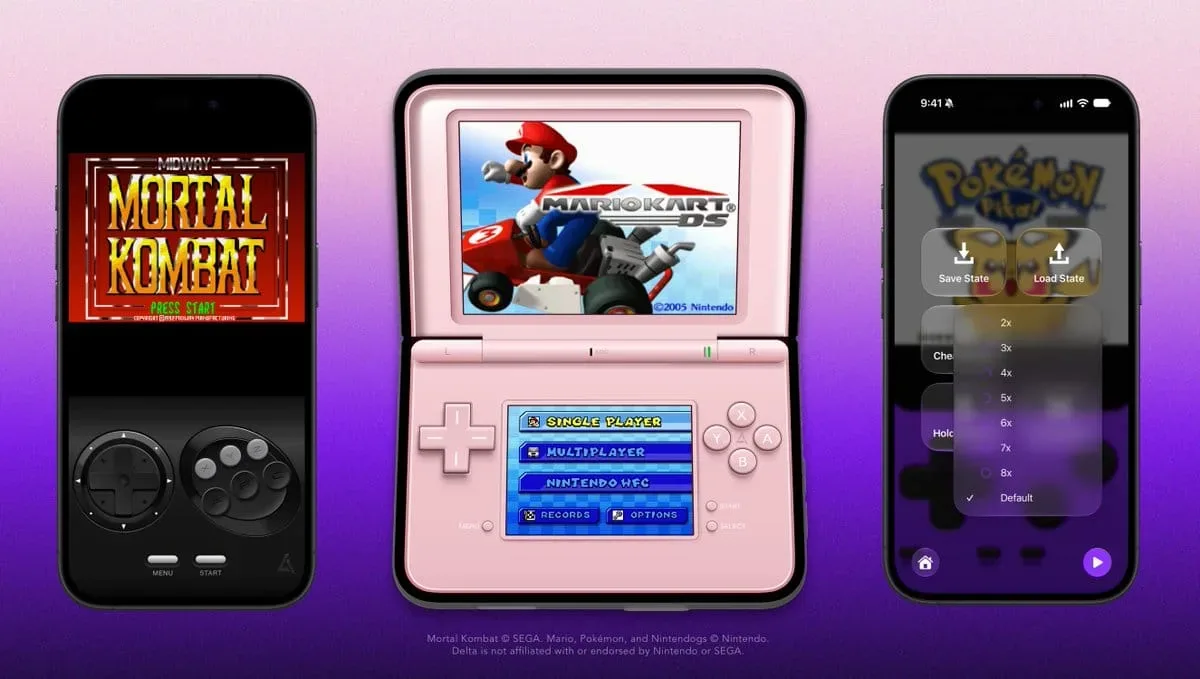
Delta Emulator is continuing to tune its iOS experience following the arrival of version 2.0, and its latest update is particularly welcome news for players who use an iPhone Duo. The new 2.0.2b build updates the app's Nintendo DS presentation with a redesigned skin that gives the top display substantially more room, while also adding a six-button control layout for Sega Genesis and Mega Drive games that need the extra inputs.
The update is presently identified as a Patron build, with the refinements set to reach the free version of the app later. Although the version number suggests a comparatively small release, it addresses several practical requests from the Delta community: better use of the Duo's screen space, more complete virtual controller support, improved Game Library customization, and a selection of fixes affecting cheats, external displays, and animated skins.
It also arrives while work is beginning on Delta 2.1, described as a larger forthcoming update. That means 2.0.2b serves as both a useful quality-of-life patch for current users and a sign that the emulator's recent 2.0 overhaul is still being actively refined.
A Larger DS Top Screen for iPhone Duo
The headline change is a new Nintendo DS skin tailored for the iPhone Duo. Delta already offered a familiar basic Duo layout for DS emulation, but the original version did not fully capitalize on the available display area. The revised skin enlarges the upper DS screen, giving games more room where it matters most.
For useful background on this topic, read NETGEAR Nighthawk Wi-Fi 6 Router Drops to $45 Ahead of Black Friday.
That may sound like a modest visual adjustment, but Nintendo DS games use their pair of displays in many different ways. Some titles place the primary gameplay action on the top screen and reserve the lower touchscreen for maps, inventories, status readouts, dialogue selections, or minigames. In those cases, a larger top panel can make the overall experience more comfortable without eliminating access to the touch-focused lower screen.
Other DS games distribute essential information across both displays, so screen arrangement is always a compromise on a single mobile device. A layout that makes better use of a larger phone screen can reduce that compromise. The new Duo skin is therefore less about altering emulation itself and more about presenting DS software in a way that better fits the hardware it is being played on.
The change also reflects a broader reality of handheld emulation on phones. Performance, compatibility, and controller support are important, but interface design often determines whether a game feels convenient to revisit. Dual-screen systems especially benefit from thoughtful layouts, since players need to see both panels at once while still having usable touch controls available.
Genesis and Mega Drive Games Get the Buttons They Need
Delta 2.0.2b also introduces a new six-button Sega Genesis and Mega Drive skin. The standard Genesis controller is closely associated with three face buttons, but Sega later released six-button pads, and some games were designed to use the expanded arrangement.
For players returning to titles that expect those additional controls, a three-button virtual layout can be limiting or require awkward workarounds. The new skin gives Delta users access to the fuller set of inputs directly on screen. It is a targeted addition, but one that makes a material difference for compatible games and helps the emulator better represent the console's later controller options.
The inclusion is also notable because virtual controls need to balance accuracy with usability. Adding buttons can make a touchscreen interface more crowded, particularly on smaller devices. A dedicated skin is a sensible solution: players can choose a layout appropriate to the game instead of forcing every Genesis or Mega Drive title into the same controller arrangement.
Fast Forward Can Now Reach 8× Speed
Another new option appears in Delta's Advanced Settings. A setting called Speed Limit allows Fast Forward to run at speeds of up to 8×. Fast Forward is a popular feature in emulation, especially for repeat playthroughs, lengthy role-playing game battles, dialogue-heavy sequences, routine level grinding, and moments where a game's original pacing is slower than a player prefers.
Higher speeds will not be equally useful in every game. Fast action can become difficult to follow when accelerated, and audio may be harder to parse. Still, the option lets users choose a more aggressive Fast Forward ceiling rather than locking everyone into the same behavior. It is another example of the update focusing on flexibility: a player can keep an experience close to original hardware pacing or speed through familiar sections when appropriate.
As an Advanced Settings option, the feature is clearly intended for users who want more control over how Delta behaves. It is not a replacement for normal play, but it can be valuable for those who use emulation to revisit games on their own terms.
More Control Over the Game Library
The Game Library receives a welcome organizational addition. Users can now hide the Favorites and Recently Played sections. Those categories can be helpful shortcuts for large collections, but not everyone wants them permanently displayed.
For someone who maintains a carefully ordered library, uses individual console collections, or simply prefers a cleaner landing screen, the ability to remove those sections is useful. Favorites and recent activity are convenient for quick access, yet they can become visual clutter for players who already know where their games are stored.
This is a small customization feature, though it fits the update's overall theme. Delta is not merely adding another emulated system or headline feature here; it is polishing the moment-to-moment experience of browsing, launching, and playing a library. Those changes can matter as much as a major addition for users who open the app every day.
Achievements and Library Navigation Fixes
The patch also adjusts RetroAchievements behavior. Hardcore mode is now automatically disabled for unsupported games. This should prevent a situation in which a player expects Hardcore functionality to apply where it cannot, providing a more straightforward experience when launching titles that do not support it.
RetroAchievements adds an extra layer of goals and progression to supported retro games, and Hardcore mode generally comes with stricter conditions. Handling unsupported titles automatically reduces confusion and lets players focus on whether a game can participate rather than wondering why a particular mode is behaving unexpectedly.
Delta 2.0.2b further fixes an issue that caused the Game Library to return to the Recently Played section after users exited the Pause Menu. That bug could be a repeated annoyance for anyone who had been browsing another part of their collection before starting a game. The correction should make navigation feel more consistent, preserving the user's sense of where they were in the library instead of abruptly redirecting them.
External Display, Cheats, and Skin Corrections
Several fixes focus on features that may be less visible than a new controller skin but are vital for a dependable emulator. Display Full Screen mode now activates properly over AirPlay and external displays on iOS 27. For users who play on a television or monitor, proper full-screen behavior is an important part of making a mobile device feel like a living-room setup.
Cheat support has also been addressed in multiple places. Genesis Game Genie and Action Replay codes are now accepted correctly, while a missing CheatBase for Nintendo DS has been fixed. Cheat systems are optional, of course, but they remain part of how many players revisit older games, whether to experiment, ease a difficult section, access unusual content, or recreate codes remembered from childhood.
Finally, animated skins should retain their intended proportions after repeated device rotation. Orientation changes are common during mobile play, especially when users switch between portrait and landscape layouts, connect an external display, or adjust how they hold a device. Keeping a skin correctly scaled after those changes helps preserve the visual presentation and ensures on-screen controls do not become distorted.
A Focused Patch Ahead of Delta 2.1
Delta 2.0.2b is a focused update, but its collection of improvements is meaningful. The larger DS top screen directly responds to iPhone Duo users seeking a more effective dual-screen layout. The six-button Genesis and Mega Drive skin fills a genuine control gap. The Fast Forward, library, achievements, external display, cheat, and rotation adjustments each remove smaller points of friction.
For iOS emulation, that kind of continued attention is significant. An emulator is not defined only by whether it launches a game; it is defined by how naturally it accommodates different systems, controller requirements, display arrangements, libraries, and player habits. Delta's latest patch makes progress across all of those areas without overcomplicating the experience.
Patrons receive 2.0.2b first, while free-app users are expected to get the changes later. With development already underway on the larger 2.1 release, players using Delta have more refinements to anticipate. For now, Nintendo DS fans with an iPhone Duo and Genesis or Mega Drive players who need six-button input have especially clear reasons to welcome this update.
Community
Discussion
Start the conversation.
No comments have been posted yet.