

Halloween the Game crossplay lets players join multiplayer sessions with people using different platforms, making it easier for groups split between PC, PlayStation, and Xbox to play together. The game also provides a dedicated cross-platform friend system, so players are not limited to the standard friend list attached to their own hardware or storefront.
There is an important limitation to keep in mind, however. Halloween the Game supports crossplay, but it does not support cross-progression. Those terms are often used interchangeably in casual conversation, yet they cover two separate features. One affects who can enter a match together; the other affects whether an individual player can take their account progress from one version of the game to another.
For Halloween the Game, the first feature is present and the second is not. That means a player can team up or matchmake with friends across PC, PlayStation, and Xbox, while still needing to maintain separate advancement, unlocks, and redeemed rewards on every platform where they play.
Halloween the Game has crossplay on PC, PlayStation, and Xbox
Crossplay is enabled in Halloween the Game, allowing multiplayer matchmaking between players on different supported platforms. In practical terms, PC users can encounter and play with PlayStation and Xbox users, while console players are not restricted to others on the same console family.
For useful background on this topic, read Strikeborn Codes for September 2026: Active Rewards and Redemption Steps.
This applies whether someone is playing with people they know or entering matchmaking with strangers. For a multiplayer horror game, that broader player pool can be useful: it gives friends more flexibility when arranging sessions and means platform choice does not automatically separate the community into isolated groups.
Crossplay matchmaking is also an option that can be changed rather than a setting that players are forced to leave active. Anyone who would prefer to limit matchmaking can turn it off through the in-game menu. Conversely, players hoping to find friends on other systems should ensure that cross-play matchmaking is switched on before looking for a session.
How to turn crossplay matchmaking on or off
The crossplay setting is located within the multiplayer area of the game. Follow these steps to change it:
- Open the Multiplayer tab.
- Press Tab when using a keyboard, or press the Menu button when using a controller.
- Select Settings.
- Move to the General section.
- Find the cross-play matchmaking option and toggle it on or off.
With the setting enabled, Halloween the Game can include players from the other supported platforms in matchmaking. With it disabled, matchmaking is restricted rather than drawing from that wider cross-platform pool.
The menu label is specifically about matchmaking. Players should not confuse it with the separate process of adding somebody to the game's cross-platform friends list. Turning crossplay on makes cross-platform sessions possible, but friends still need a way to find one another in the game, and Halloween the Game handles that through friend codes.
How cross-platform friends work in Halloween the Game
Halloween the Game includes a Crossplay menu that is distinct from the ordinary friends display. The normal friends section initially shows people connected through the same platform as the player, including platform-level friends who may or may not own Halloween the Game. That list alone is not where players add someone from another platform.
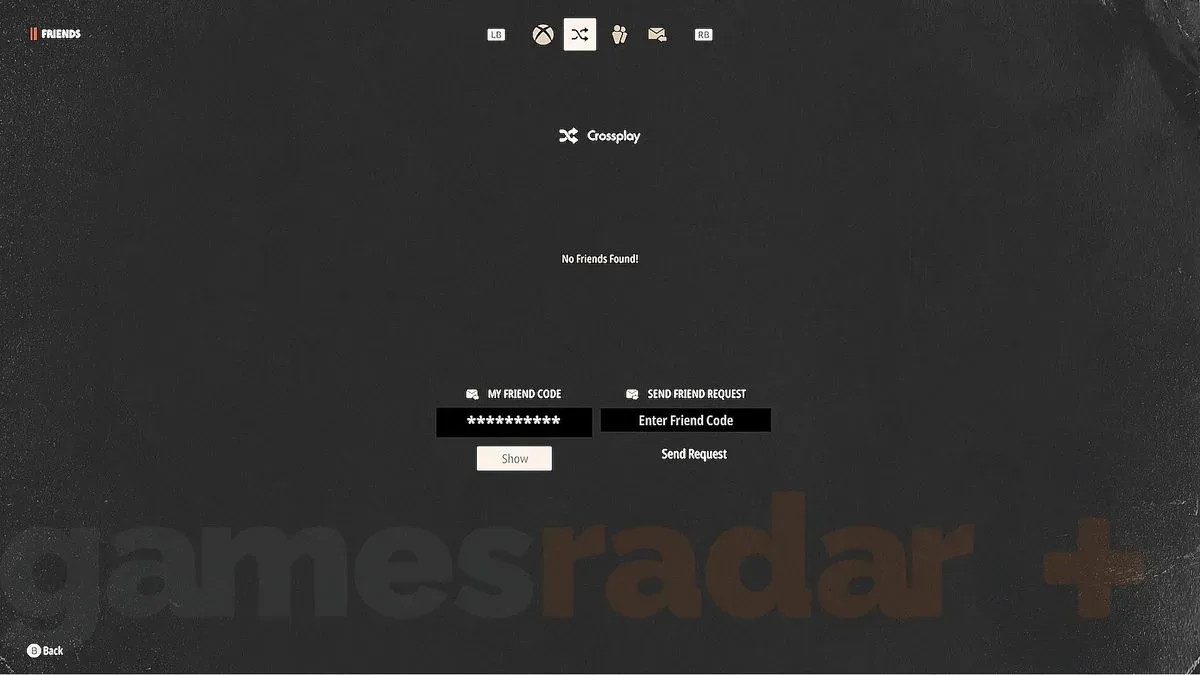
To connect with a friend using a different system, players need to move from the standard Friends area to the Crossplay tab. This tab is the second option on the menu bar and contains both the player's own code and a field for entering another player's code.
Steps for adding a crossplay friend
- Go to the Multiplayer tab.
- Press Tab on keyboard or the controller Menu button.
- Select the Friends icon, represented by three person silhouettes.
- Move to the Crossplay menu, which is the second tab in the menu bar.
- Either reveal your own friend code to share it, or enter another player's code to send a friend request.
The code assigned to a player does not change, so it can be shared with others whenever they need to send a request. This makes it the key piece of information for players organizing a group across PC, PlayStation, and Xbox. One person can reveal their code and pass it to the rest of the group; each recipient enters it in the Crossplay menu and sends the request from there.
It is worth checking the correct tab before assuming there is a problem. If a friend is on another platform, they will not simply appear in the same-platform friends listing. The Crossplay tab is the intended route for locating and adding them in Halloween the Game.
Crossplay and cross-progression are not the same feature
Halloween the Game's support for crossplay does not extend to cross-progression. Crossplay concerns multiplayer compatibility: it determines whether players on separate platforms can play together. Cross-progression concerns a single person's profile: it determines whether their progress follows them when they use the game on more than one platform.
In Halloween the Game, progression is platform-specific. A player who owns the game on PC and then starts playing on Xbox, for example, should expect the Xbox profile to advance separately from the PC one. The same principle applies to PlayStation.
Crossplay allows players on different platforms to share matches. Cross-progression would allow one player to share their progress between those platforms. Halloween the Game has the former, not the latter.
This distinction matters most for people who regularly move between systems, have access to multiple versions of the game, or are considering buying it on another platform. Joining the same friends in multiplayer remains possible through crossplay, but the profile attached to each platform does not merge with the others.
What does not transfer between platforms
Because Halloween the Game has no cross-progression, progression-related content does not carry over from one platform to another. This includes player level and unlocked customization items.
If an item is earned by completing a challenge on one platform, that completion does not automatically unlock the same item on another platform. Players using multiple versions will need to complete the relevant challenges separately on each one. Likewise, player level increases independently rather than being shared through a unified cross-platform profile.
This can be especially relevant for players who divide time between a PC setup and a console, or between PlayStation and Xbox in different locations. A session played on one platform can still be social and cross-platform through matchmaking, but it contributes to the progression of that particular version only.
Redeem codes must also be claimed separately
The same separation applies to Halloween the Game codes. If a player redeems a code on one platform, it should also be redeemed individually on every other platform where they own and play the game. Redeeming it once does not make the associated reward appear across all versions.
That approach is consistent with the game's separate unlock and level tracking. Players who want the same code-based item available everywhere will need to make sure they complete the redemption process on each platform rather than assuming it is attached to a universal account inventory.
What this means when choosing a platform
For players whose priority is simply being able to play Halloween the Game with friends, the crossplay feature removes much of the pressure to purchase on the same platform. A group can consist of PC, PlayStation, and Xbox players, provided cross-play matchmaking is active and cross-platform friends are added through the code system where necessary.
For players focused on long-term account progression, the decision is more consequential. Since levels and cosmetic unlocks remain separate, it may be preferable to choose one primary platform and concentrate challenges and reward redemptions there. Playing elsewhere does not erase progress on the original platform, but it also does not bring that progress along.
There is no contradiction between those two points. Halloween the Game is designed to let the multiplayer community play together across supported systems, while individual progression stays on the platform where it was earned. Understanding that split before beginning can prevent confusion over missing levels, cosmetics, challenge completions, or redeemed-code rewards after switching devices.
Halloween the Game crossplay checklist
- Supported for crossplay: PC, PlayStation, and Xbox players can participate in multiplayer together.
- Matchmaking option: Cross-play matchmaking can be enabled or disabled in Multiplayer, then Settings, then General.
- Cross-platform friends: Use the Crossplay tab in the Friends menu and exchange friend codes.
- Cross-progression: Not available.
- Levels and customization: They are tracked separately on each platform.
- Challenges: Complete them separately on every platform to earn the associated unlocks there.
- Redeem codes: Claim them separately on each platform where you play.
In short, Halloween the Game makes it possible for the multiplayer side of the experience to cross platform boundaries, but it does not combine a player's individual progression into one shared record. Enable crossplay if you want the widest matchmaking and friend options, use the dedicated code menu to build a cross-platform group, and keep separate progression in mind if you play on more than one system.
Community
Discussion
Start the conversation.
No comments have been posted yet.