

Handheld gaming has always involved a small compromise: players gain portability, but they often lose access to the extra inputs found on premium console controllers. Back buttons, paddles, and rear switches have become common on enthusiast-focused gamepads for docked play, yet the standard handheld Nintendo Switch 2 setup does not put those commands within easy reach.
That could matter for players preparing for The Legend of Zelda: Ocarina of Time Remake. While the full control layout has not been formally detailed, gameplay footage shown so far has prompted plenty of discussion about how actions such as item swapping, weapon selection, climbing jumps, and movement may be assigned. A controller with programmable rear inputs could give handheld users a way to move some frequently used face-button or directional-pad commands away from their thumbs.
It is not a feature reserved for competitive play. Rear controls can make a meaningful difference for anyone who wants to maintain camera control and character movement while activating an item, jumping, dodging, or changing equipment. For a long adventure designed to invite relaxed sessions on the sofa, in bed, or while traveling, that added convenience may be more valuable than milliseconds of competitive advantage.
Why rear buttons make a difference in handheld mode
Traditional controller layouts make the thumbs do most of the work. The left thumb handles movement, the right thumb operates the camera and face buttons, and the player has to briefly leave one stick whenever an action on the buttons or D-pad is needed. That is generally manageable, but it can feel awkward in moments that demand movement and camera adjustments at once.
For useful background on this topic, read Vampire Therapist Brings Its Darkly Comic CBT Sessions to iOS and Android on November 24.
Back buttons shift selected actions to the middle or ring fingers. In practical terms, this can allow a player to continue steering Link and managing the camera while carrying out a secondary action. The benefit is not necessarily about playing faster. It is about reducing the repeated hand repositioning that happens in nearly every game with a busy control scheme.
That can also be a comfort consideration. Long sessions built around frequent button presses can place extra strain on a player's thumbs, particularly when a game asks them to hold a button while moving or repeatedly tap an input. Mapping such commands to rear buttons may make an extended handheld session feel less tiring.
Docked Switch 2 players already have numerous controller choices with rear inputs. The Switch 2 Pro Controller, 8BitDo Ultimate 2, and GameSir Super Nova are among the gamepads that bring additional controls to a television setup. The challenge has been finding a comparable option for handheld use without giving up the convenience of attached controls.
CRKD Nitro Deck 2 puts four buttons on the back
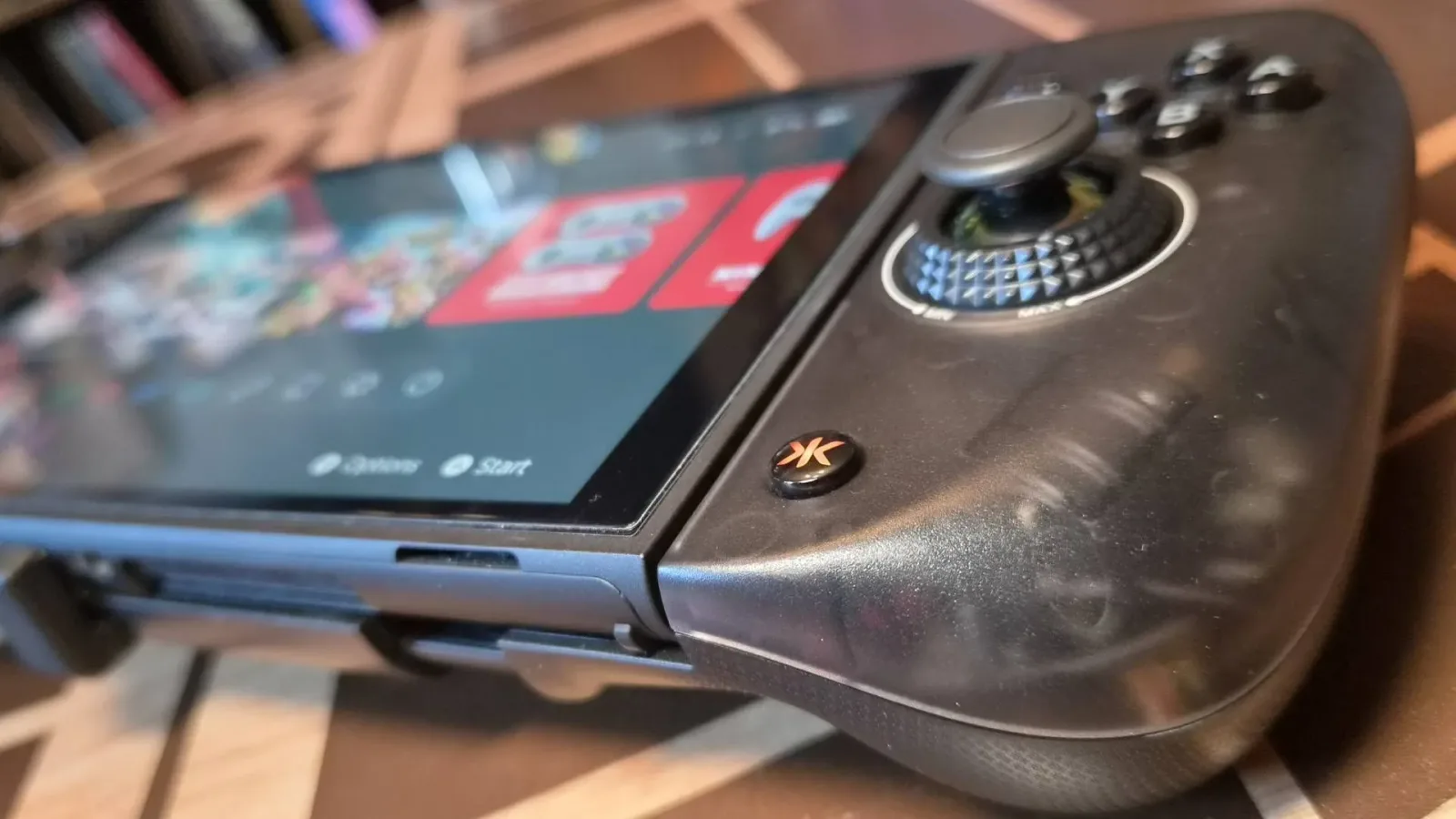
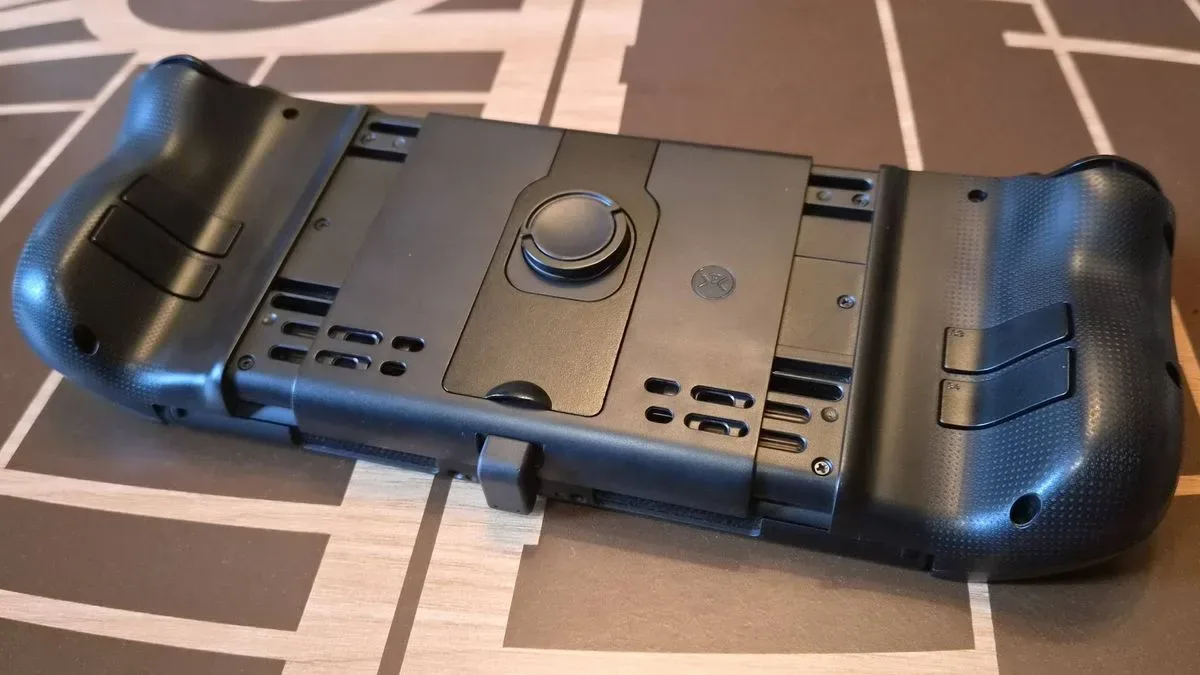
The most direct answer currently comes from the CRKD Nitro Deck 2, an all-in-one handheld control system compatible with Switch 2, Switch OLED, and the original Switch. Rather than functioning as a pair of detached Joy-Con-style controllers, it is a larger chassis that the console sits within. Its headline feature for this discussion is a set of four rear buttons.
Four programmable rear inputs provide room to cover several recurring commands instead of forcing players to choose only one or two priorities. If Ocarina of Time Remake's final controls make it possible and useful, players could potentially reserve the rear controls for functions such as item access, weapon changes, jumps, or other quick actions. The precise viability of those assignments will depend on Nintendo's eventual remapping options and on the final in-game scheme, so prospective buyers should not assume every desired command can be placed wherever they want.
Still, the Nitro Deck 2 offers more than its rear controls. Its thicker form factor is intended to give the handheld a more substantial, ergonomic grip than the console's standard controls. It also includes additional shoulder inputs, adjustable thumbstick dead zones, and thumbstick-tightening functionality. It can further be used as a docked controller, potentially making it a single purchase for both handheld and television play.
That versatility is a significant part of its appeal. Players who alternate between a monitor or TV and portable sessions do not necessarily need to retrain their hands around two radically different layouts. Keeping a broadly similar arrangement across both modes can make a control upgrade feel more worthwhile.
Trade-offs to consider before buying
A larger handheld frame is not automatically ideal for every player. The Nitro Deck 2's Steam Deck-like profile may improve grip comfort, but it also makes the Switch 2 less compact for storage and travel. People who primarily carry their system in a small bag, or who rely on a slim protective case, should account for the added bulk.
There are also hardware quirks to weigh. The thumbstick tightening system has been characterized as less premium than the product's price might suggest, while the rumble can be notably forceful. Neither issue eliminates the utility of the device, but both are reminders that controller preference is personal. A player who prefers lighter vibration, compact dimensions, or a conventional Joy-Con form factor may be happier with a different solution.
At the time of the reported promotion, the Nitro Deck 2 was listed at $79.99, down $20 from its $99.99 launch price. Discounts change quickly, of course, and players should treat that figure as a snapshot rather than a permanent price. Even at its standard cost, however, the combination of four rear buttons and docked-controller functionality separates it from many handheld alternatives.
Mobapad M12S and Nyxi Hyperion 3 Ultra offer different priorities
Players who would rather use a more familiar split-controller approach have other choices, though each makes a different compromise. The Mobapad M12S includes two rear controls rather than four. That lowers the number of actions that can be moved off the face buttons, but it features TMR thumbsticks rather than the Nitro Deck 2's capacitor-based sticks.
TMR, or tunneling magnetoresistance, is a thumbstick technology often valued for precision and durability-related potential. For users whose top concern is the stick hardware itself, that may be a convincing advantage. The M12S was listed at $99.99 during a promotion from a usual $124.99, placing it above the discounted Nitro Deck 2 while offering half as many rear inputs.
Then there is the Nyxi Hyperion 3 Ultra, a more expensive Joy-Con replacement system. It retains the original controller concept's mouse functionality while adding TMR thumbsticks and rear buttons. However, its rear-button total is also lower than the Nitro Deck 2's four-button arrangement. Its reported sale price of $149.99, reduced from $199.99, positions it as a premium route for players willing to pay more for its feature set.
The decision therefore comes down to priorities. The Nitro Deck 2 is geared toward maximum rear-button access and a unified, substantial grip. Mobapad's option emphasizes TMR sticks in a less expensive-than-premium split design, while Nyxi's model aims higher on features and price, including mouse support. There is no universal winner; hand size, travel habits, preferred stick technology, and the importance of four distinct rear assignments all matter.
What to watch for in Ocarina of Time Remake
The most important unanswered question is still the remake's final control implementation. Footage can suggest likely actions and interface behavior, but it cannot fully confirm how the game will handle button mapping, contextual actions, shortcuts, or accessibility settings. The original game's approach to equipment and item management is central to its identity, so a modern remake may have new ideas about how quickly players can switch tools and abilities.
That uncertainty does not make a handheld controller upgrade pointless. Back buttons remain useful across a broad range of games, including action titles, role-playing games, shooters, and platformers. They can be assigned to dodge commands, sprint inputs, menu shortcuts, or repeated actions depending on what the system and individual game permit. Even if a particular Zelda command does not map as hoped, the hardware can still improve other games in a Switch 2 library.
For players hoping to experience Ocarina of Time Remake in handheld mode, though, the appeal is easy to understand. A Zelda adventure is often at its best when it feels personal and unhurried: headphones on, rain outside, and the console in hand. A controller that reduces thumb movement and gives more direct access to key actions will not change the game's world or story, but it could make those long exploration sessions more comfortable.
A practical upgrade, not an essential one
No one needs back buttons to enjoy a Nintendo adventure. Standard controls remain the baseline the game will be designed around, and players should not feel compelled to replace their setup before starting. But for those who already appreciate rear paddles on a Pro Controller or PC gamepad, handheld play no longer has to mean leaving that convenience behind.
The CRKD Nitro Deck 2 stands out because it brings four rear buttons into an attached handheld package and can also serve as a docked controller. Its size, strong rumble, and design compromises will not suit everyone, but it presents a compelling all-purpose option for Switch 2 owners who value extra inputs. With Ocarina of Time Remake approaching, it is the kind of upgrade that may not be necessary, yet could quickly become difficult to play without once the benefits of keeping both thumbs on the sticks become familiar.
Community
Discussion
Start the conversation.
No comments have been posted yet.