

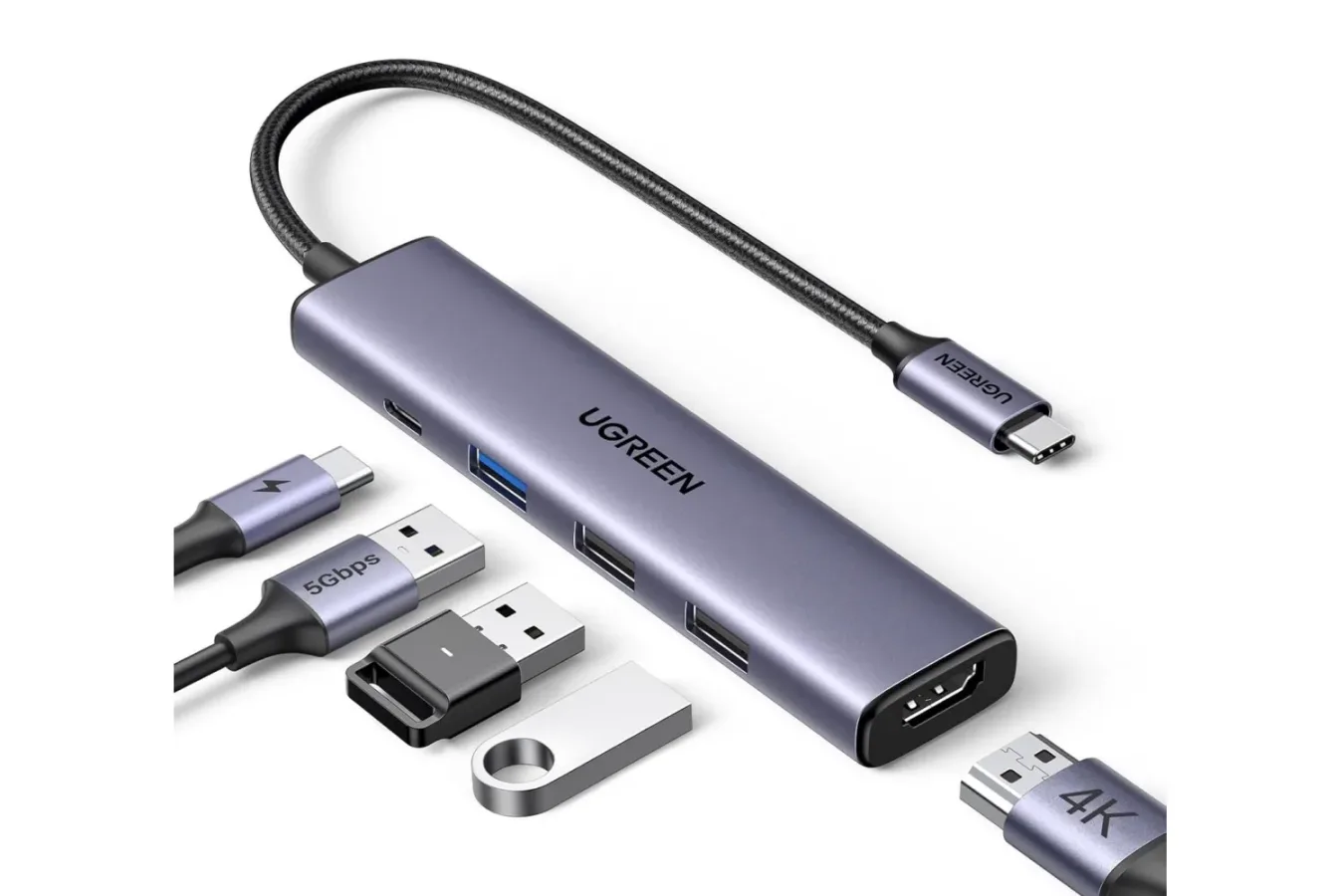
Gaming laptops are built around portability, but the moment one reaches a desk setup, their limited selection of ports can become a frustration. A mouse, mechanical keyboard, external SSD, wired controller, headset receiver, capture accessory, and second display can quickly demand more connections than a slim machine can provide. UGREEN's 5-in-1 USB-C hub is currently positioned as an inexpensive answer to that problem, with a limited-time deal cutting its price from $16 to $12 for the grey model.
The compact hub connects through a laptop's USB-C port and expands that one connection into five additional ports. Its selection includes a 4K HDMI output, a USB-C port supporting up to 100W Power Delivery pass-through, one 5Gbps USB-A data port, and two USB-A ports rated at 480Mbps. For players using a laptop as both a portable system and a home gaming station, that mix covers many of the everyday accessories that otherwise require constant cable swapping.
At $12, the hub is not being presented as a replacement for a full-powered dock loaded with Ethernet, several display outputs, SD card readers, and dedicated audio. Instead, it is a simple, low-cost expansion option for people who need the essentials: a display connection, a way to keep charging through the same USB-C port, and enough USB-A sockets for basic peripherals. The promotion is marked as a limited-time offer, though no end date has been specified.
What the UGREEN 5-in-1 hub includes
The five-port configuration is designed around broad utility rather than a specialized single purpose. The HDMI port is arguably the centerpiece for a gaming setup, since it can be used to connect a compatible laptop to an external monitor or television. A second screen can be useful beyond playing games on a larger panel. It gives players room for a Discord call, a stream dashboard, a guide, game launchers, or hardware-monitoring tools while a game occupies the laptop display.
For useful background on this topic, read Sceptre's 22-Inch 144Hz Gaming Monitor Is Listed at $63.
The HDMI port supports 4K output, although the actual resolution and refresh-rate experience will depend on the connected host device, display, cable, and the limits of the particular USB-C implementation. That distinction matters for gaming. "4K HDMI" describes the hub's supported output capability, but it does not by itself guarantee that every laptop will send a 4K high-refresh signal or that every game will run well at that resolution. Buyers with demanding monitor requirements should check their laptop's USB-C video specifications and their display's supported modes before treating this as a solution for competitive high-refresh play.
For conventional desktop use, older displays, TVs, and secondary monitors, HDMI remains one of the most convenient display standards. The hub could be especially useful to a laptop owner whose built-in HDMI port is unavailable, inconveniently placed, or absent entirely. It may also reduce the need to carry a separate USB-C-to-HDMI adapter in a travel bag.
Charging without giving up the laptop's USB-C port
The hub's USB-C Power Delivery port supports up to 100W of pass-through power. In practical terms, that means a compatible USB-C charger can connect to the hub while the hub occupies the laptop's USB-C port, allowing the user to charge the computer and use the expanded connections at the same time. This is particularly helpful on thinner laptops that rely on USB-C charging and do not have a separate barrel-style power connector.
There are important limits to keep in mind. A 100W Power Delivery rating is a maximum supported figure for the hub's pass-through capability; it does not mean every connected laptop will receive 100W, nor does it mean the hub includes a 100W charger. The laptop, charger, charging cable, and USB-C port all need to support the relevant power level. Power may also be reserved for the hub's operation, so real-world delivery can differ from the maximum advertised number.
That is still a useful feature for a gaming laptop desk arrangement. Instead of choosing between charging the system and attaching peripherals, a single connection can manage both. It can also make packing easier for students, travelers, and players who regularly move between a work space, a living-room display, and a temporary setup away from home.
USB expansion for everyday gaming accessories
UGREEN's hub provides three USB-A ports, but they are not identical. One is rated for 5Gbps data transfers, while the remaining two are rated for 480Mbps. The 5Gbps USB-A connection is the one best suited for faster external storage use, such as moving captures, installing games to a compatible external drive, or transferring large video files to and from a laptop.
The two 480Mbps USB-A ports are a more natural fit for peripherals that do not need fast storage bandwidth. A keyboard, mouse, controller charging cable, headset dongle, webcam, or other basic desk accessory can make good use of these slower ports. For many laptop players, simply having a permanent place to plug in a keyboard and mouse can make a big difference, especially if the machine's native USB-A ports are limited.
It is worth managing expectations around bandwidth. A hub does not create unlimited throughput from a single USB-C connection. Multiple devices attached simultaneously share the host connection's available resources, and the performance available to external drives or displays can vary by laptop. Users intending to run several high-speed drives, high-resolution capture hardware, or a high-refresh external monitor all at once may need a more advanced dock with specifications tailored to those tasks.
For the $12 asking price, though, the combination has a clear practical appeal. A player can connect a keyboard, mouse, and a portable SSD, while using HDMI for a display and leaving a route available for USB-C charging. That is enough to turn many compact notebooks into a more comfortable fixed setup without filling the desk with separate adapters.
Compatibility covers USB-C and Thunderbolt-equipped devices
The hub is described as compatible with a wide range of devices that offer USB-C or Thunderbolt connections. Listed examples include MacBook systems with M1, M2, M3, M4, and M5 chips, Windows laptops, and Surface laptops. That makes it relevant to PC players who use Windows handheld-adjacent laptop setups, traditional gaming notebooks, ultraportables, or a MacBook for work and cloud or remote-play gaming.
Compatibility language should still be read carefully. Not every USB-C port carries video output, and port capabilities are not always obvious from the connector's shape alone. A laptop may have USB-C for charging or data while lacking the DisplayPort Alt Mode capability required for video output through a USB-C hub. Thunderbolt-equipped systems generally offer broad functionality, but individual device configuration remains important.
Before buying, prospective users should verify several details:
- Whether their USB-C port supports video output if they plan to use HDMI.
- Whether their laptop can charge over USB-C and at what wattage if they plan to use Power Delivery pass-through.
- Whether their charger and cable are rated appropriately for the desired charging level.
- What resolution and refresh rate their external display supports through the laptop's USB-C output.
- Whether their accessory mix requires more high-speed USB bandwidth than one 5Gbps port provides.
These checks are particularly valuable for gaming hardware because specifications often vary even among models in the same laptop family. A USB-C hub is most satisfying when it solves a confirmed port shortage, rather than when it is expected to add capabilities the host machine does not support.
A plug-and-play accessory for a cleaner setup
The hub uses a plug-and-play approach, with no separate driver installation described as necessary. For users who frequently connect and disconnect their laptop, that simplicity is part of the value. One cable can act as a quick transition between portable and desktop-style use: plug it in, attach a display and core peripherals, and get to work or play.
There is also a less technical advantage: cable management. Even a modest gaming station can become cluttered when a laptop has accessories plugged into both sides. Consolidating a handful of cables into one hub may make the setup easier to reach, easier to pack away, and less awkward to use in tight spaces. It is not a full docking-station experience, but it can be a meaningful step toward one for a fraction of the price.
Players who primarily game on a desktop PC may find the hub less essential, unless they also use a USB-C laptop for travel, work, streaming support, or game capture file management. For laptop-first players, however, a hub is one of those accessories that can be more useful than its small size suggests. A notebook that feels constrained in a hotel room, classroom, or living room can become much more versatile once it can output to a screen, accept several accessories, and remain connected to power.
Is the $12 offer worth considering?
The current price represents a $4 reduction from the $16 retail price, or 25% off. That leaves the UGREEN 5-in-1 USB-C hub at $12 for the grey version. The offer is identified as limited time, with no stated expiration date, so availability and pricing may change.
At that cost, the hub makes the strongest case for someone who wants basic laptop expansion without paying dock-level prices. Its port selection is straightforward: one HDMI output, USB-C Power Delivery pass-through, one faster USB-A connection, and two slower USB-A ports. It should be viewed as a compact utility accessory rather than a complete solution for every high-end display and storage scenario.
For gamers with a compatible laptop and a growing pile of desk accessories, that may be exactly enough. The ability to add a monitor, preserve charging, connect a keyboard and mouse, and keep an external drive within reach can remove several common friction points from a portable gaming setup. Those needing multiple displays, wired networking, faster storage across several ports, or guaranteed high-refresh output should investigate more capable docks. But for a simple five-port expansion tool at $12, this deal is a practical option while it remains available.
Community
Discussion
Start the conversation.
No comments have been posted yet.