
Microsoft is expanding the ways players can control games through Xbox Cloud Gaming, with two controller-focused features now entering preview testing. The changes are aimed primarily at people streaming games through supported smart TVs, where finding a compatible controller or minimizing input lag can be an obstacle to jumping into a session quickly.
The first option turns a smartphone into a controller through a browser-based interface. The second allows the recently introduced Nano Controller to connect directly to Xbox Cloud Gaming over Wi-Fi in the United States. Both features are currently limited previews, and Microsoft has cautioned that device support, game compatibility, and availability may remain restricted while testing continues.
The timing is notable as new Xbox Cloud Gaming time limits are due to begin this month. While the company is tightening aspects of how the service can be used, it is also testing methods intended to make cloud play more flexible for viewers using TV apps and web browsers.
A phone can become an Xbox Cloud Gaming controller on TV
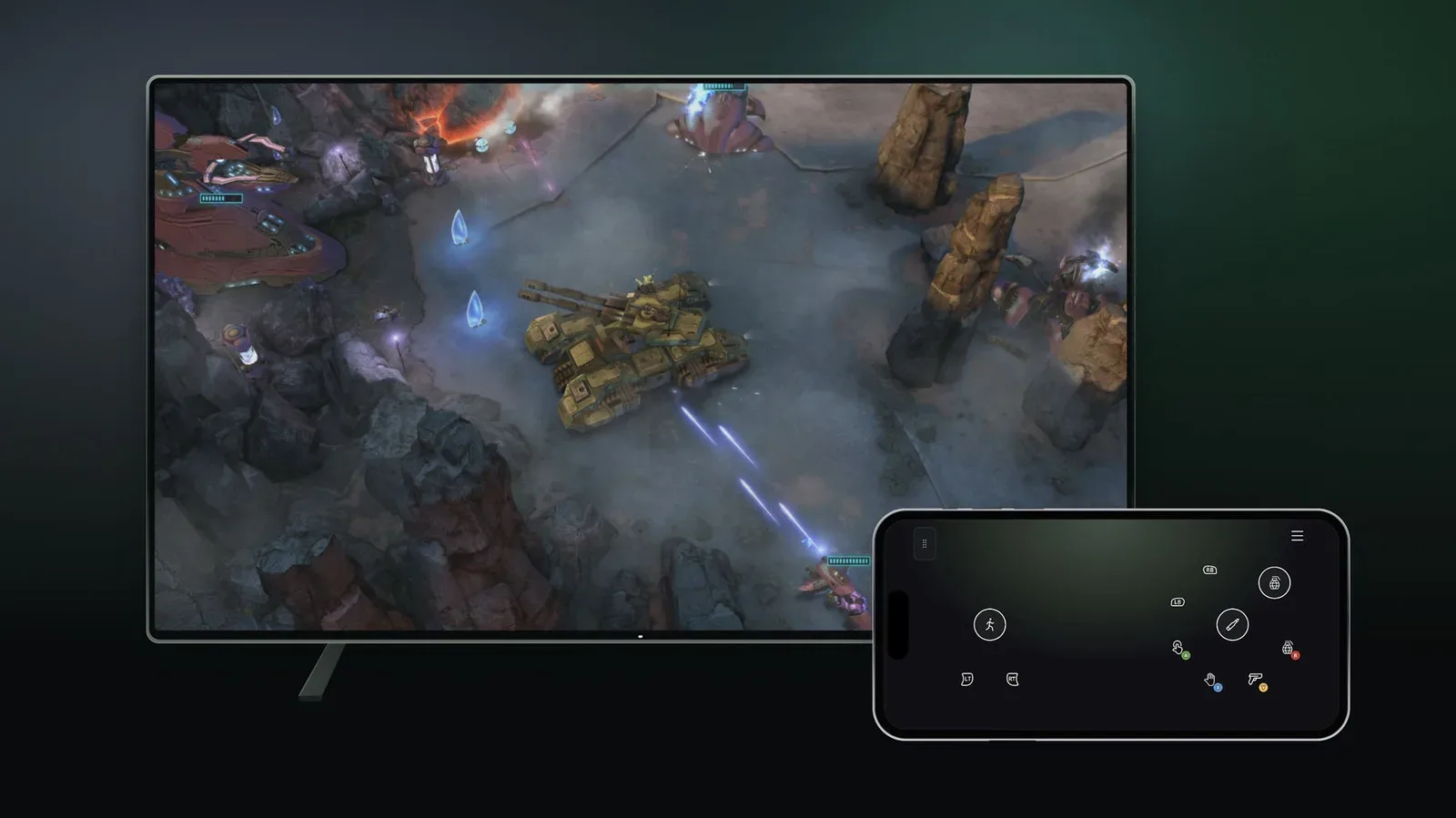
For players using Xbox Cloud Gaming on a supported smart TV, a phone can now serve as a game controller without requiring a separate dedicated mobile application. Instead, the control interface opens in a web browser on the phone.
For useful background on this topic, read Epic Director Questions Valve's AI Clone Response as Steam Tightens Reviews.
That approach could make the feature especially useful for households where a controller is not always within reach. Rather than ending a session before it starts, a player may be able to activate the phone option and use the device they already have nearby. It also removes one potential setup step, since there is no additional controller app to install before trying the feature.
Microsoft says that some games include custom controller layouts. That matters because touchscreen controls can be highly dependent on the kind of game being played. A title built around a few simple actions may work comfortably with a phone screen, while a game requiring rapid camera movement, frequent button combinations, or precise analog input may be harder to manage without a physical gamepad.
As a result, the feature appears most naturally suited to slower-paced experiences. Turn-based games are one example where a touchscreen can be a practical substitute, particularly for someone playing casually on a television. Menu-heavy games and titles with straightforward commands may also benefit from having layouts adapted for touch input. Faster action games, meanwhile, are likely to remain better suited to traditional controllers.
The phone-controller feature is available now on select TVs through the preview program. To enable it, users can open the Cloud Gaming interface on their television, go to Settings > Account, and turn on Preview Features. Because it is a preview, seeing the setting does not necessarily mean every game or TV model will support the feature in the same way.
Nano Controller gets a direct Wi-Fi option
The other test centers on the Nano Controller, with a new Wi-Fi connection method designed to reduce latency during cloud streaming. Instead of relying solely on a more conventional path through the device running the cloud gaming session, the controller can be linked directly to Xbox Cloud Gaming over Wi-Fi after setup.
Input delay is one of the central challenges for any streaming service. In cloud gaming, a button press must travel across a network to remote hardware, the game must process that action, and the resulting video frame must return to the player's screen. Every stage contributes to the overall feeling of responsiveness. A direct Wi-Fi connection for the controller is intended to reduce part of that chain, helping button presses reach the service with less delay.
For now, Nano Controller Wi-Fi connectivity is limited to users in the United States. Players first need to configure the controller through either the Xbox beta app on Android or the Xbox Accessories app on PC. After that initial setup, the relevant instructions allow the Nano Controller to join Wi-Fi.
There is an additional condition for the PC setup route: users going through the Xbox Accessories app on PC must be enrolled in the Xbox Insider testing program to access the Wi-Fi connectivity test. The Android Xbox beta app provides the other setup path mentioned for the preview.
Once the controller has been configured and connected to Wi-Fi, it can link to Xbox Cloud Gaming when a player accesses the service with the same account used during controller setup. The account connection is therefore an important part of the process, rather than the controller simply being a universal Wi-Fi accessory that can be used without account association.
Current support is narrower than the long-term ambition
Although the direct-Wi-Fi idea is designed around cloud play broadly, its current compatibility is limited. Microsoft says Nano Controller Wi-Fi connectivity works only with smart TVs and the web at this stage. It is not described as a feature available across every device that can access Xbox Cloud Gaming.
That restriction is an important reminder that this is an early test rather than a finished platform-wide rollout. Players who stream on other kinds of hardware should not assume the Wi-Fi mode will work there immediately. Likewise, the company has not presented a complete list of every supported TV, browser, or game for the two new control options.
The preview label also applies to the smartphone controller feature. Availability may vary, and supported devices and games can be limited while Microsoft gathers feedback and refines the experience. Anyone who does not see the setting on their television, or who finds a particular game lacks an ideal touch layout, may simply be outside the initial support window.
Cloud gaming revisits ideas used by Stadia
Neither of these concepts is entirely new to game streaming. Google's now-defunct Stadia service also offered a controller capable of connecting through Wi-Fi, a design intended to avoid some of the latency added when a controller first connects to a local screen or streaming device. Stadia also allowed phones to be used as controllers for television play.
That history does not make the new Xbox tests any less significant. It instead underscores how cloud gaming has repeatedly pushed companies toward the same technical priorities: removing setup friction, broadening access to games on televisions, and making streamed input feel as immediate as possible.
Using a phone as a fallback controller addresses convenience. Direct Wi-Fi support for a dedicated gamepad addresses performance. Together, the two tests cover different situations: one for a player who wants to start playing without extra hardware, and another for a player who has specialized hardware and wants the most responsive connection available under the current preview.
Other streaming services have also explored the phone-as-controller model, including Netflix. The concept is easy to understand because modern phones already have screens, touch input, browsers, and network access. The harder question is how well virtual buttons translate to different game genres. Microsoft's mention of custom layouts suggests the company recognizes that one standard overlay will not fit every game.
What these tests could mean for Xbox Cloud Gaming
Smart TVs are increasingly important endpoints for cloud services because they put games on a living-room screen without requiring a traditional console to be connected to that display. But the controller remains a key part of the experience. A person may have a supported television and an active account, yet still be blocked from playing if they do not have a compatible gamepad nearby.
Browser-based phone controls could reduce that barrier for some sessions. They are unlikely to replace physical controllers for every player or every game, but they could make Xbox Cloud Gaming more approachable for lighter use, family situations, or quick attempts at a title that does not demand rapid precision.
The Nano Controller test takes the opposite approach: it is aimed at players who want dedicated hardware and a more direct input path. If the Wi-Fi connection performs as intended, it could help make cloud sessions feel more natural on supported TVs and in browsers, where latency concerns can be especially visible in action-oriented games.
For now, both options should be treated as experiments with clear boundaries. The phone controller is available through Preview Features on select smart TVs. Nano Controller Wi-Fi support is for US users, requires setup through Android beta software or the PC accessories application, has an Xbox Insider requirement on the PC path, and currently works only on smart TVs and the web.
Still, the tests point to a straightforward goal for Xbox Cloud Gaming: make it easier to play wherever the service is already available, whether that means using the phone in a player's pocket or giving a purpose-built controller a more direct route to the cloud.
Community
Discussion
Start the conversation.
No comments have been posted yet.