

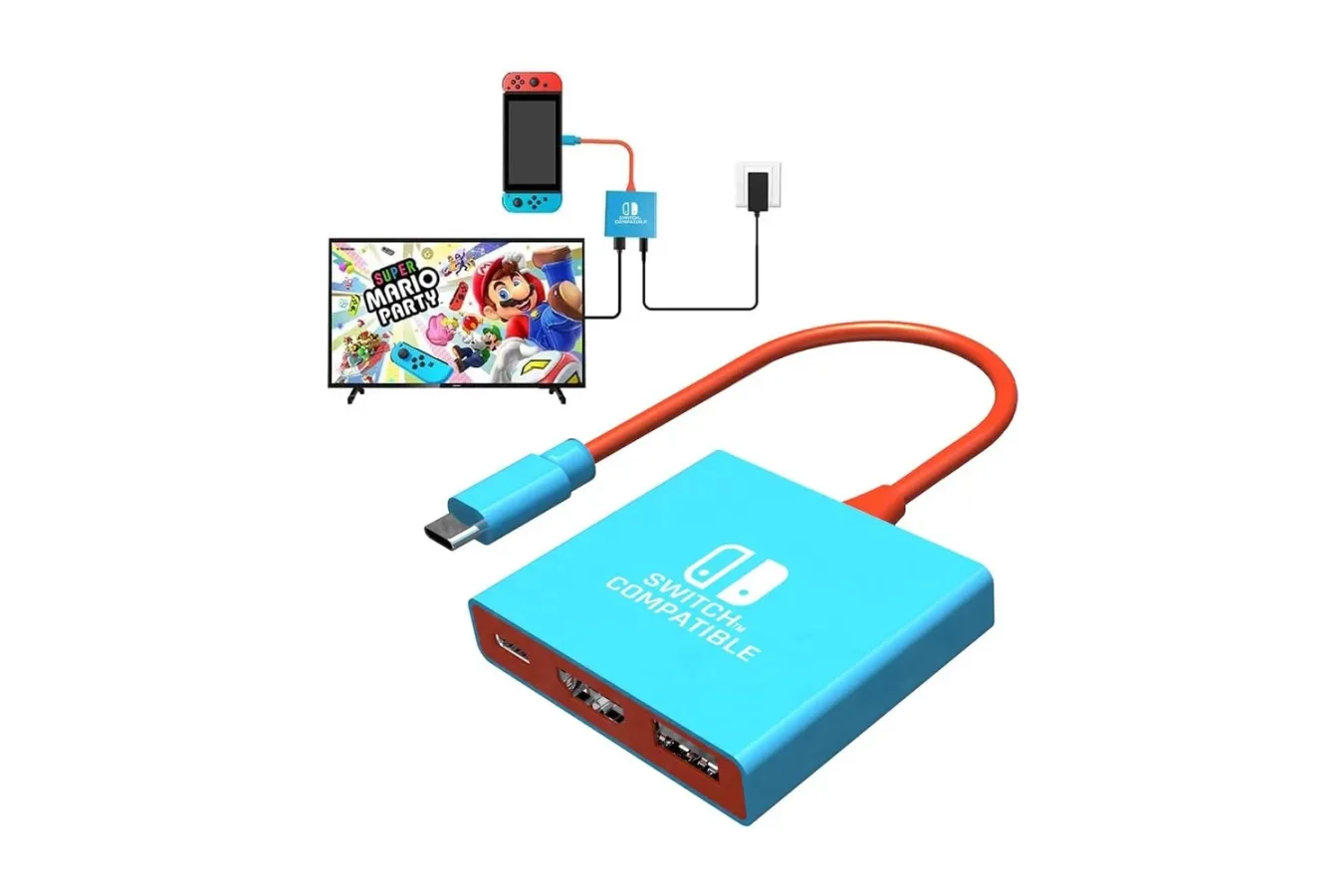
Players looking for an inexpensive way to put a Nintendo Switch game on a television without carrying the standard dock may want to look at the Pdobq Switch Docking Station. The compact accessory is listed for $15, down from a stated $17 list price. That is a modest 10% reduction, but the appeal is less about a huge percentage discount and more about the unusually low entry price for a portable, secondary docking solution.
The Pdobq dock is intended to handle the basic functions players expect from a TV-mode setup: video output through HDMI, power delivery through USB-C, and a USB connection for an accessory. Its small footprint makes it especially relevant for anyone who wants to leave a main dock connected at home while bringing a lighter alternative on trips, to another room, or to a friend's house.
It is described as compatible with the original Nintendo Switch, Nintendo Switch OLED, Nintendo Switch 2, and Valve's Steam Deck. As with any third-party power and display accessory, owners should still check their particular console, charger, display, cable, and peripheral requirements before relying on it for a longer trip or more demanding setup.
A small alternative to the standard Switch dock
Nintendo's full-size dock remains the familiar way to move between portable and television play, but it is not necessarily the easiest accessory to pack. A conventional dock takes up more room in a bag, and many households would rather not constantly disconnect the dock attached to their primary living-room television. A compact docking station can solve both problems without requiring a second official dock for every screen in the house.
For useful background on this topic, read UGREEN 6-in-1 Steam Deck Dock Falls to $32 for Early Holiday Deal.
The Pdobq unit aims to fill that role with a straightforward port selection. It includes an HDMI 2.0 output for sending video to a television or monitor, a USB 3.0 port for wired accessories, and a USB-C PD input that supplies power to the connected handheld. The design is closer to a small stand-and-hub than a large plastic cradle, which should make it easier to fit alongside a console, controller, cable, and charger in a travel case.
For Nintendo Switch use, the practical target is TV-mode play at up to 1080p. That makes it suitable for a typical modern television, a computer monitor with HDMI input, or an available hotel-room display, provided the TV allows users to switch to the relevant HDMI source. It can also be useful as a spare dock for a bedroom, game room, or home-theater setup where moving the primary dock would be inconvenient.
HDMI output, charging, and a USB accessory port
The HDMI 2.0 connection is one of the accessory's central features. Nintendo Switch hardware outputs up to 1080p in docked play, while compatible Steam Deck configurations can use the dock's stated 4K-at-60Hz HDMI capability. The latter specification should not be mistaken for a guarantee that every Steam Deck game will run at 4K and 60 frames per second; game performance depends on the title, settings, power configuration, display, and other factors. It does mean the dock is built around a more capable video standard than the Switch itself requires.
The USB 3.0 port is rated for transfer speeds up to 5Gbps and can be used for accessories such as a wired controller or keyboard. In a Switch setting, a wired controller is the most immediately useful addition for local multiplayer sessions. A portable dock and a controller can turn a temporary TV setup into an easy couch co-op station for games that support multiple players. For Steam Deck owners, the single USB port may also support a range of compatible peripherals, though users needing multiple wired devices may prefer a hub with more ports.
Power arrives through the dock's USB-C Power Delivery input. Rather than including a charger, the accessory is designed to work with a charger a player already owns, including the Switch charger. That can help keep the travel load small, but it also means buyers should account for the fact that the advertised $15 price does not include every component needed to create a complete TV setup.
An HDMI cable and a suitable USB-C charger are not included. For a quick setup away from home, players will need to bring both. They should also make sure the charger can provide the power required by their console and the dock. The unit supports standard PD profiles including 15V and 20V, and it includes a protection chip intended to help safeguard the connected device while charging.
Who benefits most from a second dock?
A low-cost secondary dock is most compelling for three groups: frequent travelers, households with several displays, and players who occasionally bring their system to social gatherings. In all three cases, the goal is convenience rather than replacing a full desktop-style hub packed with ports.
Travelers can keep their handheld experience intact during downtime while retaining the option to play on a larger screen. A hotel television with an accessible HDMI port can become a temporary gaming display, though the exact experience will vary by hotel television settings, available outlets, and whether the HDMI ports are physically easy to reach. The compact form factor is an advantage here: it is far easier to keep a small dock in a carry bag than to make room for a larger home dock.
For a family or a shared home, the accessory offers a simple way to add TV-mode capability to another space. Instead of moving the main Switch dock from the living room to a bedroom or office, users can leave the original installation alone and connect this smaller option to a second television. The single USB port also provides a place for a wired controller when an extra player joins in.
Players who visit friends may find it useful for the same reason. Bringing a Switch in handheld mode is already easy. Bringing a way to display multiplayer games on a TV is often what turns the system into a more flexible party machine. With an HDMI cable, charger, and compatible display available, the dock can supply that missing link without adding much bulk.
Setup is designed to be uncomplicated
The stated setup process does not require software, drivers, or a companion app. Users connect an HDMI cable between the dock and display, attach a USB-C charger to power the dock, and place the console into the unit. Once the connection is working, removing the console returns it to handheld use.
That simplicity matters for a travel product. A dock intended for occasional use should not demand account logins, firmware utilities, or a lengthy configuration process before a player can start a game. Still, it is sensible to test the dock, charger, and HDMI cable together at home before depending on them during a vacation or weekend away. That gives users an opportunity to verify video output, charging behavior, television input selection, and controller compatibility ahead of time.
Because this is a third-party dock rather than a first-party replacement, cautious owners may also wish to use established charging equipment and avoid treating compatibility claims as universal guarantees. The listed support for several Switch models and Steam Deck broadens its potential usefulness, but different handheld revisions, display hardware, and power adapters can produce different results.
A practical budget accessory, with a few limits
At $15, the Pdobq Switch Docking Station is positioned as a budget-minded answer to a very specific need: getting a compatible handheld onto a television while away from a main setup. Its feature list covers the essentials--HDMI output, USB 3.0, and pass-through USB-C charging--without trying to be a full desktop dock loaded with extra ports, storage readers, Ethernet, or bundled cables.
That limited focus is likely its strongest point. For players who only need a second TV connection for occasional multiplayer, travel, or an additional room, paying more for a feature-heavy hub may not make sense. The compact size also makes it easier to keep the accessory packed with a Switch case rather than stored in a drawer at home.
Before buying, shoppers should remember that retail pricing can change and that the required HDMI cable and charger are separate. Those who need multiple USB accessories, wired internet, or a more permanent multi-device workstation may be better served by a larger dock. But for a lightweight backup capable of putting Switch games on a big screen--and offering potential Steam Deck utility--the $15 listing makes the Pdobq dock a notably affordable option.
Community
Discussion
Start the conversation.
No comments have been posted yet.