

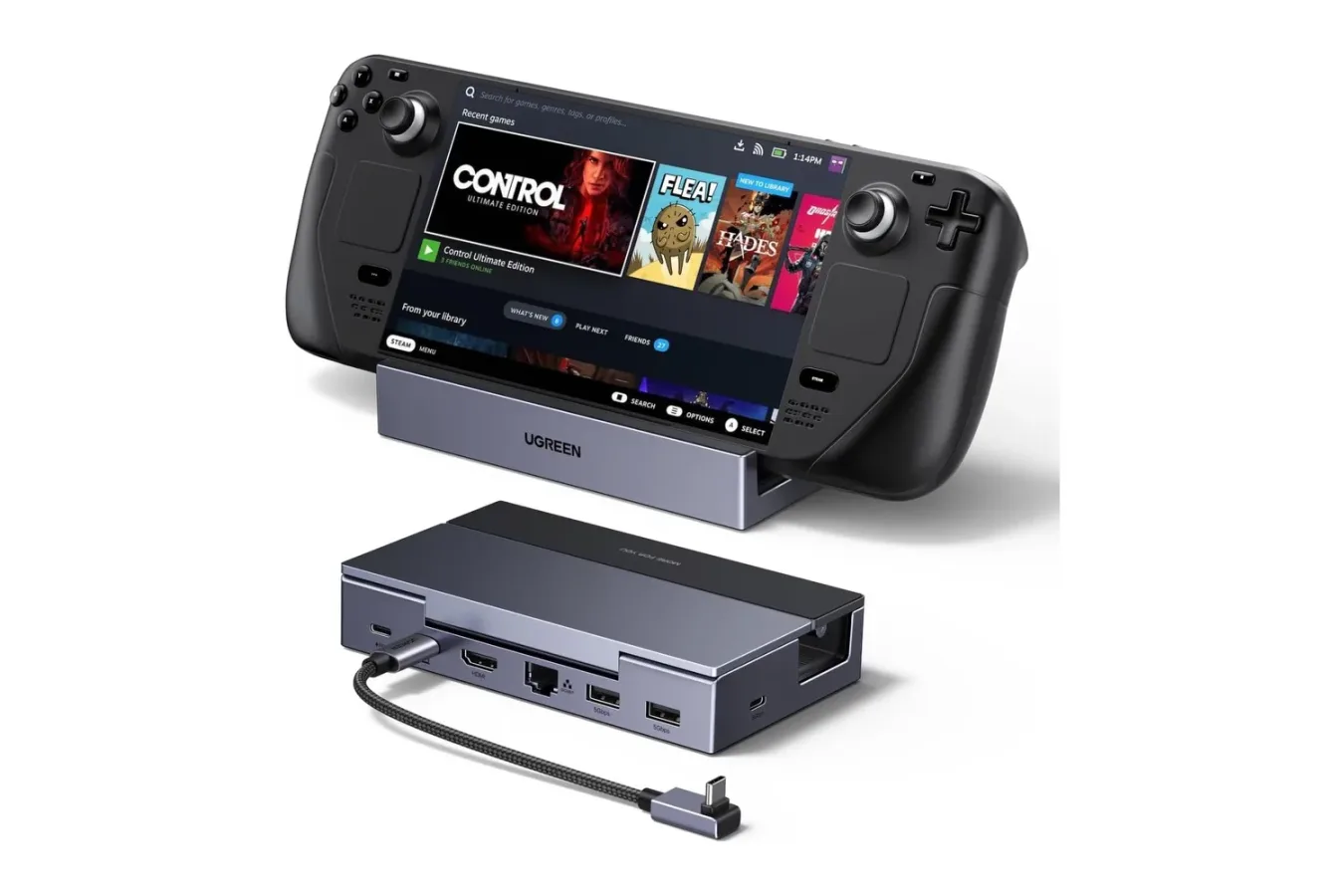
Handheld PC gaming is at its best when it can easily move between a quick session on the couch and a more permanent setup at a desk or television. The UGREEN 6-in-1 Steam Deck Dock is designed to make that switch simpler, and it is currently available for $32, down from its usual $46 price. That is a $14 reduction, or roughly 30% off, placing the accessory close to its previous Black Friday-level pricing ahead of the main holiday shopping period.
For Steam Deck owners who want a single-cable route to a TV, monitor, wired network connection, controller, and charger, a dock can be one of the more practical upgrades available. Rather than plugging separate adapters into the handheld every time it leaves portable mode, the dock creates one central place for those connections. UGREEN's model also supports a range of other USB-C handheld PCs, making it potentially useful for players who own more than one device or expect to upgrade in the future.
What the UGREEN 6-in-1 dock includes
The dock combines six main connections and functions in a compact folding design. Its headline display connection is an HDMI 2.1 port, which is rated for output of up to 4K at 120Hz. It can also handle 1440p, often referred to as 2K, at 144Hz, as well as 1080p at higher refresh rates. Those specifications do not mean every game running on a handheld will reach those performance targets, of course. Modern games can be demanding even at 1080p on portable hardware. But the dock gives compatible handhelds and displays the bandwidth needed to take advantage of smoother output where a game, emulator, streaming service, or desktop application can support it.
HDMI 2.1 support is particularly useful for people connecting their handheld to a modern gaming television or monitor. The connection also supports Variable Refresh Rate, FreeSync, and G-Sync compatibility. On a compatible display and device setup, those features can reduce distracting tearing and uneven motion when a game's frame rate changes. That can be valuable in faster-moving genres such as racing games, shooters, action titles, and platformers, where inconsistent frame pacing can be more noticeable on a larger screen.
For useful background on this topic, read WoW Forever Name Reservations Hit by Bug That Blocked Ordinary Names.
Beyond video, the UGREEN dock has Gigabit Ethernet for a wired network connection. Wi-Fi remains convenient for handheld use around the house, but Ethernet can be a worthwhile option for downloading large PC games, streaming from another computer, playing online, or simply avoiding the occasional wireless signal issue. A docked setup does not need to be permanent for this feature to be useful: connecting one cable before settling in for a longer session can provide a more consistent connection than relying on a busy home Wi-Fi network.
There are also three data ports: two USB-A ports and one USB-C port. Each is rated for speeds up to 5Gbps. This provides room for common living-room and desktop accessories, including wired controllers, keyboards, mice, USB headsets, and external storage. An external SSD can be especially handy for players with large game libraries who do not want to constantly shuffle installations on their handheld's internal drive or microSD card.
Charging while playing on a bigger screen
One of the biggest reasons to use a dock rather than a basic video adapter is power delivery. UGREEN lists a 100W USB-C Power Delivery input, while the dock can provide up to 85W of charging power to the connected handheld. Players need to supply their own USB-C charger, but this setup allows the charger to power the dock and charge the handheld during use.
That distinction matters for long sessions. Connecting a handheld to a television, Ethernet, and several peripherals can add to the practical power requirements of a setup, while more demanding games can drain a battery quickly. Pass-through charging means users can keep the device topped up while it is functioning more like a console or small desktop PC. The actual charging behavior will still depend on the handheld model, its charger, the game being played, and other connected accessories, but the dock's power input leaves considerably more headroom than a simple low-power hub.
Anyone considering the dock should also check what charger they already have. A handheld's included power adapter may be sufficient for basic use, but an adapter with higher output can be preferable when trying to power the device and several accessories through one hub. It is also worth remembering that the dock's 100W figure refers to the maximum supported input, not a promise that every connected device will receive 100W.
Built around handheld compatibility and portability
Despite being marketed toward Steam Deck users, the dock is not restricted to Valve's handheld. It is intended to work with the original Steam Deck and Steam Deck OLED, as well as USB-C-equipped handhelds including the ROG Ally, ROG Xbox Ally, Lenovo Legion Go, and MSI Claw. Compatibility ultimately depends on a device supporting video output through USB-C, so owners of less common handhelds should confirm their particular model's capabilities before buying.
The physical design is also geared toward portable gaming hardware rather than a generic laptop hub. The aluminum base has two adjustable positions, allowing the player to alter the viewing angle and accommodate handhelds with different dimensions. Crucially, a stand needs to avoid blocking intake or exhaust vents. A handheld can become much less comfortable to use as a docked machine if its cooling airflow is restricted, particularly while running more demanding games. The raised cradle is designed to leave clearance for that airflow.
The base folds down for travel, which makes this less of a fixed entertainment-center accessory and more of a dock that can go between rooms or into a travel bag. A detachable 25cm USB-C cable is included. Detachability can be useful if the cable is damaged or if a player needs a different length for a particular desk arrangement, although buyers should ensure that any replacement cable supports the video and power features they need.
A practical alternative to juggling adapters
The main appeal of a dock like this is convenience, not necessarily raw performance. A Steam Deck or similar handheld will run games according to its own hardware limits, software settings, and power profile whether it is docked or undocked. What the UGREEN unit changes is the process around playing those games. Instead of connecting display, power, storage, controller, and networking accessories individually, a player can leave those items attached to the dock and connect the handheld with one USB-C cable.
That makes it easier to treat a handheld as multiple devices. At one moment it can be a portable machine for playing in bed or on a commute. The next, it can become a compact console connected to a living-room TV with a controller. Add a keyboard and mouse, and it can also cover light desktop tasks, browsing, remote play management, or navigating PC storefronts from a monitor. No additional drivers are required for the basic setup, so the intended workflow is simply to connect the display, charger, and desired peripherals, then plug the dock into the handheld.
The dock also includes built-in surge protection, intended to help shield connected equipment from electrical spikes. It should not be treated as a replacement for broader household surge protection or a quality power strip, but it is a welcome consideration in an accessory expected to sit between a charger, display, network cable, and several peripherals.
Who should consider the $32 deal?
At $32, the UGREEN 6-in-1 dock makes the most sense for a handheld owner who regularly plays on an external display or wants to establish a small desk setup without buying several separate adapters. The combination of HDMI 2.1, Gigabit Ethernet, three 5Gbps USB data ports, charging passthrough, and a foldable stand covers the core needs of a docked handheld setup at a lower price than its typical $46 cost.
It may be less essential for someone who exclusively uses a Steam Deck in handheld mode, already has a dock they are happy with, or only needs a basic display adapter for rare occasions. Prospective buyers should also keep expectations realistic around 4K and 120Hz. The HDMI connection supports those modes, but games will often require reduced resolution, lower settings, upscaling, or less demanding software to achieve especially high frame rates on handheld hardware.
For everyone else, this is a timely accessory discount. The UGREEN dock's hardware selection is focused on the everyday realities of handheld PC use: keeping the battery charged, connecting to a larger screen, attaching familiar input devices, getting a steadier internet connection, and preserving ventilation. With the price reduced to $32, it is an accessible way to give a Steam Deck or compatible USB-C handheld a more flexible home setup before holiday deal season fully arrives.
Community
Discussion
Start the conversation.
No comments have been posted yet.