

Keeping track of a busy multiplayer conversation is about to be much easier for PlayStation 5 owners. Sony's September 16, 2026 system software update, version 26.06-14.00.00, formally introduced an on-screen party-chat speaker indicator called Display Who's Speaking. Once enabled, the feature places the name of the person currently talking directly on the screen, removing the need to repeatedly open the Voice Chat card just to work out who is speaking.
The change applies to both the standard PlayStation 5 and the PlayStation 5 Pro. It is a small quality-of-life addition, but one that could make a significant difference in parties with several friends, unfamiliar voices, or one player whose microphone is considerably louder than everyone else's. PlayStation parties can support up to 16 people, and that number can make voice chat difficult to follow when players are talking over one another.
Display Who's Speaking is not switched on automatically after the update. Players need to enter a party voice chat and enable it from the console's Voice Chat controls. Sony also allows the placement of the indicator to be changed, helping players keep it away from key game interface elements such as maps, objectives, ammo counters, health bars, or subtitles.
How to turn on Display Who's Speaking on PS5
The setting is found inside an active PlayStation party voice chat, so the first step is to either start a party or join one that is already active. The process begins from the PS5's Control Center.
For useful background on this topic, read Call of Duty Film Director Says Modern Warfare Movie Will Explore the Cost of War.
- Press the PS button to open Control Center.
- Go to Game Base, then select Parties.
- Choose Start Party if creating a new group, then select either an Open Party or a Closed Party depending on who should be able to join.
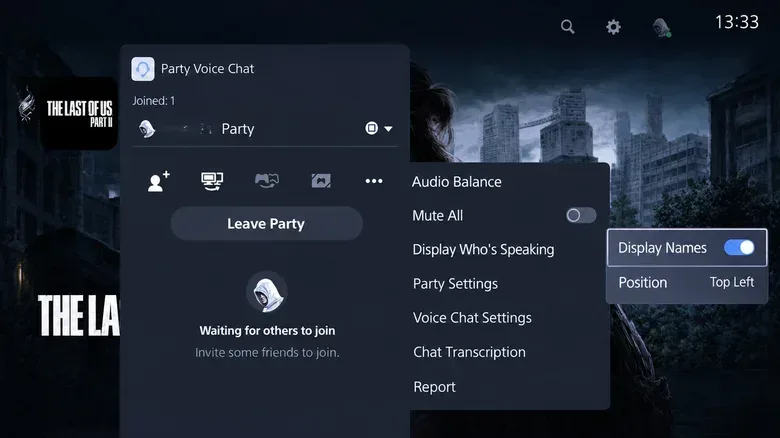
- After entering voice chat, press the PS button again to return to Control Center.
- Open the Voice Chat card.
- Select the three-dot More button, then choose Display Who's Speaking.
- Turn on Display Names.
With Display Names enabled, the active speaker's name should appear while party members talk. The same menu includes a Position option for moving the speaker display to a more suitable part of the screen. That matters in games with crowded HUD layouts, where a fixed overlay might otherwise cover useful information at an inconvenient moment.
Players who want to remove the overlay later can return to the same Voice Chat menu and turn off Display Names. Because the setting is nested inside the party voice-chat card, it may be easy to overlook for people searching through the console's broader Sound or Accessibility menus.
A practical fix for larger PS5 parties
Voice chat is often at its most useful when a group is coordinating during competitive matches, raids, co-op missions, sports games, or social sessions. It is also where conversations can become hardest to parse. A player may be giving directions while another is reacting to a match, and a third could be using a microphone that sounds different from the last time the group played together.
An on-screen name does not solve every voice-chat issue, but it provides immediate context without requiring players to interrupt their game. Instead of opening the party panel, scanning the participant list, and trying to match a voice to a name, the active speaker can be identified at a glance.
The tool could be especially helpful for players joining communities or larger friend groups for the first time. It can take time to learn who is who by voice alone, particularly if multiple people are new to the group. The indicator also has obvious value for sessions where a player is sharing a console setup, using a newly changed headset, or speaking less frequently than usual.
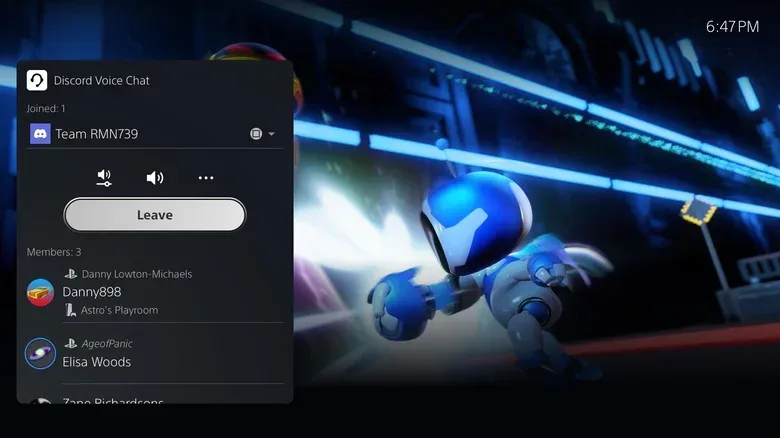
There is a more practical benefit as well: finding the source of a disruptive microphone. Once a player knows which participant is producing excessive background noise, echo, clipping, or unusually high volume, they can select that person in the Voice Chat card and use the Volume option to adjust that individual's level.
That per-player volume adjustment is designed to carry over into future chats with the same person. In other words, if one friend regularly needs to be turned down or boosted for clarity, the player should not have to repeat the adjustment every time the group creates a new party. It is a useful companion to the new speaker-name overlay, as identification and audio control are closely connected problems in crowded chats.
Check for system update version 26.06-14.00.00
Anyone unable to find Display Who's Speaking should first confirm that their PS5 has current system software. The official public release notes included the feature with the September 16, 2026 update identified as version 26.06-14.00.00.
To check for an update, navigate through the following PS5 menus:
Settings > System > System Software > System Software Update and Settings > Update System Software
Installing the latest available system software is the clearest first troubleshooting step if the Display Who's Speaking controls are absent. Since the option is used from within party voice chat, it is also worth confirming that a PlayStation party has been created or joined before looking for the setting.
The same September update also enabled enhanced PSSR upscaling by default on PS5 Pro. That enhancement is specific to Sony's higher-end console, while the party speaker indicator itself is available on both PS5 hardware models.
Why some players may have seen it earlier
Although the feature was officially listed in the September 2026 update notes, some PS5 players had reported seeing and using a comparable setting much earlier. Reports and screenshots of the option appeared as early as November 2025, while other players said the control was not available on their consoles. There were also accounts from users who initially had access and later found that the option had disappeared.
Sony has not explained how that earlier availability was managed. It is therefore unclear whether access was connected to a limited test, a gradual rollout, account-based variation, regional differences, or another factor. What changed with the September 16 update was the feature's formal appearance in the public system-software notes, establishing it as an officially documented PS5 option rather than a setting only some owners had encountered.
That history may explain why the new addition feels familiar to some PlayStation users while seeming entirely new to others. Players who remember seeing an active-speaker name before were not necessarily mistaken; the behavior simply was not consistently available across the wider PS5 audience at that time.
Party chat is supported, while game chat is different
Sony's documentation for Display Who's Speaking specifically covers PlayStation party chat. It does not extend to the separate voice-chat systems built into individual games. Many games run their own in-game chat channels, with their own speaker indicators, push-to-talk settings, audio mixing tools, and moderation functions.
As a result, players using a title's native game chat should check that game's audio, social, or interface settings if they want names to appear for active speakers. Whether such an option exists depends on the game. The PS5 party indicator should not be treated as a universal overlay for every voice channel on the console.
Some players have said they have been able to use the speaker indicator in the same manner with Discord on PS5. That behavior has been reported by users, but Sony's documented description focuses on PlayStation party chat. Players using Discord should therefore regard the feature as something to test in their own setup rather than assuming identical support in every situation.
Useful customization, but not a fully flexible overlay
Being able to reposition the active-speaker name is welcome, especially for games where every corner of the display is occupied. Still, the feature's customization remains limited. There are no stated settings for changing the indicator's text size or its transparency. Players can decide where it sits, but not how large or how opaque it appears.
Xbox has offered a comparable party overlay with options for both position and transparency since a feature announcement in May 2017. The PS5 addition closes a long-standing usability gap for PlayStation party chat, even if Sony's version currently gives players fewer visual controls.
For most users, though, the core value is straightforward: the speaker's name can stay visible without taking focus away from the game. For anyone who has ever paused mid-match to ask, "Who said that?", Display Who's Speaking is a simple PS5 setting worth enabling before the next large party session.
Community
Discussion
Start the conversation.
No comments have been posted yet.