

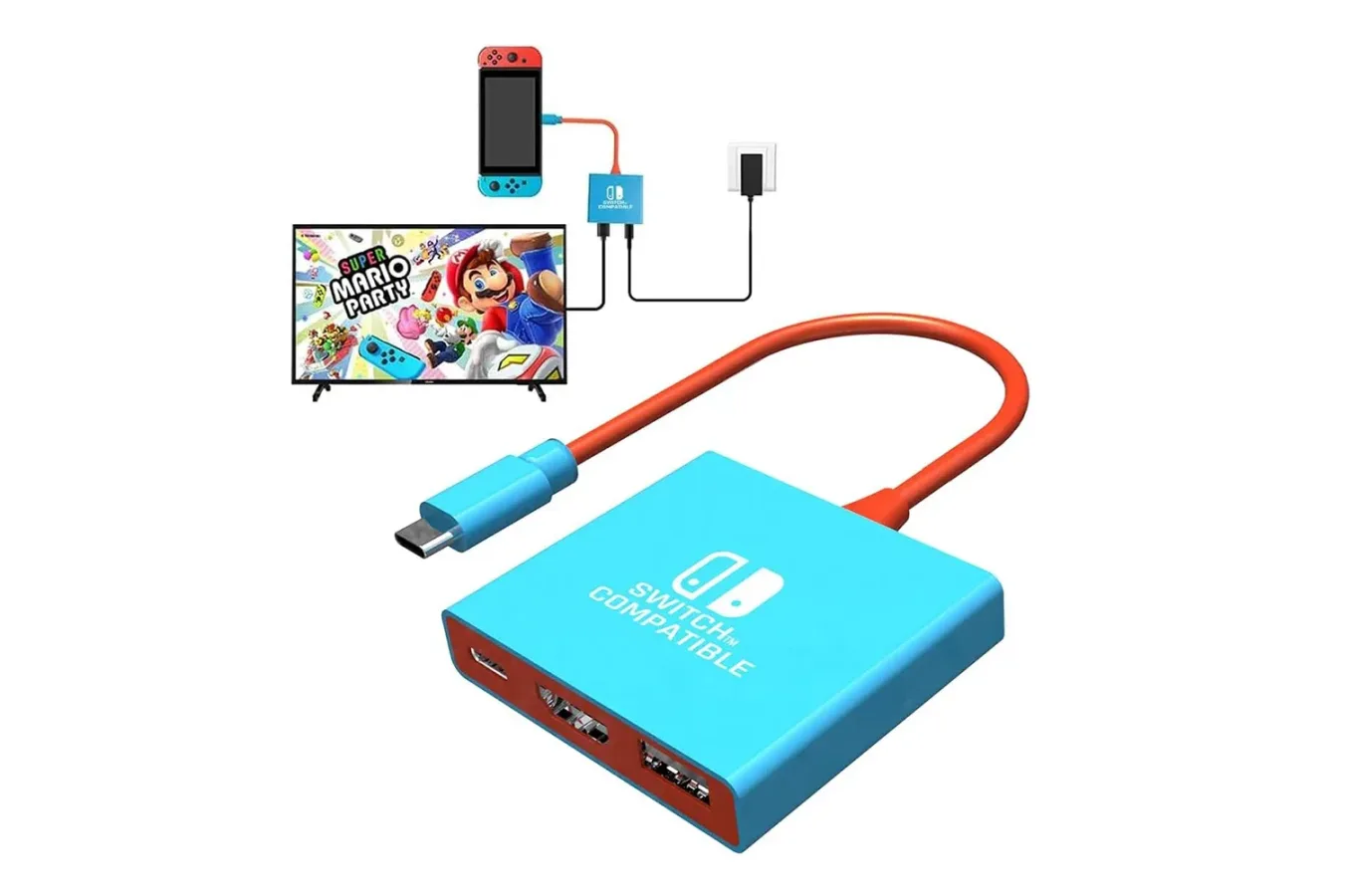
A compact alternative to carrying a full-size console dock is currently available for a notably low price. Amazon has reduced the Pdobq Switch Docking Station to $15, a modest $2 reduction that nonetheless makes the small USB-C accessory an especially cheap option for players who want a second display setup or a travel-friendly way to connect their hardware to a television.
The appeal is less about the size of the discount than the stated breadth of compatibility. The Pdobq dock is intended to work with the original Nintendo Switch, Nintendo Switch OLED, Nintendo Switch 2, and Valve's Steam Deck. It combines HDMI output, a USB 3.0 connection, and USB-C Power Delivery pass-through in a body small enough to slip into a jacket pocket or a travel bag.
For someone who regularly moves between rooms, visits family, stays in hotels, or simply does not want to put an official dock through the hazards of a packed backpack, that combination could be useful. At $15, it also occupies a very different price bracket from a replacement first-party dock, which can cost substantially more.
What the Pdobq dock is designed to do
This is a USB-C display dock rather than a traditional console stand. The basic purpose is straightforward: connect power and an HDMI cable to the accessory, plug it into a compatible handheld, and send the system's picture to a TV or monitor. A USB 3.0 port adds room for a wired peripheral, such as a keyboard or mouse when using Steam Deck in desktop-oriented situations.
For useful background on this topic, read Evercade Dual Thumbstick Wireless Controller Brings Analogue Play to a Growing Retro Ecosystem.
For Nintendo hardware that supports TV mode, the dock is advertised as delivering 1080p at 60Hz on Switch and Switch 2. That matches the familiar output target associated with Nintendo's standard docked experience. The device's HDMI 2.0 capability also opens the possibility of higher-resolution output with Steam Deck, with the dock listed as capable of 4K at 60Hz in the appropriate setup.
That Steam Deck result should not be treated as a universal guarantee. A compatible television or monitor is required, as is an HDMI 2.0 cable capable of handling the signal. Performance in actual games can also vary depending on the game's settings and the handheld's capabilities. The 4K/60Hz figure is an output specification, not a promise that every Steam Deck game will run at that level.
Likewise, a dock cannot add TV functionality to hardware that does not support it. Nintendo Switch Lite is not compatible with TV mode, so it cannot use this accessory to display games on a television. That remains the clearest limitation prospective buyers need to keep in mind before treating this as a dock for every member of the Switch family.
A possible second dock rather than a full replacement
Nintendo's official docks remain the more conventional choice for a primary living-room setup. They are made for their respective systems, are physically larger, and have the advantage of being the first-party hardware intended for daily use with the console. A Pdobq unit at this price makes the most sense in a different role: a backup, a second-room accessory, or a piece of travel gear that can be left in a bag.
That distinction matters because the usual concern around inexpensive third-party USB-C docks is not merely video quality. Earlier third-party accessories have sometimes raised concerns among handheld owners over improper power delivery or voltage behavior. Pdobq says this model includes current and voltage protection, but that is a manufacturer claim rather than a substitute for sensible setup and charging practices.
Players considering it should use a suitable USB-C Power Delivery wall charger. The outlined requirements are a 15V/2.6A or 20V/3A PD charger; the chargers supplied with Switch and Switch 2 are described as suitable. Connecting an underpowered or unsuitable charger can complicate a setup regardless of which dock is being used, so a low dock price should not encourage cutting corners on the power side.
Setup is intended to be simple
The process follows the familiar docked-handheld routine. First, power the Pdobq accessory with a compatible PD wall charger. Next, run an HDMI cable from the dock to the television. Then connect the dock's USB-C output to the handheld and wake the console. In the described setup, a Switch image generally appears on the TV within roughly three to eight seconds.
That is not fundamentally different from using Nintendo's official dock. The key practical difference is portability. A conventional dock is built to remain beside a TV, whereas this small unit is designed to fold away and take up very little space. For a player who already has a primary dock connected at home, avoiding the repeated process of unplugging cables and packing a bulkier piece of hardware may be the biggest convenience.
There are several situations where that could matter. A family may want a simple way to use one console across two televisions without relocating the usual dock. A traveler may prefer a compact accessory for a hotel TV. Steam Deck owners may want a small HDMI and USB hub for occasional desktop use. The dock's single USB 3.0 port can support a keyboard or mouse in that latter scenario, although users needing several wired accessories would need to plan around the limited port selection.
Price is the central argument
The current $15 price is what makes the Pdobq docking station compelling as a low-commitment purchase. The savings from its previous price are only $2, but the resulting cost is far below the typical price of an official replacement dock. Nintendo's standard dock has been listed in the roughly $75 to $90 range depending on retailer and configuration, while the Switch 2 dock is listed at $90.
That does not automatically make first-party hardware a poor value. The official products are established components of their respective console ecosystems, and players who want a permanent centerpiece for a main TV setup may still prefer them. But a spare dock has a different calculation. Spending nearly the cost of another major accessory for something used only on occasional trips can be hard to justify. Spending $15 to keep a travel-ready cable-and-dock solution in a bag is easier to consider.
It is also worth remembering what is and is not included in the practical equation. The dock handles the connection between handheld, power, display, and one USB accessory, but buyers still need a compatible charger, an HDMI cable, and a display. Steam Deck users seeking its higher-output mode in particular should ensure their TV and HDMI cable meet the stated HDMI 2.0 requirement.
Who should consider the deal
The strongest audience for the discounted Pdobq dock is a player who already owns a Switch, Switch OLED, Switch 2, or Steam Deck and wants flexibility without buying another expensive first-party dock. It is especially suited to people who travel with a handheld and prefer not to expose their main dock to luggage, crowded bags, and frequent cable changes.
It could also suit Steam Deck owners who periodically connect to a television and want a keyboard or mouse available for desktop-mode tasks. The compact design and USB 3.0 support make it more than just a display adapter, even though it should not be mistaken for a larger multiport desktop hub.
Switch Lite owners should skip it for TV output, because their model lacks the hardware support required for docked display. Everyone else should approach the purchase with the normal care appropriate for third-party power accessories: use the right charger, confirm cable and TV compatibility, and view protection claims as useful stated features rather than absolute assurances.
For compatible handheld owners, though, the $15 offer gives the Pdobq Switch Docking Station a clear niche. It is a small, inexpensive way to add a backup television setup, and its compact form factor is the real selling point. The discount may be slight, but the total price leaves little barrier for players who have been wanting a dedicated dock for travel or occasional use away from their primary setup.
Community
Discussion
Start the conversation.
No comments have been posted yet.